 PluginStats
browser-sync-v3-webpack-plugin weekly downloads statistics
By madbucket · npm · Webpack plugins
BrowserSync and Webpack integration
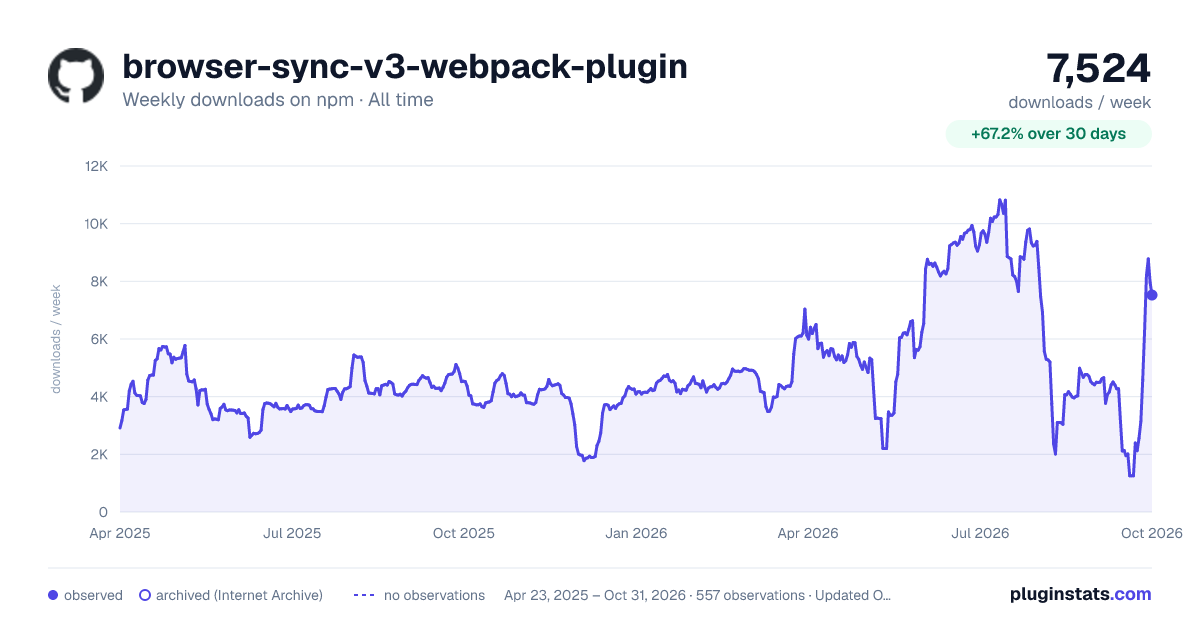
browser-sync-v3-webpack-plugin has 2,011 recorded weekly downloads on npm, a decrease of 49.6% over the past 30 days, ranking #1332 of 2,322 tracked listings.
About browser-sync-v3-webpack-plugin
Note that this is a fork of Va1/browser-sync-webpack-plugin that supports BrowserSync version 3.
BrowserSync plugin for Webpack
Easily use BrowserSync in your Webpack project.
Install:
$ npm install --save-dev browser-sync-webpack-plugin
or
$ yarn add --dev browser-sync-webpack-plugin
With release of 2.0.0 the plugin is expected to be used in Node v4+ environment. Support for Node v3 and lower was dropped, but you can install and use the plugin version of 1.2.0 in older environments.
Usage:
BrowserSync will start only when you run Webpack in watch mode:
$ webpack --watch
Basic:
If you're not using Webpack Dev Server, you can make BrowserSync to serve your project. The setup is pretty easy: just pass the BrowserSync options to the plugin as the first argument.
In your webpack.config.js:
const BrowserSyncPlugin = require("browser-sync-webpack-plugin");

module.exports = {
  // ...
  plugins: [
    new BrowserSyncPlugin({
      // browse to http://localhost:3000/ during development,
      // ./public directory is being served
      host: "localhost",
      port: 3000,
      server: { baseDir: ["public"] },
    }),
  ],
};
Advanced:
The advanced usage is about using Webpack Dev Server with BrowserSync in order to use awesome features of both.
To achieve this, BrowserSync offers the proxy option. So, basically, you are about to proxy the output from the Webpack Dev Server through BrowserSync to get the best out of both.
In your webpack.config.js:
const BrowserSyncPlugin = require("browser-sync-webpack-plugin");

module.exports = {
  // ...
  plugins: [
    new BrowserSyncPlugin(
      // BrowserSync options
      {
        // browse to http://localhost:3000/ during development
        host: "localhost",
        port: 3000,
        // proxy the Webpack Dev Server endpoint
        // (which should be serving on http://localhost:3100/)
        // through BrowserSync
        proxy: "http://localhost:3100/",
      },
      // plugin options
      {
        // prevent BrowserSync from reloading the page
        // and let Webpack Dev Server take care of this
        reload: false,
      },
    ),
  ],
};
Other supported plugin options are:
name- default:bs-webpack-plugin, BrowserSync instance namecallback- default:undefined, BrowserSync instance init callback.injectCss- default:false, allows BrowserSync to inject changes inplace instead of reloading the page when changed chunks are all CSS files
Contributing:
Feel free to open issues to propose stuff and participate. Pull requests are also welcome.
Licence:
Description from the npm listing.
- webpack
- webpack-plugin
- browsersync
- browser-sync
- livereload
- serve
README badge
Show your rank in a README or on your website. The badge updates automatically.
Charts
Images: 30d · 1y · all time · 1600×900 dark



Adoption over time
7/30/90-day growth
Ranking history
Listing placement
Listing placement
Filled points are observed values; hollow points come from Internet Archive snapshots of the listing page. Dashed segments span periods with no observations — values between points are not interpolated.
Each band is one page of 20. Weekly downloads on a linear scale. Placement is projected from weekly downloads, so it can differ from the marketplace's own sort order. Hover a dot to see the listing.
Recent observations
Full history (544)Similar npm Webpack plugins plugins
All 20 browser-sync-v3-webpack-plugin alternatives- 1.9K weekly downloads-20.0%
- 1.8K weekly downloads-68.6%
- 2.6K weekly downloads-60.6%
- 1.5K weekly downloads-20.8%
Data source
Weekly downloads (trailing 7 complete days) come from the official npm downloads API. Downloads include CI and mirrors and are not equivalent to installs or users. npm publishes no ratings.
Listing: https://www.npmjs.com/package/browser-sync-v3-webpack-plugin. First seen Oct 16, 2026; last successful collection Oct 20, 2026. See the methodology.