 PluginStats
@oglofus/tailwind-viewport-animations weekly downloads statistics
By oglofus · npm · Tailwind plugins
Viewport animation utilities for Tailwind CSS v4
@oglofus/tailwind-viewport-animations has 5 recorded weekly downloads on npm, a decrease of 16.7% over the past 30 days, ranking #2186 of 2,322 tracked listings.
About @oglofus/tailwind-viewport-animations
@oglofus/tailwind-viewport-animations 

Viewport animation utilities for Tailwind CSS v4.
Demo: https://oglofus.github.io/tailwind-viewport-animations/
Install
npm install @oglofus/tailwind-viewport-animations
Tailwind v4 usage (plugin)
In your main stylesheet:
@import "tailwindcss";
@plugin "@oglofus/tailwind-viewport-animations";
Then use classes in your markup:
<section class="va va-slide-up va-start-15 va-end-75">...</section>
Included utilities
vava-start-{number}-> number is treated as%(va-start-23=>23%)va-end-{number}-> number is treated as%(va-end-23=>23%)va-start-[...]arbitrary value (va-start-[80%],va-start-[12rem])va-end-[...]arbitrary value (va-end-[20px],va-end-[var(--my-range)])va-fadeva-zoomva-slide-leftva-slide-rightva-slide-upva-slide-downva-blur-inva-rotate-inva-popva-reveal-upva-flip-yva-duration-{number}-> milliseconds (va-duration-800=>800ms)va-duration-[...]arbitrary duration (va-duration-[1.4s])va-distance-{number}-> pixels (va-distance-120=>120px)va-distance-[...]arbitrary distance (va-distance-[20vh])va-ease-linearva-ease-inva-ease-outva-ease-in-outva-ease-smoothva-ease-snapva-ease-[...]arbitrary easing (va-ease-[cubic-bezier(0.17,0.67,0.83,0.67)])va-onceva-repeatva-group-[name]exposes a named timeline scope on a parent containerva-subject-[name]names an element as a view timeline subjectva-target-[name]names an element as its own view timeline subject and targets that named timeline
Timeline names use arbitrary values, for example va-group-[cards] or va-target-[--cards]. Bare names are automatically prefixed to CSS timeline identifiers (cards -> --va-cards).
Example combos
<div
  class="va va-reveal-up va-start-[80%] va-end-[20px] va-distance-160 va-duration-700 va-ease-smooth"
></div>
<div
  class="va va-flip-y va-start-23 va-end-65 va-duration-[1.2s] va-ease-[cubic-bezier(0.2,0.9,0.2,1)]"
></div>
Named container targets
Use va-group-[name] on a scrollable ancestor to expose a named timeline scope inside that container.
Same element as subject and target
Use va-target-[name] on the animated element when the element should animate against its own visibility inside the named scroll area:
<div class="max-h-96 overflow-y-auto va-group-[cards]">
  <article class="va va-slide-up va-target-[cards] va-start-50 va-end-80">
    ...
  </article>
</div>
This is the closest equivalent to a Tailwind group-* style API for non-window scrollers.
Separate subject and target
If one element's visibility should drive a different element's animation, split the subject and target:
<div class="max-h-96 overflow-y-auto va-group-[cards]">
  <div class="va-subject-[cards]">Tracked subject</div>
  <div class="va va-fade va-target-[cards]">Animated target</div>
</div>
Utility roles
va-group-[name]setstimeline-scopeon a shared ancestorva-subject-[name]names an element as a view timeline subjectva-target-[name]points.vaat that named timeline and also names the element as a subject for the common same-element case
These named utilities still use CSS view timelines, so the tracked scroller is the subject element's nearest ancestor scroll container. In practice, that means the scrollable parent should usually have overflow-y-auto or overflow-y-scroll.
Browser support note
These utilities rely on animation-timeline: view() / scroll-driven animations. Ensure target browsers support this API.
Compatibility reference: https://caniuse.com/?search=animation-timeline
Used by
Description from the npm listing.
- tailwindcss
- tailwindcss-plugin
- animation
- scroll-animation
- view-timeline
README badge
Show your rank in a README or on your website. The badge updates automatically.
Charts
Images: 30d · 1y · all time · 1600×900 dark


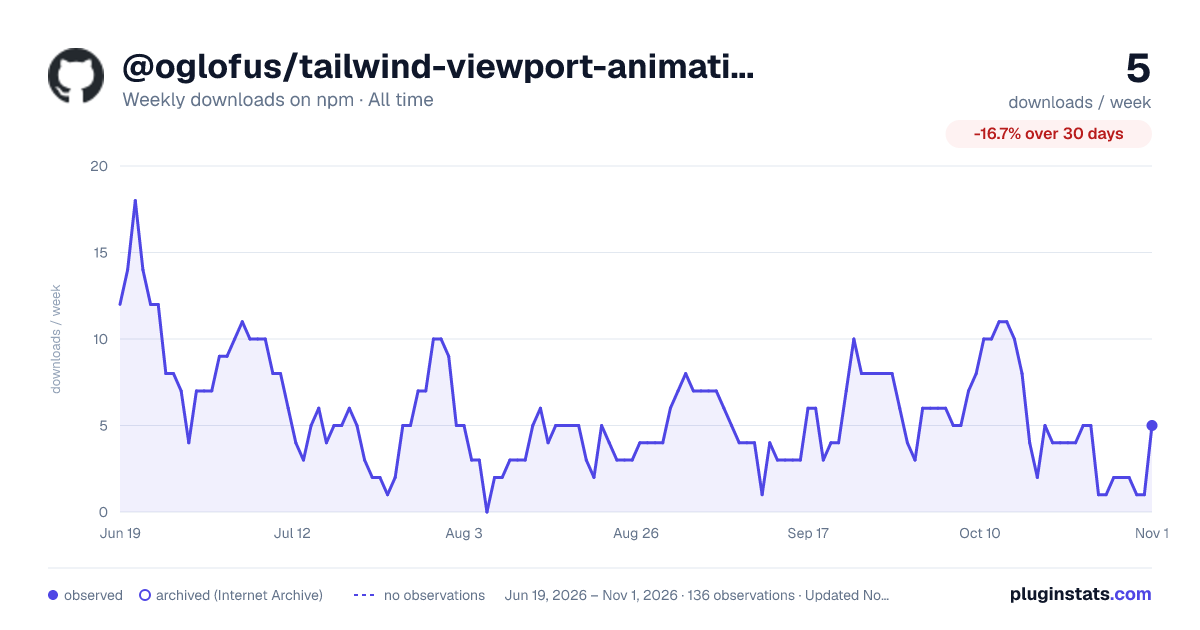

Adoption over time
7/30/90-day growth
Ranking history
Listing placement
Listing placement
Filled points are observed values; hollow points come from Internet Archive snapshots of the listing page. Dashed segments span periods with no observations — values between points are not interpolated.
Each band is one page of 20. Weekly downloads on a linear scale. Placement is projected from weekly downloads, so it can differ from the marketplace's own sort order. Hover a dot to see the listing.
Recent observations
Full history (122)Similar npm Tailwind plugins plugins
All 20 @oglofus/tailwind-viewport-animations alternatives- 5 weekly downloads-72.2%
- 5 weekly downloads-81.5%
- 5 weekly downloads-70.6%
Data source
Weekly downloads (trailing 7 complete days) come from the official npm downloads API. Downloads include CI and mirrors and are not equivalent to installs or users. npm publishes no ratings.
Listing: https://www.npmjs.com/package/@oglofus/tailwind-viewport-animations. First seen Oct 16, 2026; last successful collection Oct 20, 2026. See the methodology.