 PluginStats
@google-cloud/storage-mcp weekly downloads statistics
By google-cloud (5 listings) · npm · MCP servers
Model Context Protocol (MCP) Server for interacting with GCS APIs
@google-cloud/storage-mcp has 19,998 recorded weekly downloads on npm, an increase of 29.9% over the past 30 days.
It ranks #755 of 2,256 tracked npm listings by weekly downloads.
Over 90 days, weekly downloads changed by +1370%.
PluginStats has 543 daily observations since Apr 23, 2025; the latest is from Oct 17, 2026.
About @google-cloud/storage-mcp
Storage MCP Server ☁️
The Storage Model Context Protocol (MCP) server enables AI assistants to easily interact with Google Cloud Storage for bucket and object management. With the Storage MCP server you can:
• Interact with Google Cloud Storage using natural language. Describe the outcome you want instead of memorizing complex command syntax, flags, and arguments. • Automate and simplify complex workflows. Chain multiple storage operations into a single, repeatable command to reduce manual effort and the chance of error. • Lower the barrier to entry for cloud storage management. Empower team members who are less familiar with GCS to perform powerful actions confidently and safely. • Perform analytical and aggregation queries on your objects and buckets. Perform aggregations and compute statistics on entire storage inventory using Storage Insights Datasets • Run advanced filters and searches on your data. Search and filter your objects by file type, size and other metadata fields using Storage Insights Datasets
🚀 Getting Started
Prerequisites
• Node.js: version 20 or higher • gcloud CLI (for authentication)
✨ Set up your MCP server
Gemini CLI and Gemini Code Assist
To integrate the Storage MCP server with Gemini CLI or Gemini Code Assist, run the setup command below. This will install the MCP server as a Gemini CLI extension for the current user, making it available for all your projects.
After the initialization process, you can verify that the storage-mcp server is configured correctly by running the following command:
By default, the server only enables safe, non-destructive tools. To enable tools that can modify or delete existing data, use the --enable-destructive-tools flag:
For other AI clients
To use the Storage MCP server with other clients, add the following snippet to their respective JSON configuration files:
Instructions for popular tools:
• Claude Desktop: Open Claude > Settings > Developer > Edit Config and edit claude_desktop_config.json. • Cline: Click the MCP Servers icon, then Configure MCP Servers to edit cline_mcp_settings.json. • Cursor: Edit .cursor/mcp.json for a single project or ~/.cursor/mcp.json for all projects. • Gemini CLI (Manual Setup): If not using extensions, edit .gemini/settings.json for a single project or ~/.gemini/settings.json for all projects.
For Visual Studio Code edit the .vscode/mcp.json file in your workspace for a single project or your global user settings file for all projects:
🛠 Local Development
For more information regarding installing the repository locally, please see development.md
Testing
To run the integration or E2E tests, you will need to set the GOOGLE_CLOUD_PROJECT or GCP_PROJECT_ID environment variable to a valid Google Cloud project ID.
🧰 Available MCP Tools
The Storage MCP server offers two sets of tools: Safe Tools and Destructive Tools. By default, only the safe tools are enabled to prevent accidental data loss.
Safe Tools
Safe tools are read-only or only create new objects without affecting existing ones. They will never modify or delete existing data in GCS.
| Tool | Description |
| list_buckets | Lists all buckets in a project. | | get_bucket_metadata | Gets comprehensive metadata for a specific bucket. | | get_bucket_location | Gets the location of a bucket. | | view_iam_policy | Views the IAM policy for a bucket. | | check_iam_permissions | Tests IAM permissions for a bucket. | | create_bucket | Creates a new bucket. Fails if the bucket already exists. | | list_objects | Lists objects in a GCS bucket. | | read_object_metadata | Reads comprehensive metadata for a specific object. | | read_object_content | Reads the content of a specific object. | | write_object_new | Writes a new object. Fails if the object already exists. | | upload_object_new | Uploads a file to a new object. Fails if the object already exists. | | copy_object_new | Copies an object to a new destination. Fails if the destination already exists. | | get_metadata_table_schema | Checks if GCS insights service is enabled and returns the BigQuery table schema for a given insights dataset configuration. | | execute_insights_query | Executes a BigQuery SQL query against an insights dataset and returns the result. | | list_insights_configs | Lists the names of all Storage Insights dataset configurations for a given project. |
Destructive Tools
Warning: These tools can permanently modify or delete existing data. Enable them only when you are confident that the agent should be allowed to perform these actions.
You can enable them by running the init command with the --enable-destructive-tools flag. When enabled, these tools replace their safe counterparts (e.g., write_object is registered instead of write_object_new).
| Tool | Description |
| delete_bucket | Deletes a bucket. | | update_bucket_labels | Modifies labels for a bucket. | | delete_object | Deletes a specific object from a bucket. | | update_object_metadata | Modifies the custom metadata of an existing object. | | download_object | Downloads an object, overwriting the destination file. | | move_object | Moves an object (copies then deletes the original). | | write_object | Writes an object, overwriting it if it already exists. | | upload_object | Uploads a file, overwriting the destination object. | | copy_object | Copies an object, overwriting the destination object. |
🔑 MCP Permissions
The permissions of the Storage MCP are directly tied to the permissions of the authenticated user or service account. To restrict permissions and operate with the principle of least privilege, you can authorize gcloud as a service account and assign the service account a role with limited permissions for Google Cloud Storage.
👥 Contributing
We welcome contributions! Whether you're fixing bugs, sharing feedback, or improving documentation, your contributions are welcome. Please read our Contributing Guide to get started.
🎬 Demos
Click to watch the Storage MCP demo…
Description from the npm listing.
- storage
- gcp
- google cloud
- mcp
- mcp server
Charts
Images: 30d · 1y · all time · 1600×900 dark


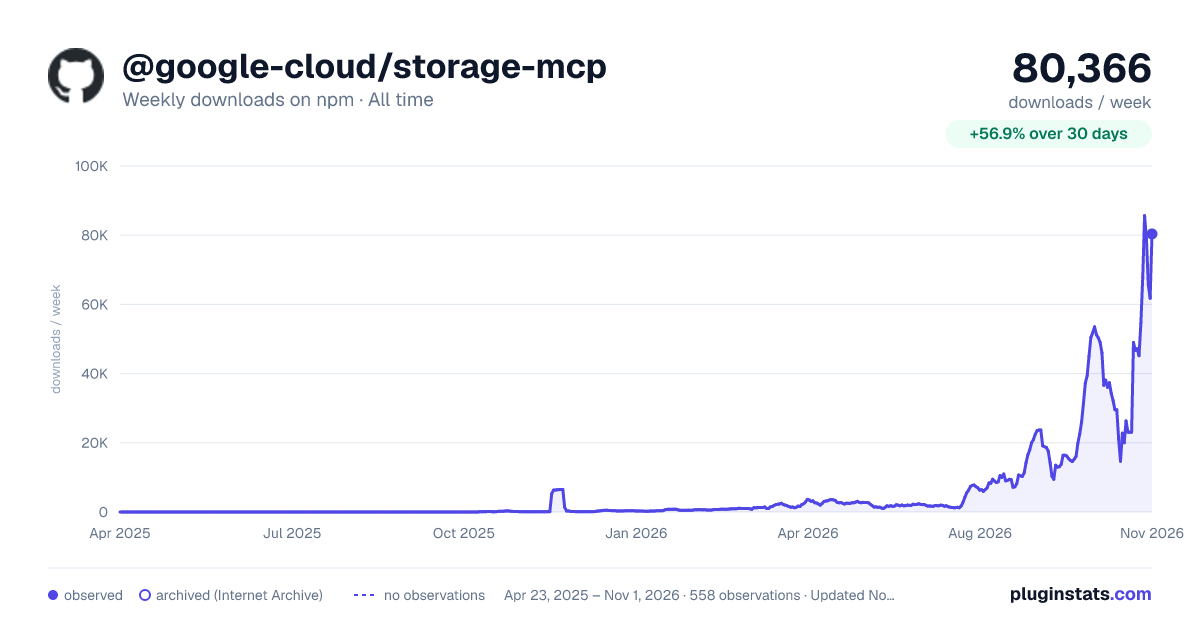

Adoption over time


7/30/90-day growth


Ranking history


Listing placement


Filled points are observed values; hollow points come from Internet Archive snapshots of the listing page. Dashed segments span periods with no observations — values between points are not interpolated.
Each band is one page of 20. Weekly downloads on a log scale. Placement is projected from weekly downloads, so it can differ from the marketplace's own sort order. Hover a dot to see the listing.
Recent observations
Full history (543)Similar npm MCP servers plugins
All 20 @google-cloud/storage-mcp alternativesData source
Weekly downloads (trailing 7 complete days) come from the official npm downloads API. Downloads include CI and mirrors and are not equivalent to installs or users. npm publishes no ratings.
Listing: https://www.npmjs.com/package/@google-cloud/storage-mcp. First seen Oct 16, 2026; last successful collection Oct 19, 2026. See the methodology.