 PluginStats
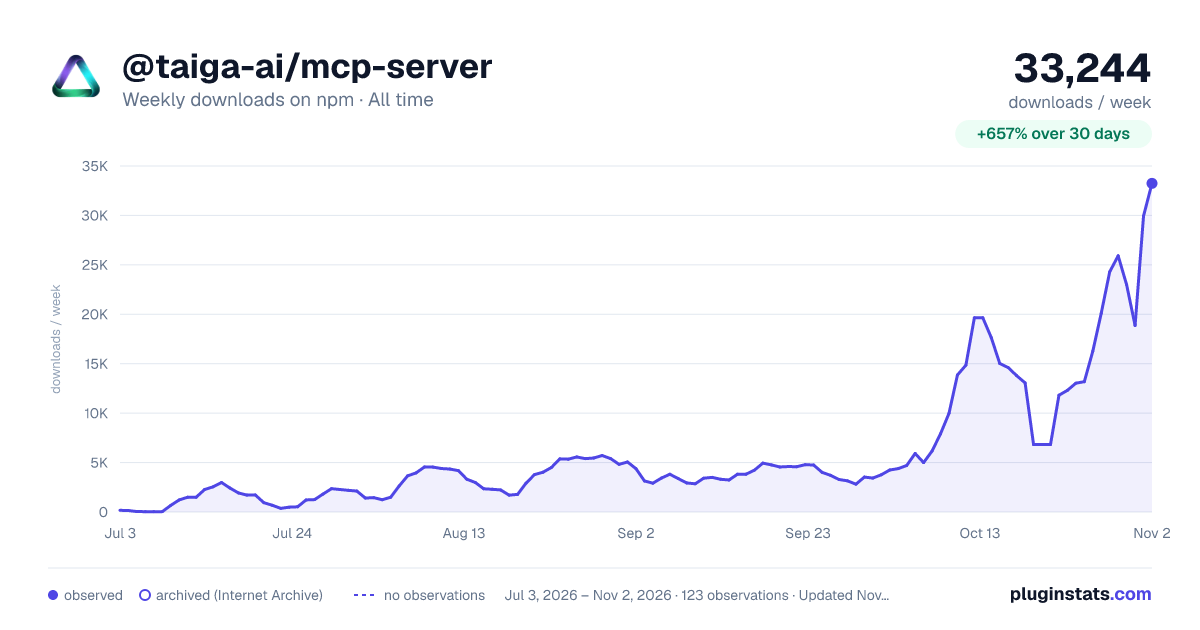
@taiga-ai/mcp-server weekly downloads statistics
By taiga-ai · npm · MCP servers
Taiga for AI coding assistants: read products, policies, initiatives and runs, and operate the line, over MCP
@taiga-ai/mcp-server has 13,058 recorded weekly downloads on npm, ranking #895 of 2,322 tracked listings.
About @taiga-ai/mcp-server
@taiga-ai/mcp-server
The Taiga MCP server lets an AI assistant work with your Taiga organization from the editor. It can:
- read where a product stands, its policies, initiatives, runs and findings;
- operate the line: queue initiatives, review plans, follow runs;
- set up factories and products.
It runs locally over stdio and calls the Taiga API with your access key.
Before you install
You need an access key, made in Taiga under Settings > Account > MCP, where you also choose its permissions. The key acts as you: it can do what your role can do, and no more.
Create the key first, and choose when it expires: in 30 days, 90 days, a year, or never. Taiga copies it to your clipboard, shows it once, and keeps it on the page until you say you have saved it, so copying the setup next does not lose it.
The same page shows the setup for your client and environment, with the key already filled in where a config file needs it, and a one-click install for Cursor. The examples here pin a release (@taiga-ai/mcp-server@0.31.0), so an install runs the version you chose rather than whatever latest is at the next start.
Install
Claude Code and Codex
Run the command. When it asks for your access key, paste it once and press Enter. Nothing appears as you paste (PowerShell shows asterisks), and the key stays out of your shell history:
printf 'Taiga access key: ' && read -rs TAIGA_API_KEY && echo && claude mcp add taiga --scope user -e TAIGA_API_KEY="$TAIGA_API_KEY" -- npx -y @taiga-ai/mcp-server@0.31.0
printf 'Taiga access key: ' && read -rs TAIGA_API_KEY && echo && codex mcp add taiga --env TAIGA_API_KEY="$TAIGA_API_KEY" -- npx -y @taiga-ai/mcp-server@0.31.0
On Windows, in PowerShell (Claude Code needs cmd /c to start npx; the quoted '--' survives npm's PowerShell shims):
$k = Read-Host 'Taiga access key' -AsSecureString; claude mcp add taiga --scope user -e "TAIGA_API_KEY=$([Net.NetworkCredential]::new('', $k).Password)" '--' cmd /c npx -y @taiga-ai/mcp-server@0.31.0
$k = Read-Host 'Taiga access key' -AsSecureString; codex mcp add taiga --env "TAIGA_API_KEY=$([Net.NetworkCredential]::new('', $k).Password)" '--' npx -y @taiga-ai/mcp-server@0.31.0
Cursor, Windsurf, Claude Desktop and other MCP clients
Most clients read the same mcpServers block. Add it with your key in place of YOUR_ACCESS_KEY; the Taiga page fills it in for you. If the file already lists other servers, add the taiga entry beside them. The block holds your key, so keep it out of repositories:
{
  "mcpServers": {
    "taiga": {
      "command": "npx",
      "args": ["-y", "@taiga-ai/mcp-server@0.31.0"],
      "env": { "TAIGA_API_KEY": "YOUR_ACCESS_KEY" }
    }
  }
}
| Client | Where the block goes |
|---|---|
| Cursor | ~/.cursor/mcp.json |
| Windsurf | ~/.codeium/windsurf/mcp_config.json |
| Claude Desktop | Settings, Developer, Edit Config (claude_desktop_config.json) |
| Gemini CLI | ~/.gemini/settings.json |
| Kiro | ~/.kiro/settings/mcp.json |
| JetBrains AI Assistant | Settings, Tools, AI Assistant, Model Context Protocol (MCP), Add |
| GitHub Copilot CLI | ~/.copilot/mcp-config.json, with "type": "local" and "tools": ["*"] |
| Zed | ~/.config/zed/settings.json, under context_servers not mcpServers |
VS Code
In .vscode/mcp.json. VS Code reads servers, and prompts for the key once and keeps it out of the file:
{
  "inputs": [{ "type": "promptString", "id": "taiga-api-key", "description": "Taiga access key", "password": true }],
  "servers": {
    "taiga": {
      "type": "stdio",
      "command": "npx",
      "args": ["-y", "@taiga-ai/mcp-server@0.31.0"],
      "env": { "TAIGA_API_KEY": "${input:taiga-api-key}" }
    }
  }
}
Configuration
| Variable | Required | Meaning |
|---|---|---|
TAIGA_API_KEY | Yes | Your access key. |
TAIGA_API_URL | For @dev and @staging builds | The Taiga API. A release defaults to https://api.eu.tai.ga. It must be https (plain http only for localhost), with no query or fragment. |
TAIGA_TOOLSETS | No | Overrides the key's toolsets for this server, comma-separated, or all. See Toolsets. |
Toolsets
The tools come in five toolsets. Every toolset is on unless you choose otherwise for the key.…
Description from the npm listing.
- mcp
- model-context-protocol
- taiga
- ai
- claude
README badge
Show your rank in a README or on your website. The badge updates automatically.
Charts
Images: 30d · 1y · all time · 1600×900 dark



Adoption over time
7/30/90-day growth
Ranking history
Listing placement
Listing placement
Filled points are observed values; hollow points come from Internet Archive snapshots of the listing page. Dashed segments span periods with no observations — values between points are not interpolated.
Each band is one page of 20. Weekly downloads on a linear scale. Placement is projected from weekly downloads, so it can differ from the marketplace's own sort order. Hover a dot to see the listing.
Recent observations
Full history (2)Similar npm MCP servers plugins
All 20 @taiga-ai/mcp-server alternativesData source
Weekly downloads (trailing 7 complete days) come from the official npm downloads API. Downloads include CI and mirrors and are not equivalent to installs or users. npm publishes no ratings.
Listing: https://www.npmjs.com/package/@taiga-ai/mcp-server. First seen Oct 18, 2026; last successful collection Oct 20, 2026. See the methodology.