 PluginStats
@yworks/optimizer weekly downloads statistics
By yworks · npm · Webpack plugins
yFiles for HTML optimization and obfuscation tool
@yworks/optimizer has 544 recorded weekly downloads on npm, a decrease of 52.2% over the past 30 days.
It ranks #1491 of 2,256 tracked npm listings by weekly downloads.
Over 90 days, weekly downloads changed by -71.8%.
PluginStats has 121 daily observations since Jun 19, 2026; the latest is from Oct 17, 2026.
About @yworks/optimizer
yFiles for HTML Optimizer
Use this tool to minimize and obfuscate your yFiles for HTML applications.
The optimizer will minimize/obfuscate the public API of the yFiles module files, as well as yFiles API usages in application sources, increasing startup and runtime performance.
Note that this tool is meant to be used in production builds. The resulting yFiles module files will be tailor-made to the yFiles API usages in the application sources that were processed along with the yFiles modules.
We highly recommend optimizing the yFiles for HTML library before deploying your application to a public web server to reduce the download size of the library for the end user. Note that, at the time of writing, you are not required to use the optimization step for the standard yFiles SLA.
Obfuscation Excludes
The optimizer might replace non-yFiles API calls that share a name with a yFiles member. Add those names to the blacklist option to keep them unchanged in both the yFiles modules and application sources.
• Use scope-local @yjs:keep comments to exclude these members from obfuscation in a particular scope. This is the preferred approach, because the excluded names will still be obfuscated in yFiles modules and all other scopes. • Currently, @yjs:keep does not work with Vite: Comments are removed by Vite before presenting the sources to the optimizer.
Options
• safeMode (default: false): Enable safeMode to prevent the optimizer from adjusting any names in non-yFiles code.
The default behavior of the optimizer is to obfuscate the names of all yFiles library members and adjust the corresponding occurrences in your source code. When you use a third-party library that uses member names that also exist in the yFiles API, it can happen that these third-party library calls in your sources are accidentally renamed. In general, we recommend adding these member names to the optimizer's blacklist, or use Obfuscation Excludes to prevent the optimizer from renaming them. However, if it's hard to find out which exact member names would have to be excluded from obfuscation in your project, you can enable safeMode to prevent renaming of any yFiles members that are used in your code. That way, only unused yFiles members will be obfuscated in the yFiles library modules and your sources will be left untouched.
• blacklist (default: []): An array of names that should never be renamed by the optimizer. See Obfuscation Excludes • logLevel (default: "info"): One of "error", "warn", "info", "verbose", "debug", "silly".
Note that with logLevel "debug" or finer, a yworks-optimizer-mappings.json file will be created in the working directory that contains the mappings of unobfuscated to obfuscated yFiles member names. These mappings can help to debug the obfuscated code.
• obfuscateBabelSafePublicFields (default: true) Whether the optimizer should try to obfuscate calls of babel's _defineProperty() helper. With this option enabled, the optimizer will try to detect usages like _defineProperty(item, "propertyName", value) and rename the "propertyName" if it matches a yFiles member. Note that this behavior could erroneously rename strings in your application. If you find unwanted obfuscated strings in the generated output, try disabling this option. You can also set the logLevel to "debug" and watch for "Renaming possible babel defineProperty call" messages. For details about configuring the babel output of public class fields, please see https://babeljs.io/docs/en/assumptions#setpublicclassfields
Rolldown Plugin
The plugin uses the Rolldown plugin API. It performs a collection build followed by a fresh optimized build, so place it after plugins that produce JavaScript.
It supports direct Rolldown builds and Vite 8 production builds. On Vite, the second pass invokes Vite again so Vite owns HTML, stylesheet, worker, and asset handling. Be careful when combining the plugin with other non-standard plugins and carefully test the outputs.
Plugin Options
Options supported by the weback, rollup, and Rolldown plugin in addition to the optimizer options explained above:
• ignore An array of minimatch-glob patterns or regexps specifying files that should be ignored by the optimizer. Note that the path separators are not normalized for regexp matching, i.e., on windows, /\\ignoreme.js/ would match, but /\/ignoreme.js/ would not.
This option can be used when some source files contain language features that are not supported by the optimizer (e.g. dynamic imports).
Use this option to ignore only files that do not contain any yFiles code. If the ignored files contain yFiles code, this code will not work with the optimized library.
• shouldOptimize An function that determines whether a particular module should be optimized. The default shouldOptimize function will exclude all node_modules from optimization. Example:
API
The optimized sources are attached to the same objects passed to the optimizer, so additional information (e.g. destination paths) on these objects is not lost.
Examples
Please see your yFiles for HTML package for example usages of the optimizer.
License
MIT © yWorks GmbH
Description from the npm listing.
- yFiles
- yfiles-for-html
- yfiles-js
- rollup-plugin
- rolldown-plugin
- webpack-plugin
- plugin
- optimizer
- obfuscation
- minifier
Where @yworks/optimizer sits in the listing
Each band is one page of 20. Weekly downloads on a log scale. Placement is projected from weekly downloads, so it can differ from the marketplace's own sort order. Hover a dot to see the listing.


Charts
Images: 30d · 1y · all time · 1600×900 dark


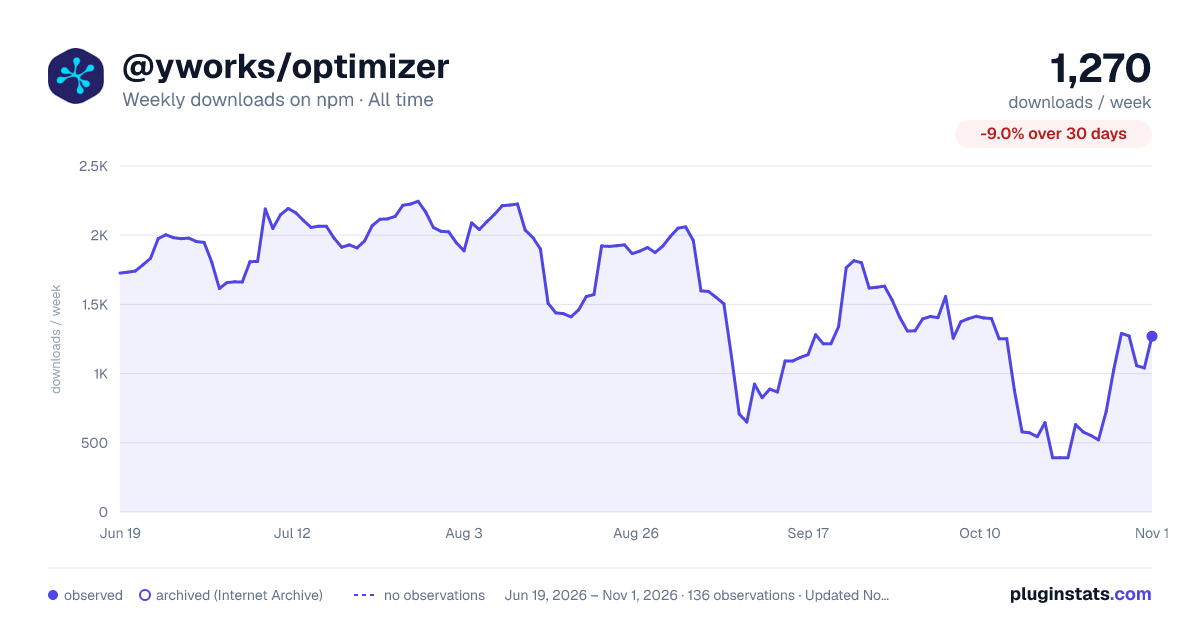

Adoption over time


7/30/90-day growth


Filled points are observed values; hollow points come from Internet Archive snapshots of the listing page. Dashed segments span periods with no observations — values between points are not interpolated.
Recent observations
Full history (121)Similar npm Webpack plugins plugins
Data source
Weekly downloads (trailing 7 complete days) come from the official npm downloads API. Downloads include CI and mirrors and are not equivalent to installs or users. npm publishes no ratings.
Listing: https://www.npmjs.com/package/@yworks/optimizer. First seen Oct 16, 2026; last successful collection Oct 19, 2026. See the methodology.