 PluginStats
@promptctl/cc-candybar weekly downloads statistics
By promptctl · npm · Claude Code
Statusline renderer for Claude Code — a JSON5-configurable DSL with daemon-cached data sources, byte-clean palette-aware composition, and OSC8 click verbs.
@promptctl/cc-candybar has 3,382 recorded weekly downloads on npm, a decrease of 8.0% over the past 30 days.
It ranks #1179 of 2,256 tracked npm listings by weekly downloads.
Over 90 days, weekly downloads changed by +2672%.
PluginStats has 543 daily observations since Apr 23, 2025; the latest is from Oct 17, 2026.
About @promptctl/cc-candybar
CCCandybar
Powerline statusline for Claude Code — daemon-backed, config-driven, zero-config-file required.
Try the live bar in your browser → The real daemon, compiled for the page, replays a few turns of a Claude Code session; every click in the bar is real.
What it is
CCCandybar is a statusline renderer for Claude Code. It shows session cost, context usage, git status, model info, rate-limit utilization, and more, configured through a JSON5 DSL with hot-reloading.
A background daemon caches git state, usage data, and per-session values across concurrent Claude Code sessions. The renderer connects to the daemon over a Unix socket, so every invocation is fast (~50ms budget) and stateful.
Quick start
npm is the only install channel: the GitHub releases are tags plus a changelog with no downloadable assets, and installing from a GitHub tag does not work (the built dist/ is not committed).
pnpm 11 delays freshly published packages (minimumReleaseAge), so on or near a release day @latest can silently resolve to an older version. install compares what it staged against the registry and warns when it is behind; to get a specific release immediately, name it: pnpm dlx @promptctl/cc-candybar@ install.
That single command (re-run it any time to update to the latest release):
1. Stages the runtime at a stable path independent of any package-manager cache — ~/Library/Application Support/CCCandybar/ on macOS, $XDG_DATA_HOME/cc-candybar/ on Linux — as bin/cc-candybar (the prebuilt native render binary for your platform, or a node entry where none exists) beside dist/index.mjs (the daemon + CLI bundle). 2. On macOS, builds ~/Applications/CCCandybarURLHandler.app and registers the cc-candybar:// URL scheme with Launch Services. 3. Writes the staged bin/cc-candybar path as the statusline command into ~/.claude/settings.json (skipped with a notice if you've customized the command; --force overwrites).
Restart Claude Code. The statusline appears with the bundled default layout — an identity row (host, directory, gitaculous) over a status row (model, context, ceiling, autocompact, cacheTimer, block, weekly, activity). On macOS, Cmd-clicking clickable cells fires cc-candybar:// URL verbs that the daemon dispatches (via the URL handler registered in step 2).
Customization
Drop a .cc-candybar.json5 (or .cc-candybar.json — both extensions are accepted) at any of these locations:
1. $CC_CANDYBAR_CONFIG in the statusline command's environment (~ is expanded, and a relative path is relative to the directory Claude Code runs the statusline in). It is read by the client on every render and carried to the daemon, so it can differ per session. A path that names no file renders the bundled default under a Config file not found warning, and one the daemon cannot stat (behind an unsearchable directory, say) under Config file could not be read with the error — either way the bar stays live and loads the file once it can. 2. /.cc-candybar.json5 (then .json at the same location) 3. /.cc-candybar.json5 (then .json) 4. $XDG_CONFIG_HOME/cc-candybar/config.json5 (then .json; defaults to ~/.config/cc-candybar/config.json5)
Without $CC_CANDYBAR_CONFIG, every file found is a layer: your user file merges over the bundled default, the cwd's over that, and the project's on top. So a project file declares only what that project adds or changes — a segment placed in a row, a plugin listed — and keeps the rest of your own config. $CC_CANDYBAR_CONFIG names the one file the session loads, and the others are not read. A change made from the bar (a theme picked and saved, a segment added in edit mode) is written to your user file, never to a project's; when a project file sets the same value, the click is refused and names that file.
JSON is a strict subset of JSON5, so the same parser handles both — .json5 is the documented format (supports inline comments, trailing commas, unquoted keys), .json is the legacy/compat extension. When both exist at the same location, .json5 wins and the bar shows a persistent warning so you can remove the shadowed duplicate.
The file merges onto the bundled default, so it declares only what differs. globals merge per field; the named sections (variables, segments, actions, helpers, …) merge by name, your entry winning; root merges per named row (identity and status in the bundled default; a whole tree at root replaces every row). The bundled default is src/config/default-dsl-config.ts, and fuller starting points live under examples/. Run cc-candybar check to load a file exactly as the daemon will: exit 0 means it renders, exit 1 prints the error with the path and line to fix. Add --render and it prints the bar it rendered, so you can read a config's result without installing it.
Saving the file triggers a hot-reload of every active session.
Architecture…
Description from the npm listing.
- claude
- powerline
- statusline
- typescript
- claude-code
Charts
Images: 30d · 1y · all time · 1600×900 dark


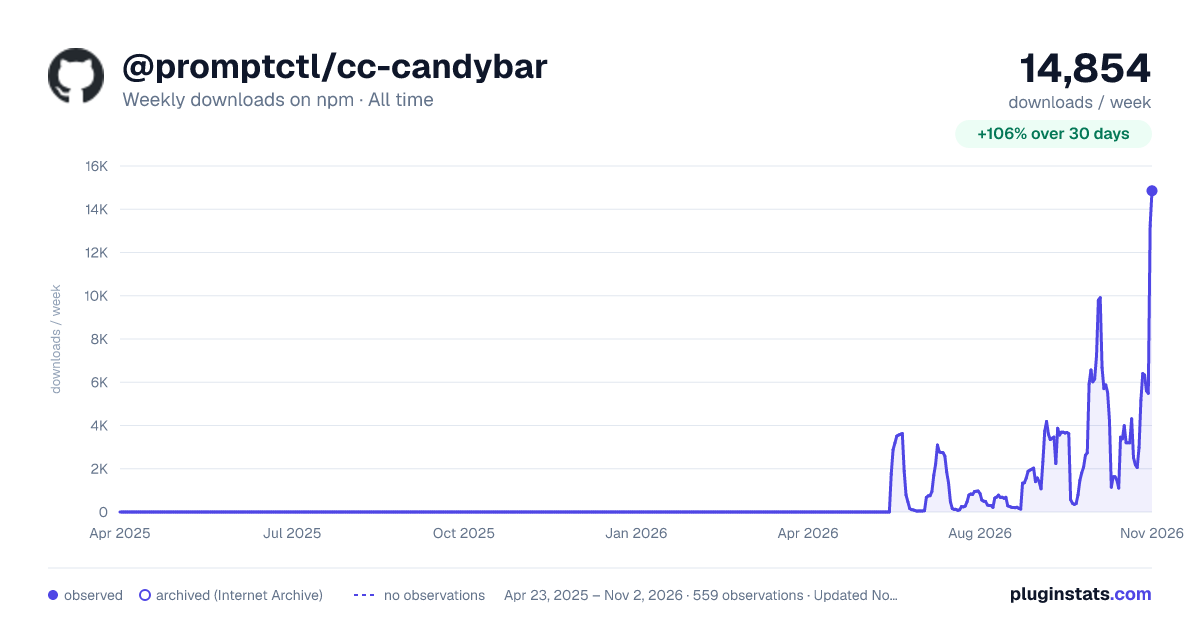

Adoption over time


7/30/90-day growth


Ranking history


Listing placement


Filled points are observed values; hollow points come from Internet Archive snapshots of the listing page. Dashed segments span periods with no observations — values between points are not interpolated.
Each band is one page of 20. Weekly downloads on a log scale. Placement is projected from weekly downloads, so it can differ from the marketplace's own sort order. Hover a dot to see the listing.
Recent observations
Full history (543)Similar npm Claude Code plugins
All 20 @promptctl/cc-candybar alternativesData source
Weekly downloads (trailing 7 complete days) come from the official npm downloads API. Downloads include CI and mirrors and are not equivalent to installs or users. npm publishes no ratings.
Listing: https://www.npmjs.com/package/@promptctl/cc-candybar. First seen Oct 16, 2026; last successful collection Oct 19, 2026. See the methodology.