 PluginStats
vite-plugin-readable-classnames weekly downloads statistics
By teplostanski · npm · Vite plugins
Make your scoped CSS module class names clear and readable. This plugin automatically adds the module filename and other useful info to class names for easier development.
vite-plugin-readable-classnames has 17,295 recorded weekly downloads on npm, a decrease of 44.7% over the past 30 days, ranking #788 of 2,256 tracked listings.
About vite-plugin-readable-classnames
vite-plugin-readable-classnames
docs · npmx.dev · github · fund this package
Make your scoped CSS module class names clear and readable. This plugin automatically adds the module filename and other useful info to class names for easier development.
• Installation • Documentation for Humans • Features • Problem • Usage • lineNumber option • separator option • Migration from vite-plugin-pretty-module-classnames • Contributing • License
Installation
Documentation for Humans
vite-plugin-readable-classnames.js.org
Features
• Framework-agnostic: • Universal: • Compatible with both CommonJS and ES Modules • Support Vite 2.x • Customizable: Flexible configuration through options object • Zero Dependencies
Problem
In React with CSS modules, we're used to class names like SomeComponentclassname_hash. By default, Vite generates names in the format classname_hash, omitting the component name, which makes debugging more difficult.
If you try to add the component name through the generateScopedName: '[name]__[local]_[hash:base64:5]' configuration, React will add an extra -module suffix, and in Vue, such configuration may lead to build errors.
This plugin solves these problems and ensures predictable, readable class naming in the format ComponentName__classname_hash regardless of the framework.
[!TIP] What are generated class names and where are they visible?
When you use CSS modules, the resulting class names are automatically generated by the bundler (e.g., Vite or Webpack). These names are visible:
- in the HTML code of the page (through browser DevTools); - in the final CSS file; - when debugging in the browser as you search for the right element or style.
Readable class names that include the component name help you quickly understand where a style comes from, making debugging and project maintenance easier.
Usage
lineNumber option
The lineNumber option adds the line number where the class is declared in the source file to the class name.
If your CSS file looks like this:
The resulting class names will be:
• SomeComponent__wrapper_abcd1-1 • SomeComponent__container_abcd2-5
[!IMPORTANT] Please note: The lineNumber option works the same way as Vite's standard class name generation when using preprocessors (Sass, Less, Stylus). The line number is taken from the generated CSS, where empty lines and comments are usually removed. Therefore, the line numbers in class names may not match the line numbers in the source files.
In .vue files, line counting always starts from the tag, regardless of where it is located in the file. So the line number in the class name will be counted from the beginning of the block, not from the beginning of the entire file.
separator option
The separator option allows you to customize the characters used to join parts of the generated class name. You can override any of the following fields (all are optional, default values are shown below):
| Field | Default | Description |
| beforeHash | '_' | Separator before the hash part | | beforeClassName | '__' | Separator between the file name and class name | | beforeLineNumber | '-' | Separator before the line number (if enabled) |
In this case, class names will look like: SomeComponent--classname_abcd1
[!TIP] You can specify only the fields you want to override; the rest will use the default values.
Migration from vite-plugin-pretty-module-classnames
vite-plugin-readable-classnames is the new identity for vite-plugin-pretty-module-classnames. This guide will help you migrate from vite-plugin-pretty-module-classnames to vite-plugin-readable-classnames.
-
Uninstall the old plugin and install the new one
-
Update the import and plugin usage in your vite.config.js or vite.config.ts
Contributing
Want to contribute? Awesome! To show your support is to star the project, or to raise issues on GitHub.
Before you contribute to the development of the project, read the rules.
Thanks again for your support, it is much appreciated! 🙏
License
MIT License © 2024-present Igor Teplostanski
Description from the npm listing.
- vite
- vite-plugin
- plugin
- css
- scss
- css module
- scss module
- class name
- class names
- classname
- classnames
- css module name
- scss module class name
README badge
Show your rank in a README or on your website. The badge updates automatically.
Charts
Images: 30d · 1y · all time · 1600×900 dark


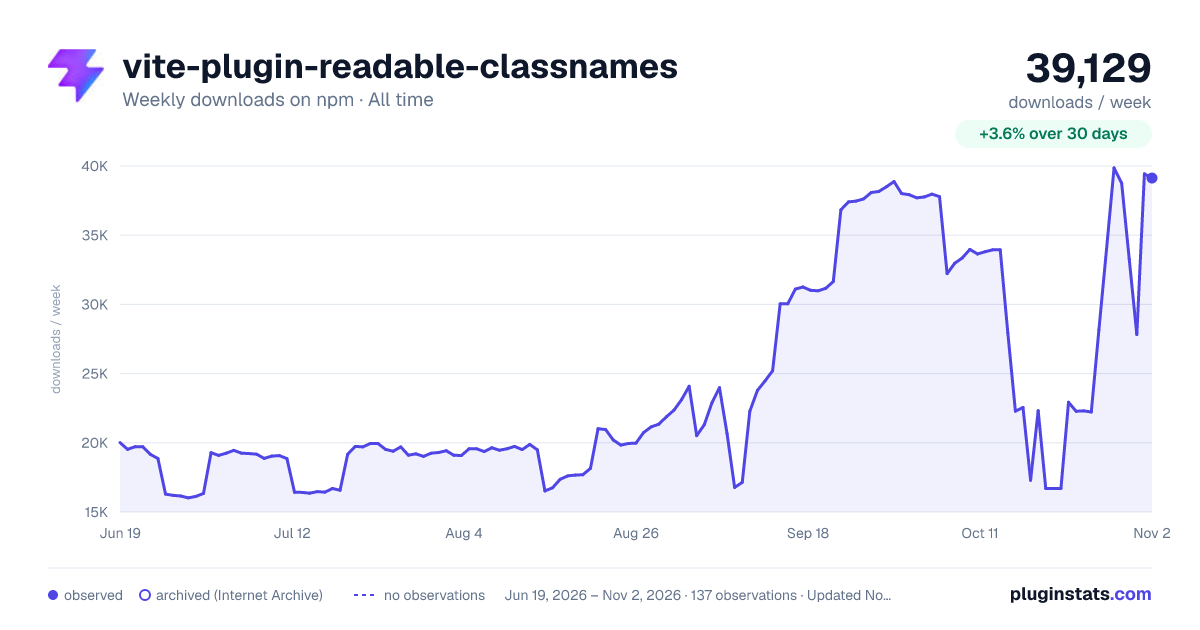

Adoption over time
7/30/90-day growth
Ranking history
Listing placement
Listing placement
Filled points are observed values; hollow points come from Internet Archive snapshots of the listing page. Dashed segments span periods with no observations — values between points are not interpolated.
Each band is one page of 20. Weekly downloads on a linear scale. Placement is projected from weekly downloads, so it can differ from the marketplace's own sort order. Hover a dot to see the listing.
Recent observations
Full history (121)Similar npm Vite plugins plugins
All 20 vite-plugin-readable-classnames alternatives- 18K weekly downloads-54.6%
- 15.3K weekly downloads-54.6%
Data source
Weekly downloads (trailing 7 complete days) come from the official npm downloads API. Downloads include CI and mirrors and are not equivalent to installs or users. npm publishes no ratings.
Listing: https://www.npmjs.com/package/vite-plugin-readable-classnames. First seen Oct 16, 2026; last successful collection Oct 19, 2026. See the methodology.