 PluginStats
@digitaliseringsbyran/tailwindcss-screens-in-dom weekly downloads statistics
By digitaliseringsbyran · npm · Tailwind plugins
Expose the active tailwind screen to the DOM.
@digitaliseringsbyran/tailwindcss-screens-in-dom has 15 recorded weekly downloads on npm, an increase of 50.0% over the past 30 days.
About @digitaliseringsbyran/tailwindcss-screens-in-dom
tailwindcss-screens-in-dom
Expose the active tailwind screen (like sm, md) in body:before, allowing you to use the value in Javascript. Read more
Installation
$ npm install @digitaliseringsbyran/tailwindcss-screens-in-dom --save-dev
Usage
Add the plugin to the plugins array in your tailwind config.
plugins: [
  // ...
  require('@digitaliseringsbyran/tailwindcss-screens-in-dom')()
]
Options
You can pass an object to override the default settings.
// Default options

plugins: [
  require('@digitaliseringsbyran/tailwindcss-screens-in-dom')({
    noScreen: 'xs' // Viewports below the smallest defined screen.
  })
]
Access the active screen in Javascript
Accessing the value in plain Javascript is explained here.
React
A example hook that returns the active screen as a string:
useTailwindScreen.js
import { useState, useEffect } from 'react'

export default () => {
  const isClient = typeof window === 'object'

  function getScreen() {
    return window
      .getComputedStyle(document.querySelector('body'), ':before')
      .getPropertyValue('content')
      .replace(/"|'/g, '')
  }

  const initialState = isClient ? getScreen() : ''
  const [screen, setScreen] = useState(initialState)

  useEffect(() => {
    if (!isClient) {
      return false
    }

    function handleResize() {
      setScreen(getScreen())
    }

    window.addEventListener('resize', handleResize)
    return () => window.removeEventListener('resize', handleResize)
  }, [])

  return screen
}
Component
import React from 'react'
import useTailwindBreakpoint from './useTailwindBreakpoint'

const ActiveScreen => {
  const screen = useTailwindBreakpoint()

  return (
      <span>{screen}</span>
  )
}

export default ActiveScreen
Description from the npm listing.
- tailwind
- tailwindcss
- tailwind css
- tailwindcss-plugin
- plugin
- screens
- screen
- active
- breakpoint
README badge
Show your rank in a README or on your website. The badge updates automatically.
Charts
Images: 30d · 1y · all time · 1600×900 dark


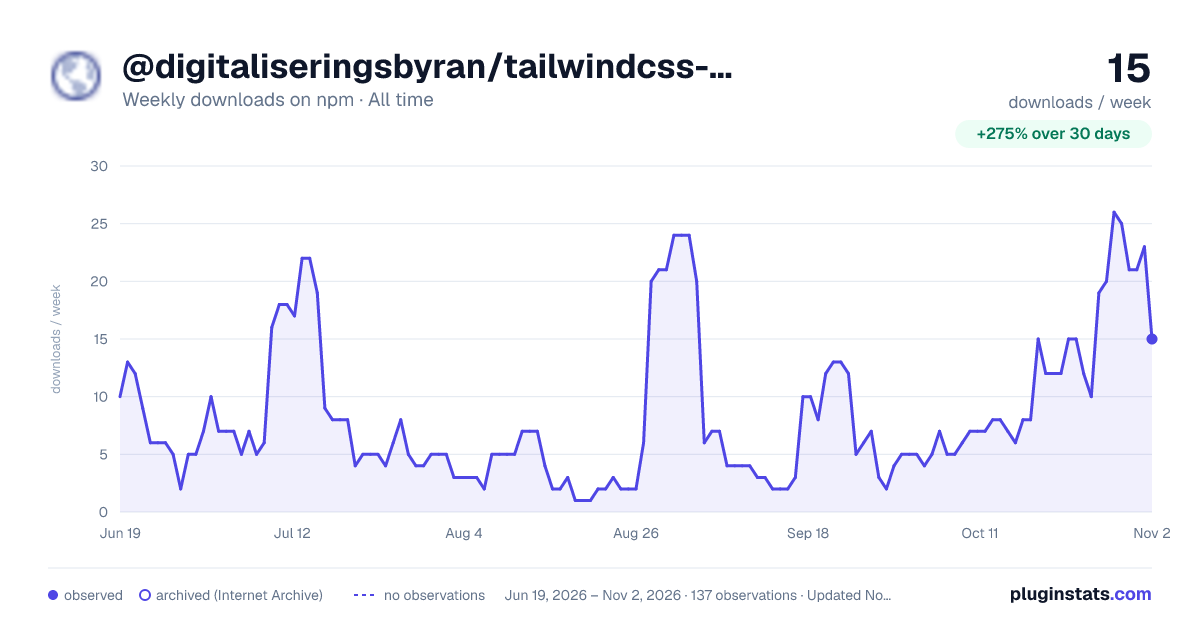

Adoption over time
7/30/90-day growth
Ranking history
Listing placement
Listing placement
Filled points are observed values; hollow points come from Internet Archive snapshots of the listing page. Dashed segments span periods with no observations — values between points are not interpolated.
Each band is one page of 20. Weekly downloads on a linear scale. Placement is projected from weekly downloads, so it can differ from the marketplace's own sort order. Hover a dot to see the listing.
Recent observations
Full history (122)Similar npm Tailwind plugins plugins
All 20 @digitaliseringsbyran/tailwindcss-screens-in-dom alternatives- 15 weekly downloads-72.7%
- 15 weekly downloads+66.7%
- 15 weekly downloads-51.6%
Data source
Weekly downloads (trailing 7 complete days) come from the official npm downloads API. Downloads include CI and mirrors and are not equivalent to installs or users. npm publishes no ratings.
Listing: https://www.npmjs.com/package/@digitaliseringsbyran/tailwindcss-screens-in-dom. First seen Oct 16, 2026; last successful collection Oct 23, 2026. See the methodology.