 PluginStats
@firedmosquito831/my-claude-code weekly downloads statistics
By firedmosquito831 · npm · Claude Code
My Claude Code (MCC): a local multi-provider LLM proxy, model router and control plane for Claude Code, Codex, OpenCode, Gemini CLI and other AI coding agents, with 57 providers, fallback routing, credential health, a native web-search tool proxy, and ana
@firedmosquito831/my-claude-code has 3,166 recorded weekly downloads on npm, a decrease of 76.1% over the past 30 days, ranking #1249 of 2,391 tracked listings.
About @firedmosquito831/my-claude-code
@firedmosquito831/my-claude-code
Route Claude Code and other coding agents to any model provider through one local proxy, with a dashboard for routing, fallback chains, reasoning controls, credential rotation and request analytics.
The server is a Python package. This npm package is a thin wrapper over the project's own digest-verified install script — it does not reimplement it and it does not vendor a second copy of the server.
Install what this machine actually needs
npm install -g @firedmosquito831/my-claude-code
A global install looks at the machine first and then installs the latest release of the right shape:
- the server, always, through the official installer (
install.ps1/install.sh), which bringsuv, Python 3.14 and everymcc-*command; - the native desktop application, where there is a desktop session —
Windows and macOS always, Linux only with
DISPLAYorWAYLAND_DISPLAY. Over SSH, in CI, on a headless server or in WSL — with or without a display, because the desktop app for a Windows PC is the Windows one — it installs the server alone, without even the installer's desktop flag, so no shortcuts are created for a screen that does not exist.
It prints one line saying what it decided and why before it does anything
(npm shows a hook's output only with --foreground-scripts).
With a system Node, sudo, and a user-level prefix
My Claude Code installs per user. With a system Node whose global folder
belongs to root, sudo npm install -g gives you the mcc command and nothing
else: run as root on behalf of your user, the hook installs no server for root
(a root-owned copy you could not use, and a root server on your port) and the
server is installed by your first mcc — as you, not root. Simpler still, give
npm a folder you own and skip sudo entirely:
npm config set prefix ~/.npm-global      # then add ~/.npm-global/bin to PATH
npm install -g @firedmosquito831/my-claude-code
To install for root on purpose, set MCC_INSTALL_ALLOW_ROOT=1 (or run
mcc install --allow-root). A root shell, a root VPS or a Docker image — no
SUDO_USER — is not affected.
| Platform | What the desktop half installs |
|---|---|
| Windows | MyClaudeCode-Setup-windows-x86_64.exe run /VERYSILENT, per-user, no UAC prompt |
| macOS | the universal .dmg, mounted with hdiutil, copied into ~/Applications, quarantine cleared (it says so) |
Linux with dpkg | the .deb, downloaded and verified — it prints sudo dpkg -i … rather than escalating, unless you pass --yes-sudo |
Linux without dpkg | the tarball's own install-desktop.sh, per-user, no root |
Every one of those downloads is checked against
SHA256SUMS-desktop-shell.txt from the same release before it is run,
mounted or unpacked; a file whose digest does not match is deleted and nothing
is executed.
This is the OS-native shape on purpose. mcc-desktop also downloads the same
verified Tauri shell on first launch, into your config home — that needs no
installer and no root, but leaves no Start Menu entry, .desktop file or
Applications icon. Typing npm install -g asks for an installed application,
so that is what you get; mcc-desktop stays as the zero-install fallback.
Choosing for yourself
npx @firedmosquito831/my-claude-code install --help   # the list, installs nothing
npx @firedmosquito831/my-claude-code install --server-only
npx @firedmosquito831/my-claude-code install --desktop-only
npx @firedmosquito831/my-claude-code install --yes-sudo     # Linux: run dpkg for me
MCC_NPM_INSTALL=server npm install -g @firedmosquito831/my-claude-code
MCC_NPM_INSTALL takes server, desktop, both or none and is the
channel for Dockerfiles and provisioning scripts; a command-line flag beats it.
Skip the hook entirely and take the launcher only with
MCC_NPM_SKIP_INSTALL=1 npm install -g @firedmosquito831/my-claude-code. A
local install, an npx run, CI being set, and --ignore-scripts all skip it
too, each printing one line saying so.
If the server installs and the desktop half fails — a flaky network, a 404 —
the install stays green and tells you how to retry just that half. A failing
server install fails npm install -g with it — and that includes curl
being missing or the installer download failing on Linux and macOS, which
fail with a WARNING: line saying so rather than a "done" with nothing
installed.
Run without installing globally
npx @firedmosquito831/my-claude-code            # install if needed, then start the server
npx @firedmosquito831/my-claude-code install    # install or update, deciding as above
npx @firedmosquito831/my-claude-code desktop    # open the desktop app, installing it first if missing
npx @firedmosquito831/my-claude-code claude     # launch Claude Code through the proxy
npx @firedmosquito831/my-claude-code help       # list every mcc-* command
npx … --version installs nothing: the launcher installs the server only when
you ask it to run something that needs one.
Uninstall
mcc uninstall          # removes the server, its commands and the config home
npm uninstall -g @firedmosquito831/my-claude-code   # removes only this launcher
Run mcc uninstall first: npm removes the launcher it installed and nothing
else, so uninstalling the package on its own leaves the Python server in place.
On Windows mcc uninstall keeps the Start Menu entry when it is the
installed desktop app's own. The desktop application is uninstalled the way
its platform expects — Add or
remove programs on Windows, deleting it from ~/Applications on macOS,
sudo dpkg -r my-claude-code-desktop or install-desktop.sh --uninstall on
Linux.
Requirements: Node 18+, and on Windows PowerShell 5.1+ (the installer brings
uv and Python itself).
Docs, releases and the desktop installers for Windows, Linux and macOS: https://github.com/FiredMosquito831/my-claude-code…
Description from the npm listing.
- claude-code
- claude-code-proxy
- llm-proxy
- llm-router
- model-routing
- ai-gateway
- coding-agents
- opencode
- codex
- gemini-cli
- claude
- anthropic
- openai
- openrouter
- mcc
README badge
Show your rank in a README or on your website. The badge updates automatically.
Charts
Images: 30d · 1y · all time · 1600×900 dark


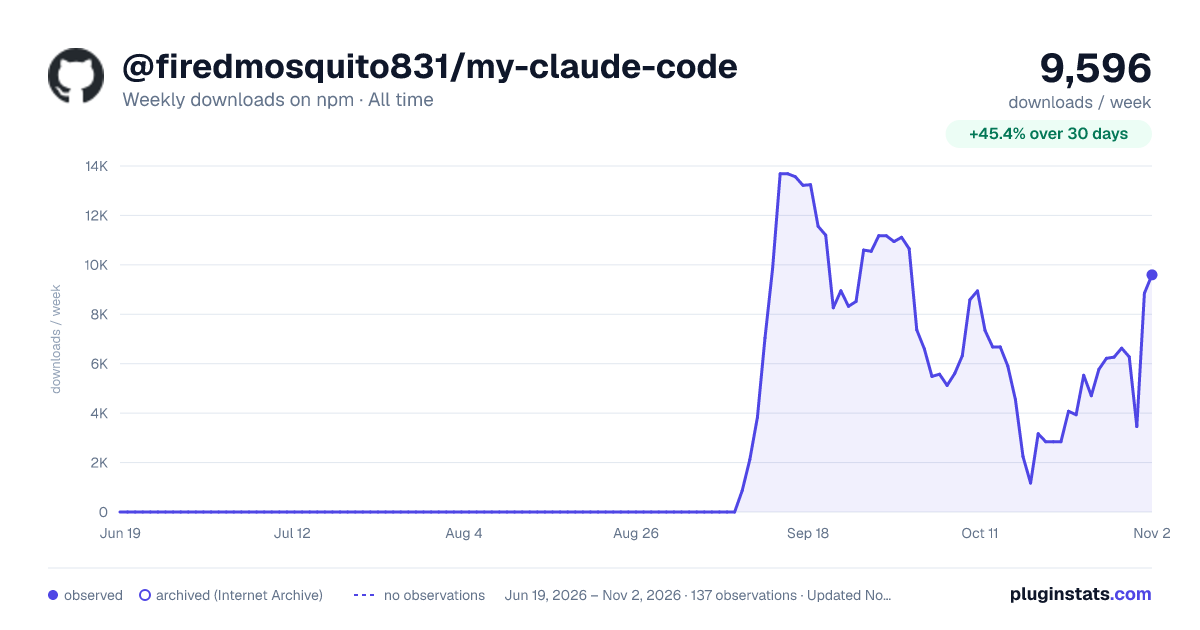

Adoption over time
7/30/90-day growth
Ranking history
Listing placement
Listing placement
Filled points are observed values; hollow points come from Internet Archive snapshots of the listing page. Dashed segments span periods with no observations — values between points are not interpolated.
Each band is one page of 20. Weekly downloads on a linear scale. Placement is projected from weekly downloads, so it can differ from the marketplace's own sort order. Hover a dot to see the listing.
Recent observations
Full history (122)Similar npm Claude Code plugins
All 20 @firedmosquito831/my-claude-code alternativesData source
Weekly downloads (trailing 7 complete days) come from the official npm downloads API. Downloads include CI and mirrors and are not equivalent to installs or users. npm publishes no ratings.
Listing: https://www.npmjs.com/package/@firedmosquito831/my-claude-code. First seen Oct 16, 2026; last successful collection Oct 21, 2026. See the methodology.