 PluginStats
@chatpanel/bridge weekly downloads statistics
By chatpanel · npm · Claude Code
Local bridge that exposes the AI coding agents installed on your machine — Claude Code (CLI), Codex (CLI), and Antigravity CLI (formerly Gemini CLI, which remains available for business/enterprise) — to the ChatPanel Chrome extension over a localhost SSE
@chatpanel/bridge has 91 recorded weekly downloads on npm, a decrease of 98.1% over the past 30 days.
It ranks #1677 of 2,251 tracked npm listings by weekly downloads.
Over 90 days, weekly downloads changed by +93.6%.
PluginStats has 543 daily observations since Apr 23, 2025; the latest is from Oct 17, 2026.
About @chatpanel/bridge
ChatPanel Bridge
A tiny localhost server that lets the ChatPanel Chrome extension talk to the coding agents on your machine. A browser extension can't spawn local processes, so this bridges the gap.
• Claude Code — embedded via @anthropic-ai/claude-agent-sdk, using your existing Claude Code login (or ANTHROPIC_API_KEY). • Codex — driven via the codex exec CLI, using your codex login. • Antigravity CLI — driven via the agy -p CLI, using your Antigravity login. This is Google's successor to Gemini CLI; Gemini CLI itself remains available for business/enterprise (paid API keys) and can be added as a custom agent.
Bring whichever agent you already have installed — the extension auto-detects the ones the bridge reports as available.
Run it
macOS / Linux — one line, no Node.js needed
Downloads the standalone binary, installs it, and sets it to start at login (installing via curl avoids the macOS "damaged" prompt). Re-running is a clean in-place upgrade.
Windows — via Node (recommended)
Windows SmartScreen flags unsigned downloads, so on Windows run the bridge through Node — you already have it if you use Claude Code / Codex (both npm CLIs), and there's no security prompt:
Just trying it? npx @chatpanel/bridge runs it once in the foreground.
Manage it anywhere: chatpanel-bridge --status · --uninstall.
Manual download
Grab the binary from the latest release and:
These binaries aren't code-signed yet, so macOS/Windows may warn on first run (the curl/npm routes above sidestep that). Intel Mac? No x64 binary yet — use npm (npx @chatpanel/bridge). Apple Silicon uses chatpanel-bridge-macos-arm64.
Prerequisites
The agents you want to use must already be set up:
• Claude Code: installed and signed in (claude), or set ANTHROPIC_API_KEY. • Codex: codex on your PATH and codex login done. • Antigravity CLI: agy on your PATH and signed in (install the Antigravity app, then run agy once to sign in). Replaces Gemini CLI; business/enterprise users can still run gemini as a custom agent.
The extension polls /health and shows each agent as available/unavailable.
Develop (from source)
Only if you're hacking on the bridge itself:
API
| Method | Path | Purpose |
| GET | /health | { ok, version, agents:[{id,label,available,reason}] } | | POST | /chat | SSE stream — body { agent, system, options, messages } | | GET | /v1/models | OpenAI-compatible list of available local agents | | POST | /v1/chat/completions | OpenAI-compatible Chat Completions (streaming and non-streaming) | | POST | /v1/completions | OpenAI-compatible legacy text Completions (streaming and non-streaming) | | POST | /v1/responses | OpenAI-compatible Responses API (streaming and non-streaming) | | POST | /v1/messages | Anthropic-compatible Messages API (streaming and non-streaming) | | GET | /skills | skills installed on this machine, across every agent harness + configured folders | | GET | /skills/ · /skills//file/ | one skill's instructions · one reference file | | POST | /mcp | MCP endpoint — chatpanel_skill_* tools any CLI can call (plus browser tools while a ChatPanel chat is driving) |
/chat streams Server-Sent Events: {type:'delta',text} as the answer is generated, {type:'tool',name,summary} / {type:'status'} for activity, and a final {type:'done'} (or {type:'error',error}).
Use your skills from any CLI
The bridge discovers the skills installed on your machine — Claude Code, Codex, Copilot, Gemini, Hermes, ~/.agents/skills, and any folder you configure — and exposes them as MCP tools (chatpanel_skill_list / _open / _read). Point any MCP client at http://127.0.0.1:4319/mcp and it can list and load them with no browser open.
For one server that adds your local history (chats, meetings, notes — redacted) *alongside* your skills, add the Privacy Gateway instead and point your CLI at chatpanel-gateway mcp. The gateway proxies these skill tools and puts redaction in front.
options per agent (set in ChatPanel Settings):
OpenAI and Anthropic SDK compatibility
The compatibility routes run a local coding agent; they do not call a provider API. Use the per-install token from ~/.chatpanel/bridge-token as the SDK API key. The token protects endpoints that can start local processes, so do not put it in browser-delivered code or share it.
For OpenAI clients, set the base URL to http://127.0.0.1:4319/v1 and use an installed agent id such as codex as the model:
client.chat.completions.create(...) and legacy client.completions.create(...) work through the same base URL. For the Anthropic SDK, use http://127.0.0.1:4319 as its base URL and the same token as its API key; requests to /v1/messages can also use model: "codex".
The model field selects the local agent. codex/gpt-5.5, for example, selects the Codex agent and passes gpt-5.5 as its CLI model override. Advanced bridge settings can be supplied through an extra chatpanel request object:
The adapter currently covers text conversations. Provider-hosted function tools, stored responses, log probabilities, and exact token accounting are not available; unsupported tool requests return HTTP 400, and usage counts are zero.
Safety…
Description from the npm listing.
- chatpanel
- claude-code
- codex
- antigravity-cli
- gemini-cli
- chrome-extension
- ai-agents
- bridge
Where @chatpanel/bridge sits in the listing
Each band is one page of 20. Weekly downloads on a log scale. Placement is projected from weekly downloads, so it can differ from the marketplace's own sort order. Hover a dot to see the listing.


Charts
Images: 30d · 1y · all time · 1600×900 dark


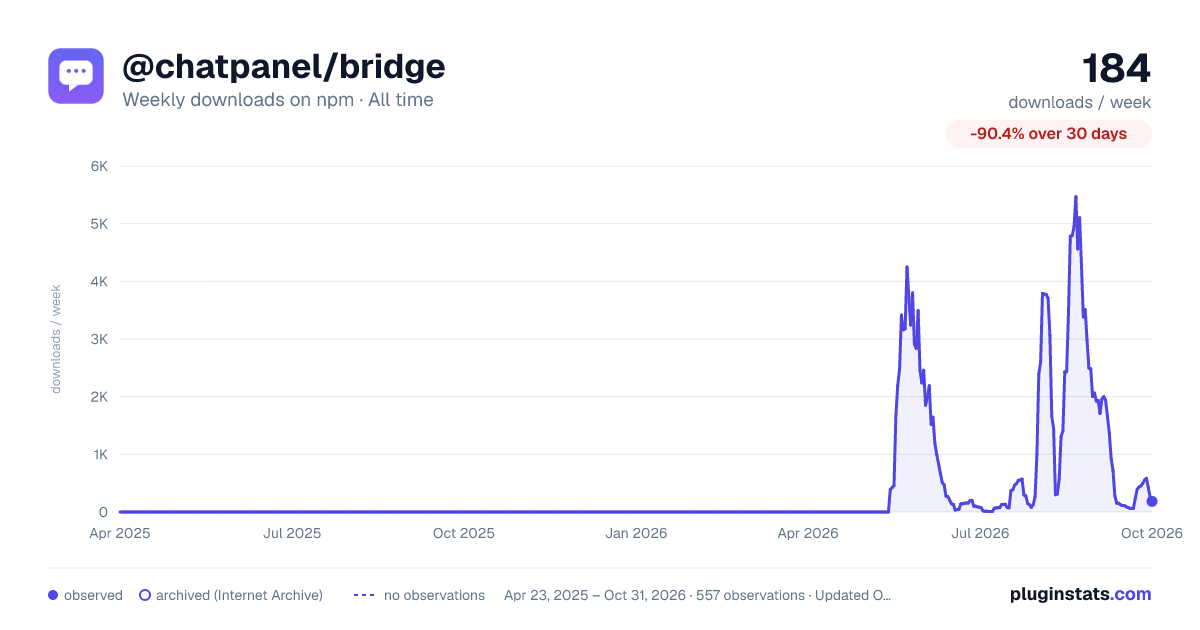

Adoption over time


7/30/90-day growth


Filled points are observed values; hollow points come from Internet Archive snapshots of the listing page. Dashed segments span periods with no observations — values between points are not interpolated.
Recent observations
Full history (543)Similar npm Claude Code plugins
Data source
Weekly downloads (trailing 7 complete days) come from the official npm downloads API. Downloads include CI and mirrors and are not equivalent to installs or users. npm publishes no ratings.
Listing: https://www.npmjs.com/package/@chatpanel/bridge. First seen Oct 16, 2026; last successful collection Oct 18, 2026. See the methodology.