 PluginStats
vite-plugin-terminal weekly downloads statistics
By patak-dev · npm · Vite plugins
Log in the node terminal from the browser
vite-plugin-terminal has 14,670 recorded weekly downloads on npm, a decrease of 48.4% over the past 30 days, ranking #864 of 2,322 tracked listings.
About vite-plugin-terminal
vite-plugin-terminal

Log in the node terminal from the browser

Open a playground online in StackBlitz
Install
npm i -D vite-plugin-terminal
Add plugin to your vite.config.ts:
// vite.config.ts
import Terminal from 'vite-plugin-terminal'

export default {
  plugins: [
    Terminal()
  ]
}
Usage
In your source code import terminal, and use it like you do with console.log.
import { terminal } from 'virtual:terminal'

terminal.log('Hey terminal! A message from the browser')
The terminal log calls will be removed when building the app.
Types
There are two ways of telling typescript about the types of the virtual import:
-
In your
global.d.tsfile add the following line:/// <reference types="vite-plugin-terminal/client" /> -
In your
tsconfig.jsonadd the following to yourcompilerOptions.typesarray:{ // ... "compilerOptions": { // ... "types": [ "vite-plugin-terminal/client" ], }, }
API
Supported methods:
terminal.log(obj1 [, obj2, ..., objN])terminal.info(obj1 [, obj2, ..., objN])terminal.warn(obj1 [, obj2, ..., objN])terminal.error(obj1 [, obj2, ..., objN])terminal.assert(assertion, obj1 [, obj2, ..., objN])terminal.group()terminal.groupCollapsed()terminal.groupEnd()terminal.table(obj)terminal.time(id)terminal.timeLog(id, obj1 [, obj2, ..., objN])terminal.timeEnd(id)terminal.clear()terminal.count(label)terminal.countReset(label)terminal.dir(obj)terminal.dirxml(obj)
These methods will work but use the console
terminal.trace(...args: any[])terminal.profile(...args: any[])terminal.profileEnd(...args: any[])
Redirect console logs to the terminal
If you want the standard console logs to appear in the terminal, you can use the console: 'terminal' option in your vite.config.ts:
// vite.config.ts
import Terminal from 'vite-plugin-terminal'

export default {
  plugins: [
    Terminal({
      console: 'terminal'
    })
  ]
}
In this case, you don't need to import the virtual terminal to use the plugin.
console.log('Hey terminal! A message from the browser')
You can also overwrite it in your index.html head manually in case you would like more control.
  <script type="module">
    // Redirect console logs to the terminal
    import terminal from 'virtual:terminal'
    globalThis.console = terminal
  </script>
Check the Console playground for a full example.
Log in both the terminal and the console
You can use the output option to define where the terminal logs should be logged. Accepts terminal, console, or an array with both.
// vite.config.ts
import Terminal from 'vite-plugin-terminal'

export default {
  plugins: [
    Terminal({
      output: ['terminal', 'console']
    })
  ]
}
Examples
- Basic - Playground using every available method.
- Console - Redirect standard console logs to the terminal.
- Auto Import - Use unplugin-auto-import to make
terminalglobal in your app. - Vue - Example of logging to the terminal from a Vue App.
Options
console
Type: 'terminal' | undefined<br>
Default: undefined<br>
Set to 'terminal' to make globalThis.console equal to the terminal object in your app.
output
Type: 'terminal' | 'console' | ['terminal', 'console']<br>
Default: terminal<br>
Define where the output for the logs.
strip
Type: boolean<br>
Default: true<br>
Strip terminal.*() when bundling for production.
include
Type: String | RegExp | Array[...String|RegExp]<br>
Default: /.+\.(js|ts|mjs|cjs|mts|cts)/<br>
Example: include: '**/*.(mjs|js)',<br>
A pattern, or array of patterns, which specify the files in the build the plugin should operate on when removing calls for production.
exclude
Type: String | RegExp | Array[...String|RegExp]<br>
Default: []<br>
Example: exlude: 'tests/**/*',<br>
A pattern, or array of patterns, which specify the files in the build the plugin should ignore when removing calls for production.
Credits
- Original idea from Domenic Elm
- Project setup from @antfu's vite-plugin-inspect
- Bundling by unbuild
- Strip functions during build uses rollup-plugin-strip
Sponsors
<p align="center"> <a href="https://patak.dev/sponsors.svg"> <img src="https://patak.dev/sponsors.svg"/> </a> </p>License
MIT License © 2022-present Matias Capeletto
Description from the npm listing.
- vite-plugin
README badge
Show your rank in a README or on your website. The badge updates automatically.
Charts
Images: 30d · 1y · all time · 1600×900 dark


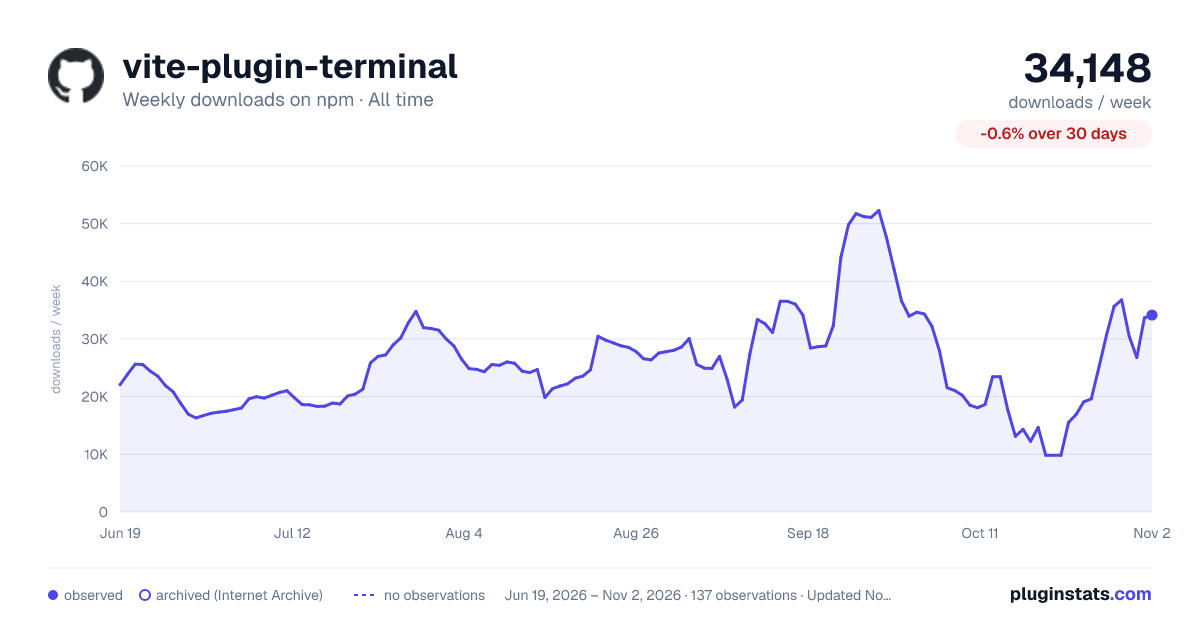

Adoption over time
7/30/90-day growth
Ranking history
Listing placement
Listing placement
Filled points are observed values; hollow points come from Internet Archive snapshots of the listing page. Dashed segments span periods with no observations — values between points are not interpolated.
Each band is one page of 20. Weekly downloads on a linear scale. Placement is projected from weekly downloads, so it can differ from the marketplace's own sort order. Hover a dot to see the listing.
Recent observations
Full history (122)Similar npm Vite plugins plugins
All 20 vite-plugin-terminal alternativesData source
Weekly downloads (trailing 7 complete days) come from the official npm downloads API. Downloads include CI and mirrors and are not equivalent to installs or users. npm publishes no ratings.
Listing: https://www.npmjs.com/package/vite-plugin-terminal. First seen Oct 16, 2026; last successful collection Oct 20, 2026. See the methodology.