 PluginStats
@carlrannaberg/cclint weekly downloads statistics
By carlrannaberg · npm · Claude Code
Claude Code Lint - A comprehensive linting tool for Claude Code projects
@carlrannaberg/cclint has 2,924 recorded weekly downloads on npm, an increase of 84.4% over the past 30 days.
About @carlrannaberg/cclint
cclint (Claude Code Lint)



A comprehensive linting tool for Claude Code projects that validates agent definitions, command configurations, settings files, and project documentation.
Features
- Agent/Subagent Linting: Validates frontmatter, tools configuration, and naming conventions
- Command Linting: Checks slash command definitions and tool permissions
- Settings Validation: Validates
.claude/settings.jsonhook configurations - Documentation Linting: Ensures CLAUDE.md follows best practices and template structure
- Custom Schema Support: Extend base schemas with Zod for project-specific validation
- Project Auto-Detection: Automatically finds project root using directory climbing
- Multiple Output Formats: Console, JSON, and Markdown reports
- CI/CD Friendly: Configurable exit codes and quiet mode
Installation
# Install globally
npm install -g @carlrannaberg/cclint

# Install as dev dependency
npm install --save-dev @carlrannaberg/cclint

# Use without installing
npx @carlrannaberg/cclint
Usage
Basic Linting
# Lint current project (auto-detects root)
cclint

# Lint specific directory
cclint --root /path/to/project

# Quiet mode (minimal output)
cclint --quiet

# Verbose mode (show all files)
cclint --verbose
Specialized Linting
Lint only specific file types for faster, focused validation:
# Lint only agent definition files
cclint agents

# Lint only command definition files
cclint commands

# Lint only settings.json files
cclint settings

# Lint only CLAUDE.md context files
cclint context

# Use with options for specialized linting
cclint agents --verbose --follow-symlinks
cclint commands --root /path/to/project --quiet
Report Generation
# Generate JSON report
cclint --format json --output lint-report.json

# Generate Markdown report
cclint --format markdown --output reports/lint-report.md
CI/CD Integration
# Fail on errors only (default)
cclint --fail-on error

# Fail on warnings or errors
cclint --fail-on warning

# Fail on suggestions, warnings, or errors
cclint --fail-on suggestion

# Disable custom schema validation
cclint --no-custom-schemas
Symlink Support
# Follow symlinks when discovering files (secure by default)
cclint --follow-symlinks

# Symlinks are NOT followed by default for security
# When enabled, validates that symlink targets remain within project root
# Useful for projects with shared agent/command definitions
SDK/Programmatic Usage
CCLint can be used programmatically in your Node.js applications:
import CClint from '@carlrannaberg/cclint';

// Create linter instance
const linter = new CClint();

// Lint entire project
const summary = await linter.lintProject('./my-project', {
  quiet: true,
  followSymlinks: true  // Enable symlink support
});

// Lint specific file types
const agentResults = await linter.lintAgents('./my-project');
const commandResults = await linter.lintCommands('./my-project');
Return Types Explained
lintProject() returns a LintSummary:
{
  totalFiles: 35,
  validFiles: 24,
  totalErrors: 11,
  totalWarnings: 2,
  totalSuggestions: 0,
  duration: 150,
  results: [...] // Array of all individual file results
}
lintAgents(), lintCommands(), etc. return LintResult[]:
[
  {
    file: '/path/to/agent.md',
    valid: true,
    errors: [],
    warnings: [],
    suggestions: [],
    missingFields: []
  },
  // ... more individual file results
]
Use Cases
lintProject(): Full project validation, CI/CD integration, comprehensive reportslintAgents(): Validate only agent definitions, useful for agent-focused toolslintCommands(): Validate only command definitions, useful for command management toolslintSettings(): Validate settings.json, useful for configuration tools
What It Checks
Official Claude Code Fields
cclint validates against the official Claude Code specifications. Any additional fields must be added via custom schema extensions.
Agent/Subagent Frontmatter Fields
Required:
name- Agent identifier (lowercase, alphanumeric with hyphens)description- Natural language description of when to invoke
Optional:
toolsorallowed-tools- Tool access: "*" for all, or array of tool namesmodel- Preferred model: sonnet, opus, haiku, sonnet[1m], opusplan, inheritcolor- UI color (must be one of: red, blue, green, yellow, purple, orange, pink, cyan)
Command Frontmatter Fields
All fields are optional:
description- Command description (defaults to first heading or line from content)allowed-tools- Tools the command can use (string format: "Tool1, Tool2")argument-hint- Hint for command arguments shown in UImodel- Model to use (same values as agents)
Agent/Subagent Files (*.md with frontmatter)
- ✅ Required fields:
name,description - ✅ Tool configurations and syntax
- ✅ Color validation (8 valid Claude Code colors: red, blue, green, yellow, purple, orange, pink, cyan)
- ✅ Naming conventions and filename matching
- ⚠️ Unknown tools and deprecated fields
- 💡 Content optimization suggestions
Command Files (*.md with frontmatter)
- ✅ Frontmatter schema validation
- ✅ Tool permissions in
allowed-tools - ✅ Bash command usage validation
- ✅ File reference patterns
- ⚠️ Unknown tools and syntax errors
- 💡 Missing descriptions and argument hints
Settings Files (.claude/settings.json)…
Description from the npm listing.
- claude
- claude-code
- lint
- validation
- cli
README badge
Show your rank in a README or on your website. The badge updates automatically.
Charts
Images: 30d · 1y · all time · 1600×900 dark


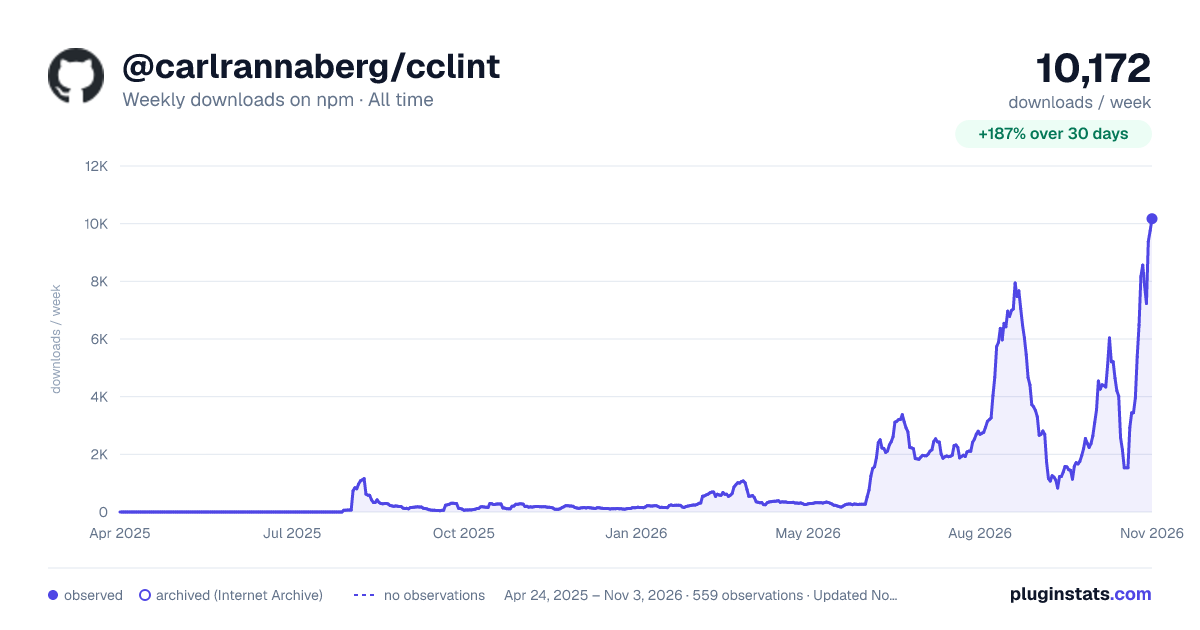

Adoption over time
7/30/90-day growth
Ranking history
Listing placement
Listing placement
Filled points are observed values; hollow points come from Internet Archive snapshots of the listing page. Dashed segments span periods with no observations — values between points are not interpolated.
Each band is one page of 20. Weekly downloads on a linear scale. Placement is projected from weekly downloads, so it can differ from the marketplace's own sort order. Hover a dot to see the listing.
Recent observations
Full history (544)Similar npm Claude Code plugins
All 20 @carlrannaberg/cclint alternativesData source
Weekly downloads (trailing 7 complete days) come from the official npm downloads API. Downloads include CI and mirrors and are not equivalent to installs or users. npm publishes no ratings.
Listing: https://www.npmjs.com/package/@carlrannaberg/cclint. First seen Oct 16, 2026; last successful collection Oct 27, 2026. See the methodology.