 PluginStats
@qase/mcp-server weekly downloads statistics
By qase (2 listings) · npm · MCP servers
Official MCP server for Qase Test Management Platform
@qase/mcp-server has 2,726 recorded weekly downloads on npm, a decrease of 58.8% over the past 30 days, ranking #1267 of 2,322 tracked listings.
About @qase/mcp-server
Qase MCP Server
Official Model Context Protocol (MCP) server for Qase Test Management Platform — connect AI assistants to your test cases, runs, defects, and more.



Table of Contents
- Overview
- Use Cases
- Quick Start
- Building on top of this server
- Upgrading from v1
- Tools
- Documentation
- Contributing
- License
- Support
- Links
Overview
The Qase MCP Server lets AI assistants (Claude, Cursor, Codex, and any other MCP client) read and write Qase test cases, runs, results, defects, suites, milestones, and more — through a standardized protocol, with no custom integration code.
Features:
- 40 task-oriented tools (42 total, with
qase_discover_toolsandqase_tool_help) — consolidated from 83 v1 tools for lower token usage and better LLM accuracy - Composite tools — multi-step workflows in a single call: CI reporting, defect triage, regression run setup
- QQL support — Qase Query Language for advanced searches across cases, runs, results, defects, and plans
- Project context bootstrap — one call returns full project structure (suites, milestones, environments, users, custom fields)
- Test case review — propose new cases or changes for review, assign reviewers, and track status (approving and merging remain UI-only)
- Short descriptions, documentation on demand — every tool is listed from the first request;
qase_tool_helpreturns a tool's full documentation when the agent first reaches for it, andqase_discover_toolssearches the catalogue by task - Hosted or self-run — connect to
https://mcp.qase.io/mcp(orhttps://mcp-eu.qase.io/mcpon the EU cluster) with just your Qase login, or run the server locally with your own API token - Tenant-safe caching & HTTP resilience — two-tier cache (in-memory + optional Redis), connection pooling, retry with backoff
- Escape hatch — direct REST API access for any endpoint via
qase_api
Use Cases
| Scenario | Example prompt | Tool |
|---|---|---|
| Bootstrap project context | "Show me the structure of project DEMO — suites, milestones, environments" | qase_project_context |
| Create or update a test case | "Create a high-priority smoke test case in project DEMO titled 'Login with valid credentials'" | qase_case_upsert |
| Report CI results | "Report these CI results for project DEMO: case 1 passed, case 2 failed with 'timeout error'" | qase_ci_report |
| Triage a failed test | "Create a critical defect for the login timeout failure in run #42" | qase_triage_defect |
| Search with QQL | "Find all failed test results from the last 7 days in project DEMO" | qql_search |
See Tools and docs/tools.md for the full reference.
Quick Start
Use the hosted Qase MCP (recommended)
No install, no API token — connect to the Qase-hosted server and sign in with your Qase account.
Note: The hosted Qase MCP is available on every paid plan. On the Free plan, or on a dedicated instance, run the server yourself with your own API token — that works everywhere.
Pick the URL for your region:
https://mcp.qase.io/mcpfor the main cloud (app.qase.io),https://mcp-eu.qase.io/mcpfor the EU cluster (app-eu.qase.io). The examples below use the main cloud; on the EU cluster substitute the EU URL and change nothing else.
- Claude — open Settings → Connectors, find Qase Test Management, click Connect. (The directory connector is main-cloud; on the EU cluster add
https://mcp-eu.qase.io/mcpas a custom connector.) - Cursor — add
{"mcpServers": {"qase": {"url": "https://mcp.qase.io/mcp"}}}to.cursor/mcp.json. - Codex — add the URL
https://mcp.qase.io/mcpin Settings → MCPs → Add server, or configure~/.codex/config.tomlfor the CLI. - VS Code — add
{"servers": {"qase": {"type": "http", "url": "https://mcp.qase.io/mcp"}}}to.vscode/mcp.json, or run MCP: Add Server.
Full per-client steps, other clients, and the active-workspace model: docs/connect.md.
Run it yourself
Install the package and provide your own API token:
npm install -g @qase/mcp-server
export QASE_API_TOKEN=your_api_token_here
Then point your MCP client's stdio config at the @qase/mcp-server binary. Full install options, client configs (Claude Desktop, Cursor, Claude Code, Codex, OpenCode), environment variables, and transports (stdio/SSE/streamable-HTTP): docs/self-run.md.
Building on top of this server
For integration authors only — if you use the server directly, nothing here applies to you.
If your product drives this server (a plugin, an agent, a wrapper CLI), it can identify itself so its usage is attributable in Qase analytics, independently of which AI host is connected:
QASE_MCP_INTEGRATION=quality-supervisor/1.4.0   # <name>/<version>, version optional
```…
Description from the npm listing.
- mcp
- qase
- testing
- test-management
- model-context-protocol
- test-automation
- qa
- quality-assurance
- test-cases
- test-runs
- defect-tracking
- claude
- ai-assistant
- llm
- anthropic
README badge
Show your rank in a README or on your website. The badge updates automatically.
Charts
Images: 30d · 1y · all time · 1600×900 dark


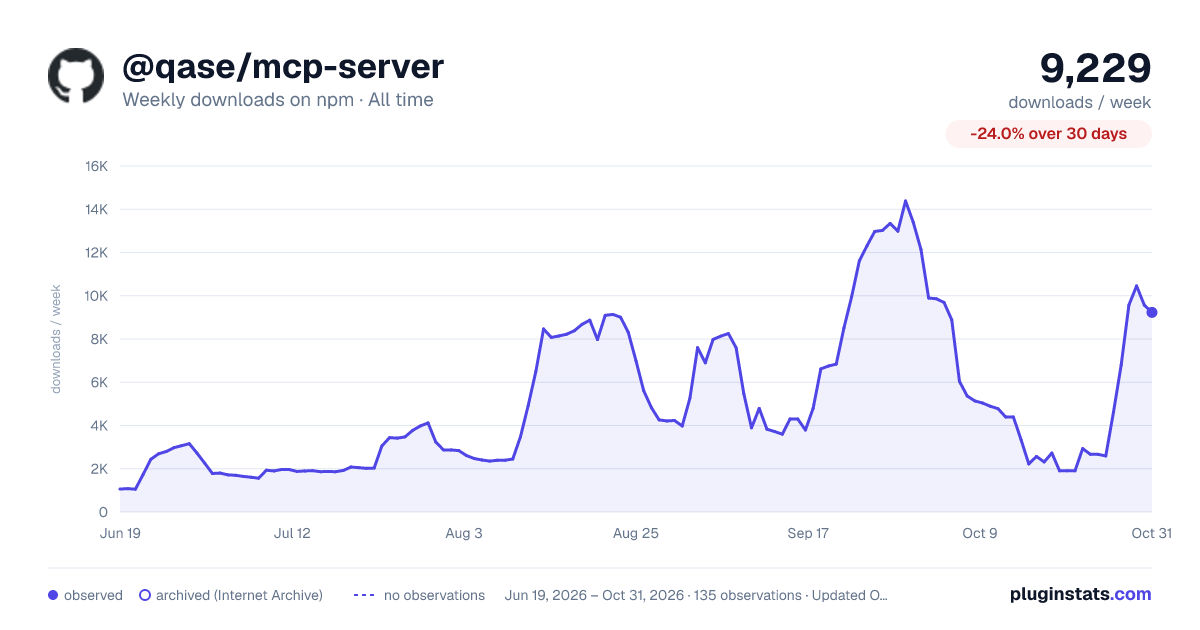

Adoption over time
7/30/90-day growth
Ranking history
Listing placement
Listing placement
Filled points are observed values; hollow points come from Internet Archive snapshots of the listing page. Dashed segments span periods with no observations — values between points are not interpolated.
Each band is one page of 20. Weekly downloads on a linear scale. Placement is projected from weekly downloads, so it can differ from the marketplace's own sort order. Hover a dot to see the listing.
Recent observations
Full history (122)Similar npm MCP servers plugins
All 20 @qase/mcp-server alternativesData source
Weekly downloads (trailing 7 complete days) come from the official npm downloads API. Downloads include CI and mirrors and are not equivalent to installs or users. npm publishes no ratings.
Listing: https://www.npmjs.com/package/@qase/mcp-server. First seen Oct 17, 2026; last successful collection Oct 20, 2026. See the methodology.