 PluginStats
eslint-plugin-storybook weekly downloads statistics
By storybookjs (2 listings) · npm · ESLint plugins
Storybook ESLint Plugin: Best practice rules for writing stories
eslint-plugin-storybook has 4,487,383 recorded weekly downloads on npm, a decrease of 44.5% over the past 30 days, ranking #135 of 2,391 tracked listings.
About eslint-plugin-storybook
eslint-plugin-storybook
Best practice rules for Storybook
Installation
You'll first need to install ESLint:
npm install eslint --save-dev
# or
yarn add eslint --dev
Next, install eslint-plugin-storybook:
npm install eslint-plugin-storybook --save-dev
# or
yarn add eslint-plugin-storybook --dev
The plugin bundles the CSF helpers it needs, so you do not need to install storybook just to load the ESLint plugin (for example in a shared monorepo ESLint preset).
And finally, add this to your .eslintignore file:
// Inside your .eslintignore file
!.storybook
This allows for this plugin to also lint your configuration files inside the .storybook folder, so that you always have a correct configuration and don't face any issues regarding mistyped addon names, for instance.
For more info on why this line is required in the .eslintignore file, check this ESLint documentation.
If you are using flat config style, add this to your configuration file:
import { defineConfig, globalIgnores } from 'eslint/config';

export default defineConfig([
  globalIgnores(['!.storybook'], 'Include Storybook Directory'),
  // ...
]);
ESLint compatibility
Use the following table to use the correct version of this package, based on the version of ESLint you're using:
| ESLint version | Storybook plugin version |
|---|---|
| ^9.0.0 | ^0.10.0 |
| ^8.57.0 | ^0.10.0 |
| ^7.0.0 | ~0.9.0 |
Usage
Configuration (.eslintrc)
Use .eslintrc.* file to configure rules in ESLint < v9. See also: https://eslint.org/docs/latest/use/configure/.
Add plugin:storybook/recommended to the extends section of your .eslintrc configuration file. Note that we can omit the eslint-plugin- prefix:
{
  // extend plugin:storybook/<configuration>, such as:
  "extends": ["plugin:storybook/recommended"]
}
This plugin will only be applied to files following the *.stories.* (we recommend this) or *.story.* pattern. This is an automatic configuration, so you don't have to do anything.
Overriding/disabling rules
Optionally, you can override, add or disable rules settings. You likely don't want these settings to be applied in every file, so make sure that you add a overrides section in your .eslintrc.* file that applies the overrides only to your stories files.
{
  "overrides": [
    {
      // or whatever matches stories specified in .storybook/main.js
      "files": ['**/*.stories.@(ts|tsx|js|jsx|mjs|cjs)'],
      "rules": {
        // example of overriding a rule
        'storybook/hierarchy-separator': 'error',
        // example of disabling a rule
        'storybook/default-exports': 'off',
      }
    }
  ]
}
Configuration (eslint.config.[c|m]?js)
Use eslint.config.[c|m]?js file to configure rules using the flat config style. This is the default in ESLint v9, but can be used starting from ESLint v8.57.0. See also: https://eslint.org/docs/latest/use/configure/configuration-files-new.
import storybook from 'eslint-plugin-storybook';

export default [
  // add more generic rulesets here, such as:
  // js.configs.recommended,
  ...storybook.configs['flat/recommended'],

  // something ...
];
In case you are using utility functions from tools like tseslint, you might need to set the plugin a little differently:
import storybook from 'eslint-plugin-storybook';
import somePlugin from 'some-plugin';
import tseslint from 'typescript-eslint';

export default tseslint.config(
  somePlugin,
  storybook.configs['flat/recommended'] // notice that it is not destructured
);
Overriding/disabling rules
Optionally, you can override, add or disable rules settings. You likely don't want these settings to be applied in every file, so make sure that you add a flat config section in your eslint.config.[m|c]?js file that applies the overrides only to your stories files.
import storybook from 'eslint-plugin-storybook';

export default [
  // ...

  ...storybook.configs['flat/recommended'],
  {
    files: ['**/*.stories.@(ts|tsx|js|jsx|mjs|cjs)'],
    rules: {
      // example of overriding a rule
      'storybook/hierarchy-separator': 'error',
      // example of disabling a rule
      'storybook/default-exports': 'off',
    },
  },

  // something ...
];
Usage with oxlint…
Description from the npm listing.
- eslint
- eslintplugin
- eslint-plugin
- storybook
README badge
Show your rank in a README or on your website. The badge updates automatically.
Charts
Images: 30d · 1y · all time · 1600×900 dark


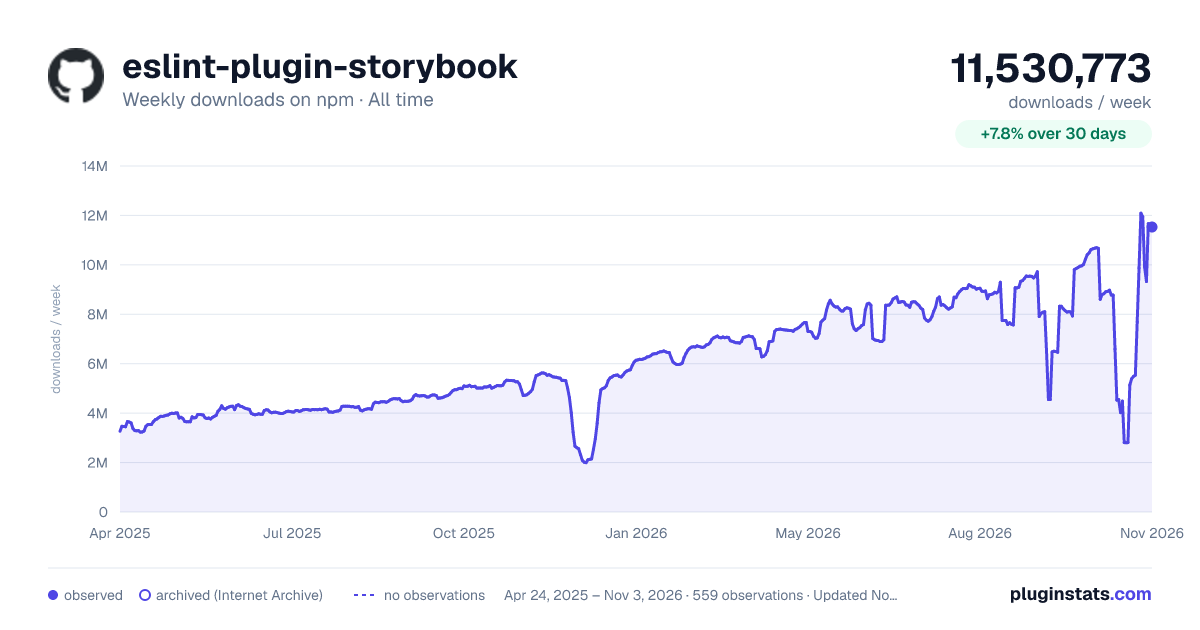

Adoption over time
7/30/90-day growth
Ranking history
Listing placement
Listing placement
Filled points are observed values; hollow points come from Internet Archive snapshots of the listing page. Dashed segments span periods with no observations — values between points are not interpolated.
Each band is one page of 20. Weekly downloads on a linear scale. Placement is projected from weekly downloads, so it can differ from the marketplace's own sort order. Hover a dot to see the listing.
Recent observations
Full history (543)Similar npm ESLint plugins plugins
All 20 eslint-plugin-storybook alternativesData source
Weekly downloads (trailing 7 complete days) come from the official npm downloads API. Downloads include CI and mirrors and are not equivalent to installs or users. npm publishes no ratings.
Listing: https://www.npmjs.com/package/eslint-plugin-storybook. First seen Oct 16, 2026; last successful collection Oct 21, 2026. See the methodology.