 PluginStats
exa-mcp-server weekly downloads statistics
By exa-labs (4 listings) · npm · MCP servers
Connect AI agents to Exa for web search, content fetching, and multi-step research.
exa-mcp-server has 9,705 recorded weekly downloads on npm, a decrease of 93.6% over the past 30 days.
It ranks #912 of 2,256 tracked npm listings by weekly downloads.
Over 90 days, weekly downloads changed by -38.3%.
PluginStats has 543 daily observations since Apr 23, 2025; the latest is from Oct 17, 2026.
About exa-mcp-server
Exa MCP Server
Connect AI agents to Exa for web search, content fetching, and multi-step research.
Documentation · NPM Package · Get your API key
Installation
Connect to Exa's hosted MCP server:
Or use a plugin when your client supports one.
Agent Plugin
This repository is an Agent Plugin. Install it with any compatible client.
Claude
Install from the Claude Plugin Marketplace, or run:
Codex / ChatGPT
Install via Plugins in ChatGPT, or run:
Other MCP Clients
Most clients can be configured manually with the standard mcpServers shape:
Client-specific configs
Exa MCP works with most other clients, point them at https://mcp.exa.ai/mcp.
| Client | Where to add it |
| Kiro | Use the Kiro power, or add manually to ~/.kiro/settings/mcp.json | | LM Studio | Add to LM Studio, or add manually to mcp.json | | Replit | Add to Replit | | Grok Build | /marketplace → install Exa, then /mcp to sign in | | Gemini CLI | Add manually to ~/.gemini/settings.json | | OpenCode | Add manually to opencode.json | | Windsurf | Add manually to ~/.codeium/windsurf/mcp_config.json | | Google Antigravity | Add manually to mcp_config.json | | Zed | Add manually to settings.json under context_servers | | Warp | Settings → Agents → MCP servers | | v0 by Vercel | Settings → MCP connections |
Available Tools
Default Tools
| Tool | Description |
| web_search_exa | Search the web for any topic and get clean, ready-to-use content | | web_fetch_exa | Read a webpage's full content as clean markdown from one or more URLs |
Optional Tools (enable via the tools parameter)
| Tool | Description |
| agent_run | Run an Exa Agent for multi-step research, list-building, enrichment, and structured output | | web_search_advanced_exa | Advanced search with filters, domains, dates, highlights, summaries, and subpage crawling |
Enable tools by appending them to the MCP URL (this will replace the defaults, so include all you want):
Exa Agent requires authentication (OAuth or an API key).
Agent Skills
Skills live in skills/ and load with Agent Plugin / Claude plugin installs.
| Skill | Path | Use when |
| search | skills/search/ | Deep research, lead gen, competitive analysis, multi-step web investigation | | exa-agent | skills/exa-agent/ | Exa Agent runs, enrichment, structured output, Connect providers |
Invoke from your client's skill UI (or /skill-name where supported). MCP-only setups still get the tools; skills add orchestration on top.
Authentication
The hosted MCP server works anonymously with rate limits. For higher limits and access to Exa Agent, use either OAuth or an API key.
OAuth is preferred: most clients prompt you to sign in to Exa. To force the login flow (useful for shared connectors and plugins), use https://mcp.exa.ai/mcp?login or https://mcp.exa.ai/mcp/oauth.
If you prefer, you can get an API key from the dashboard and pass it on the URL as ?exaApiKey=…. You can also send it as a Authorization: Bearer … header or an x-api-key header.
Built with ❤️ by Exa
Description from the npm listing.
- mcp
- search mcp
- model context protocol
- exa
- agent
- search
- websearch
- claude
- ai
- research
- papers
- people
Where exa-mcp-server sits in the listing
Each band is one page of 20. Weekly downloads on a log scale. Placement is projected from weekly downloads, so it can differ from the marketplace's own sort order. Hover a dot to see the listing.


Charts
Images: 30d · 1y · all time · 1600×900 dark


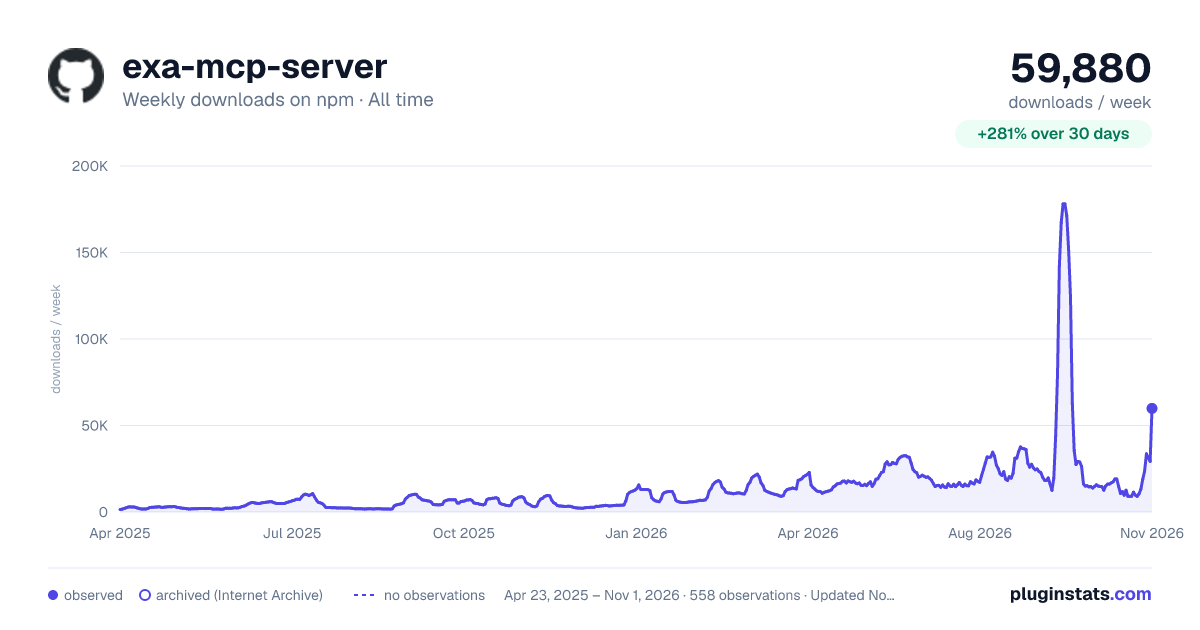

Adoption over time


7/30/90-day growth


Filled points are observed values; hollow points come from Internet Archive snapshots of the listing page. Dashed segments span periods with no observations — values between points are not interpolated.
Recent observations
Full history (543)Similar npm MCP servers plugins
Data source
Weekly downloads (trailing 7 complete days) come from the official npm downloads API. Downloads include CI and mirrors and are not equivalent to installs or users. npm publishes no ratings.
Listing: https://www.npmjs.com/package/exa-mcp-server. First seen Oct 16, 2026; last successful collection Oct 19, 2026. See the methodology.