 PluginStats
@lumoai/cli weekly downloads statistics
By lumoai · npm · Claude Code
Lumo CLI — manage tasks and sessions from the terminal
@lumoai/cli has 1,939 recorded weekly downloads on npm, an increase of 80.5% over the past 30 days, ranking #1360 of 2,391 tracked listings.
About @lumoai/cli
Lumo CLI
Manage Lumo tasks, sessions, sprints, and documents from the terminal. Designed to pair with Claude Code and Codex so AI agents can bind to a task, load context, and update state without leaving the shell.
Install
npm install -g @lumoai/cli
Verify:
lumo --version
One-Shot Setup for Claude Code and Codex
Wire up the Lumo skill + hooks for Claude Code and Codex in one command — no install required upfront:
npx @lumoai/cli init
Without --scope it installs for the current project (./.claude/, ./.agents/, ./.codex/); --scope user installs for the current user (~/.claude/, ~/.agents/, ~/.codex/). It never asks. Then it:
- Drops the skill files (
SKILL.md+references/) into.claude/skills/lumo/(Claude Code) and.agents/skills/lumo/(Codex) - Idempotently merges the Lumo hook handlers into
.claude/settings.jsonand.codex/hooks.json(existing hooks and permissions are preserved). Codex runs hooks only after you trust them: Codex app Settings → Hooks, or/hooksin the Codex CLI - Writes
.codex/rules/lumo.rules, Codex rules that let the server-onlylumocommands (they only call the Lumo API, read no arbitrary local file and write none —task show/context/list,doc show/list,session status, …) run outside Codex's sandbox (which has no network) without a prompt. Every other command stays sandboxed, including thelumocommands that change local files or start local processes (init,uninstall,update,auth,worktree,memory sync/push,session attach,task update,hook) or can read a local file and upload it (doc create/update/patch/append/diff,task artifact add,task template create/edit,task testcase run,crossing explain,milestone testcase run,usage resync): Codex asks before running those outside the sandbox. Restart Codex to load it (a project rule loads once the project is trusted) - Prints any remaining steps (global install,
lumo auth login)
Non-interactive flags for CI / scripts:
npx @lumoai/cli init --scope project
npx @lumoai/cli init --scope user --force
npx @lumoai/cli init --scope project --agent codex        # only Codex
npx @lumoai/cli init --scope project --agent claude-code  # only Claude Code
After init, install the CLI globally so the agents' hooks can resolve the lumo binary at startup:
npm install -g @lumoai/cli
Update
lumo update
Checks npm for a newer release and runs npm install -g @lumoai/cli@latest if one is available. The CLI also performs a background check once every 24 hours and prints a one-line notice on subsequent invocations when an upgrade is available.
Auto-update is on by default: the CLI installs new releases in the background. Turn it off with lumo update --auto off (back on with lumo update --auto on), or set LUMO_NO_AUTO_UPDATE=1 in the environment. It is also off whenever CI is set (CI runs never self-update).
Keeping installs in sync
User-scope installs (~/.claude/, ~/.agents/) are synced automatically after the CLI upgrades. Project-scope and git-tracked files are never auto-written, modified copies are never overwritten, and the CLI never downgrades an install that is newer than itself. Re-run lumo init --scope user or lumo init --scope project (in each repo) to refresh an install by hand; add --dry-run to preview the diff.
lumo doctor      # read-only report of every Lumo install and its state
lumo uninstall   # remove Lumo-owned skills, hooks, the Codex rule and the git hook block
lumo uninstall --agent <token> filters by agent (claude-code, codex, …); the prepare-commit-msg hook is labelled git, so it is only included by --agent git (or no --agent).
Authentication
lumo auth login
The CLI opens your browser to create an API key, then reads it from stdin. Keys are stored in ~/.lumo/credentials.json.
Check who you're logged in as:
lumo whoami
# Logged in as you@example.com
#   Workspace: Acme (acme)
#   Key: My laptop (lum_abc1...)
#   API: https://www.uselumo.ai
Quick Start
# What am I working on?
lumo task list

# Create a task
lumo task create "Fix Slack OAuth redirect" --priority high

# Mark it in progress
lumo task update LUM-42 --status in_progress

# Bind the current Claude Code session to the task
lumo session attach LUM-42

# Load full background (description, prior session summaries, memory)
lumo task context LUM-42

# When you're done
lumo task update LUM-42 --status done
Commands…
Description from the npm listing.
- lumo
- cli
- task-management
- project-management
- claude-code
- codex
README badge
Show your rank in a README or on your website. The badge updates automatically.
Charts
Images: 30d · 1y · all time · 1600×900 dark


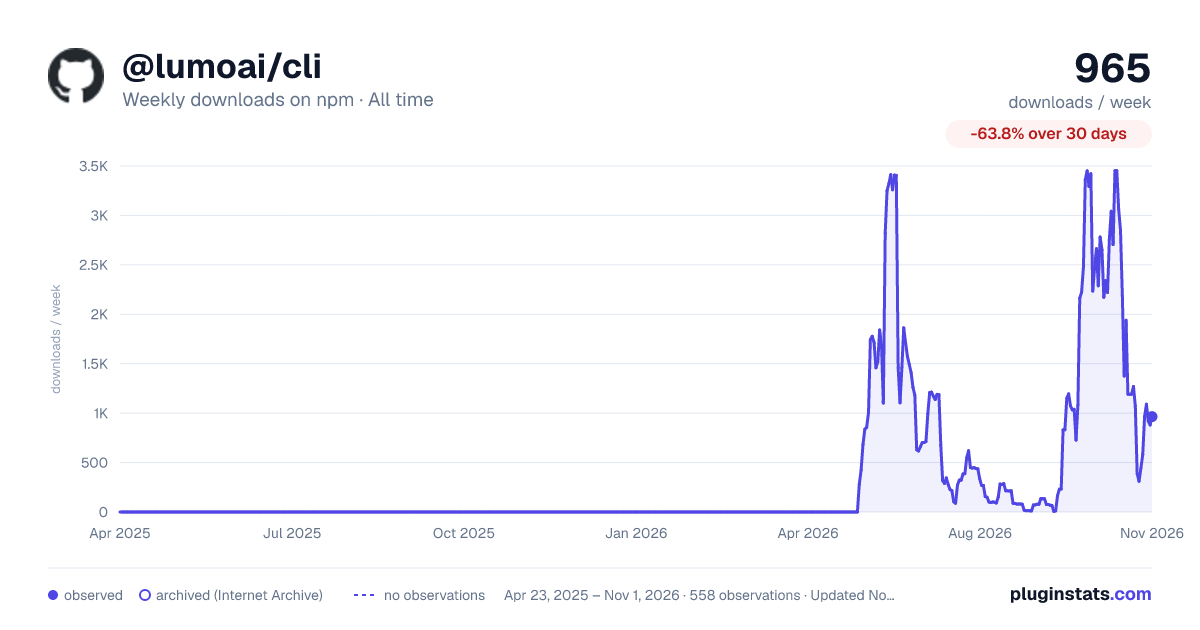

Adoption over time
7/30/90-day growth
Ranking history
Listing placement
Listing placement
Filled points are observed values; hollow points come from Internet Archive snapshots of the listing page. Dashed segments span periods with no observations — values between points are not interpolated.
Each band is one page of 20. Weekly downloads on a linear scale. Placement is projected from weekly downloads, so it can differ from the marketplace's own sort order. Hover a dot to see the listing.
Recent observations
Full history (544)Similar npm Claude Code plugins
All 20 @lumoai/cli alternativesData source
Weekly downloads (trailing 7 complete days) come from the official npm downloads API. Downloads include CI and mirrors and are not equivalent to installs or users. npm publishes no ratings.
Listing: https://www.npmjs.com/package/@lumoai/cli. First seen Oct 16, 2026; last successful collection Oct 21, 2026. See the methodology.