 PluginStats
@route-resource-preload/webpack-plugin weekly downloads statistics
By route-resource-preload · npm · Webpack plugins
Focus on improving the first screen loading speed of applications and providing the best user experience.
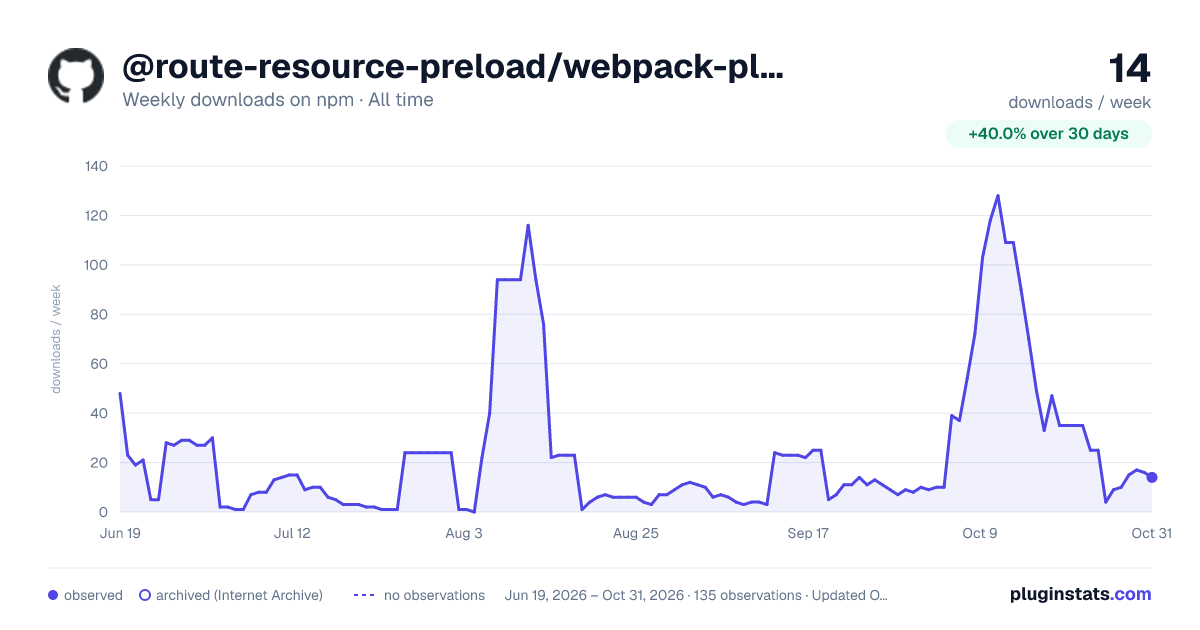
@route-resource-preload/webpack-plugin has 47 recorded weekly downloads on npm, an increase of 88.0% over the past 30 days, ranking #1817 of 2,322 tracked listings.
About @route-resource-preload/webpack-plugin
@route-resource-preload/webpack-plugin - Any code can be split


🚀 Focus on improving the first screen loading speed of applications and providing the best user experience, inspiration comes from the preloading of NextJS.
中文文档
Comparison
<details> <summary>Based-on-react.lazy-normal-loading-effect.gif</summary> <br />

As we can see from the gif, the display time of the loading component is greatly reduced by route-resource-preload relative to react.lazy.
Why do you need route-resource-preload ?
- <a href="#dynamic---split-your-component-code-and-load-it-dynamically">
Split modules loads as needed</a>, improving the first screen loading experience of your App. Minimize dynamic component loading timeand providing the best user experience.- Support <a href="#method-3---automatic-preloading">
automatic the preloading of resources</a> ( JS / Component / Module-Federation / UMD / Svg / Png , Etc) and providing the best user experience. - Support <a href="#method-1----manually-to-preload-single-component-based-on-dynamic">
manually to preload</a>. - Support
typescript. - Support <a href="#dynamic---split-your-component-code-and-load-it-dynamically">
React <Suspense></a>.
Why route-resoure-preload over react.lazy?
route-resource-preload support code splitting of components, and support automatic preloading and manual preloading of components to avoid poor component interaction experience due to component rendering delays.
Why route-resource-preload over webpack-prefetch/preload and loadable-components-prefetch/preload?
- Control <a href="#preloadlink---automatic-the-preloading-of-resources-based-on-flag">
when to preload in more detail</a> - Support preload <a href="#webpack-routeresourcepreloadplugin">
Module-Federation</a> - Support <a href="#webpack-routeresourcepreloadplugin">
More types</a> of resource (image/font/svg/css/js/...)
Online Demo Test
| Component | Normal Lazy Load(ms) | Preload (ms) |
|---|---|---|
| Simple Component (one-resource) | 150 | 1 |
| Complex Component (six-resource) | 350 | 10 |
It can be seen from the table that preloading significantly improves the loading speed of components, especially for complex components, the improvement of loading speed is more obvious. This shows that in complex business scenarios,
preloading can significantly improve component loading speed and user experience.
React Demo Source
Install
npm install @route-resource-preload/webpack-plugin @route-resource-preload/react
Using in react
Method 1 - Manually To Preload Single Component Based on Dynamic
import { dynamic } from '@route-resource-preload/react'

const Image = dynamic({
  loader: () => import('Components'),
  loading: (props) => <>loading...</>,
})

const handleClick = () => {
  // execute preloading
  Image.preload()
}

export default function Main(props){
  return <div onClick={handleClick}>
    <Image {...props} />
  </div>
}
Method 2 - Manually To Preload Multiple Components
- Step 1: First, you need add
pluginin your build config.
const RouteResourcePreloadPlugin = require('@route-resource-preload/webpack-plugin')

webpack: {
  plugins: {
    add: [
      new RouteResourcePreloadPlugin({
        // [the-preloading-flag]: ['path']

        // project's components(modules)
        modulePreloadMap: {
          "flagA": ["../components/A"]
        },

        // module-federation's components(modules)
        mfPreloadMap: {
          "flagMF": ["ling_core/Components"]
        },

        // static assets (just like js/css/png/jpg/font, etc.)
        assetPreloadMap: {
          "flagA": ['https://domain.com/xxx.png']
        }
      })
    ]
  },
}
- Step 2: Create a
Preloaderandrun
import { Preloader } from '@route-resource-preload/react'

const preloader = new Preloader()

// execute preloading
preloader.run('flagA')
Method 3 - Automatic Preloading.
- Step 1: First, you need add
pluginin your build config.
const RouteResourcePreloadPlugin = require('@route-resource-preload/webpack-plugin')

webpack: {
  plugins: {
    add: [
      new RouteResourcePreloadPlugin({
        // [the-preloading-flag]: ['path']

        // project's components(modules)
        modulePreloadMap: {
          "flagA": ["../components/A"]
        },

        // module-federation's components(modules)
        mfPreloadMap: {
          "flagMF": ["ling_core/Components"]
        },

        // static assets (just like js/css/png/jpg/font, etc.)
        assetPreloadMap: {
          "flagA": ['https://domain.com/xxx.png']
        }
      })
    ]
  },
}
```…
Description from the npm listing.
- route-resource-preload-plugin
- webpack-plugin
- route-resource-preload
README badge
Show your rank in a README or on your website. The badge updates automatically.
Charts
Images: 30d · 1y · all time · 1600×900 dark



Adoption over time
7/30/90-day growth
Ranking history
Listing placement
Listing placement
Filled points are observed values; hollow points come from Internet Archive snapshots of the listing page. Dashed segments span periods with no observations — values between points are not interpolated.
Each band is one page of 20. Weekly downloads on a linear scale. Placement is projected from weekly downloads, so it can differ from the marketplace's own sort order. Hover a dot to see the listing.
Recent observations
Full history (122)Similar npm Webpack plugins plugins
All 20 @route-resource-preload/webpack-plugin alternatives- 48 weekly downloads-61.3%
- 46 weekly downloads-46.5%
- 45 weekly downloads-32.8%
- 54 weekly downloads-28.0%
Data source
Weekly downloads (trailing 7 complete days) come from the official npm downloads API. Downloads include CI and mirrors and are not equivalent to installs or users. npm publishes no ratings.
Listing: https://www.npmjs.com/package/@route-resource-preload/webpack-plugin. First seen Oct 16, 2026; last successful collection Oct 20, 2026. See the methodology.