 PluginStats
@xiao-edu/open has 32 recorded weekly downloads on npm, a decrease of 67.0% over the past 30 days, ranking #1863 of 2,322 tracked listings.
About @xiao-edu/open









awesome-open 强大的开发者工具:Open
用于开发环境下,打开组件所在的文件
点击页面元素,即可在文件编辑器中打开组件所在的文件
目前支持 Vue 和 React
支持情况
- React 项目支持 React 16, React 17 等(15 及之前的版本未进行测试)
- Vue 项目支持 Vue 2, Vue 3
安装
使用 npm 安装(推荐)
npm i -D @xiao-edu/open

# 或者您更喜欢yarn
yarn add @xiao-edu/open -D
或者使用 CDN 引入
<!-- jsdelivr -->
<script src="https://cdn.jsdelivr.net/npm/@xiao-edu/open/dist/opener.min.js"></script>
<!-- 或者使用 unpkg -->
<script src="https://unpkg.com/@xiao-edu/open/dist/opener.min.js"></script>
使用
前端部分
在应用初始化的任意文件中引入 open 的前端部分即可
1. js 项目
在 src/index.js 中引入:
import Opener from '@xiao-edu/open'

const open = new Opener({
  // config...
})

open.init()
2. react 项目:
// src/index.js

import react from 'react'

import Opener from '@xiao-edu/open'

const open = new Opener({
  // config...
  type: 'react',
  src: react
})

open.init()
3. vue 项目:
// src/index.js

import vue from 'vue'

import Opener from '@xiao-edu/open'

const open = new Opener({
  // config...
  type: 'vue',
  src: vue
})

open.init()
开发服务器部分
配置一个 open-server:
引入 open 的后端部分即可
1. webpack
如果你使用 webpack 的 devServer 作为你的开发服务器,你可以这样写:
如在 webpack.config.js 中:
const launchEditor = require('@xiao-edu/open/server')

devServer: {
  before(app, server){
    // https://gitlab.com/lihao/awesome-open/blob/master/README-server.md
    app.use('/__open-in-editor', launchEditor('code'))
  }
}
2. umi 2.x 项目
如果你用的是 umi 2.x 版本,你可以这样修改 webpack 的配置:
import { defineConfig } from 'umi';

const launchEditorMiddleware = require('@xiao-edu/open/server');
const launchEditor = launchEditorMiddleware('code');

export default defineConfig({
    // ...config
    devServer: {
        beforeMiddlewares: [
            (req, res, next) => {
                // https://gitlab.com/lihao/awesome-open/blob/master/README-server.md
                if (req.path.startsWith('/__open-in-editor')) {
                    launchEditor(req, res, next);
                } else {
                    next();
                }
            },
        ],
    },
3. umi 3.x 项目
可以构造一个 umi 插件来用
// .umirc.ts

// https://umijs.org/config/
import { defineConfig } from 'umi'
import { join } from 'path'

const { REACT_APP_ENV } = process.env
export default defineConfig({
  // config...
  plugins: [
    /** 用于open功能的umi3插件,可以点击页面元素打开组件所在的文件 */
    join(__dirname, './umi-open-plugin')
  ]
})
// ./umi-open-plugin.ts

/**
 * preset plugins for umi3
 * 用于open功能的umi3插件,可以点击页面元素打开组件所在的文件
 */

import type { IApi } from '@umijs/types'

import launchEditorMiddleware from '@xiao-edu/open/server'
const launchEditor = launchEditorMiddleware('code')

export default function inspectorPlugin(api: IApi) {
  const OpenMiddleware = (req, res, next) => {
    // https://gitlab.com/lihao/awesome-open/blob/master/README-server.md
    if (req.path.startsWith('/__open-in-editor')) {
      launchEditor(req, res, next)
    } else {
      next()
    }
  }

  /**
   * Inspector component open file into IDE via `/__open-in-editor` api,
   * due to umi3 not use webpack devServer,
   * so need add launch editor middleware manually
   */
  api.addBeforeMiddlewares(() => OpenMiddleware)
}
4. 独立的 open server
或者你不想侵入 webpack 的开发服务器:
你可以利用 cr 的 open-server:
安装一下 cr 命令行工具:
npm i -g @xiao-edu/cr
然后启动 cr 的 open-server:
cr open --server
// or
cr o -s
然后你就可以将 open 的接口 api 前缀改为:
// src/index.js

import react from 'react'

import Opener from '@xiao-edu/open'

const open = new Opener({
  // config...
  type: 'react',
  src: react,
  api: 'http://localhost:5000/open'
})

open.init()
到这里就完成啦,去试试点击页面上的 open 按钮吧!
配置
interface IConfig {
  /** 类型,目前暂时只支持vue和react */
  type?: 'vue' | 'react'
  /** 构造函数,Vue或者React */
  /** src?: () => {} */
  src?: unknown
  /** 打开文件时的请求api前缀,默认为'/__open-in-editor' */
  api?: string
  /** 是否不打印log信息 */
  slient?: boolean
  /** 是否阻止鼠标右键的默认行为,默认是false */
  isPreventDefaultForRightClick?: boolean
  /** 显示组件名的规范,默认是'class' */
  componentNameStyle?: 'class' | 'kebab' | 'original'
}
代码贡献
- Fork 代码!
- 创建自己的分支:
git checkout -b feat/xxxx - 提交你的修改:
git commit -am 'feat(function): add xxxxx' - 推送您的分支:
git push origin feat/xxxx - 提交:
pull request
作者
协议…
Description from the npm listing.
- open
- react
- vue
- inspector
- devtools
- open-server
- plugin
- webpack-plugin
README badge
Show your rank in a README or on your website. The badge updates automatically.
Charts
Images: 30d · 1y · all time · 1600×900 dark


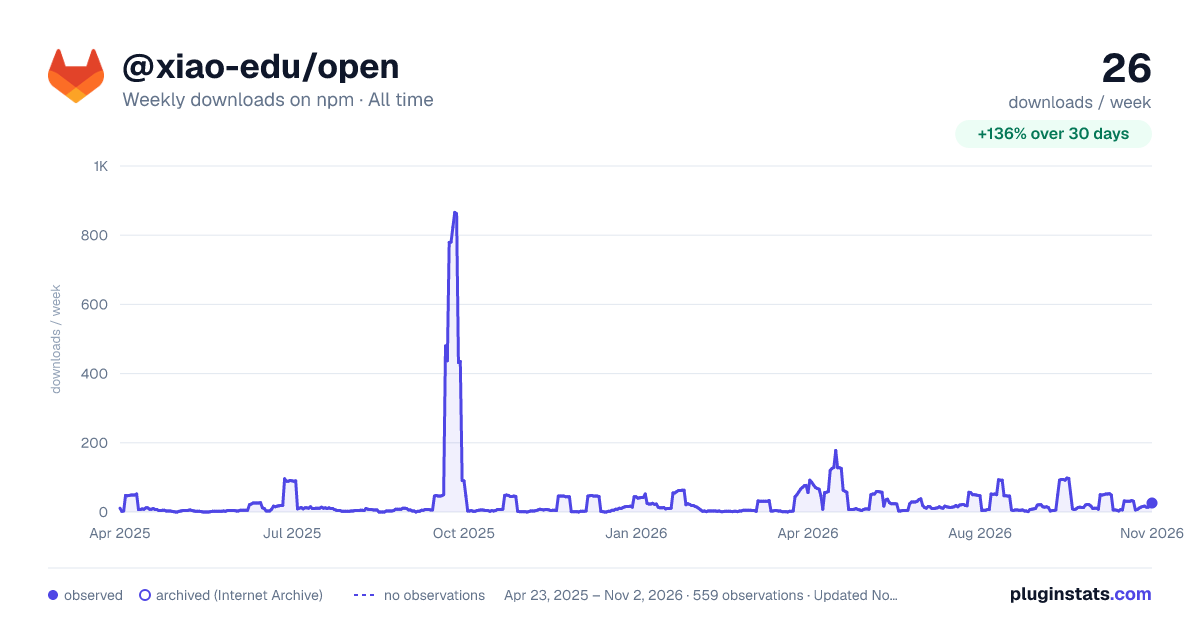

Adoption over time
7/30/90-day growth
Ranking history
Listing placement
Listing placement
Filled points are observed values; hollow points come from Internet Archive snapshots of the listing page. Dashed segments span periods with no observations — values between points are not interpolated.
Each band is one page of 20. Weekly downloads on a linear scale. Placement is projected from weekly downloads, so it can differ from the marketplace's own sort order. Hover a dot to see the listing.
Recent observations
Full history (544)Similar npm Webpack plugins plugins
All 20 @xiao-edu/open alternativesData source
Weekly downloads (trailing 7 complete days) come from the official npm downloads API. Downloads include CI and mirrors and are not equivalent to installs or users. npm publishes no ratings.
Listing: https://www.npmjs.com/package/@xiao-edu/open. First seen Oct 16, 2026; last successful collection Oct 20, 2026. See the methodology.