 PluginStats
vite-ssg weekly downloads statistics
By antfu-collective (2 listings) · npm · Vite plugins
Server-side generation for Vite
vite-ssg has 29,825 recorded weekly downloads on npm, a decrease of 33.7% over the past 30 days, ranking #694 of 2,322 tracked listings.
About vite-ssg
Vite SSG
Static-site generation for Vue 3 on Vite.

ℹ️ ESM-only from
v27.0.0(CJS generation format also dropped).ℹ️ Vite 2 is supported from
v0.2.x, Vite 1's support is discontinued.
Install
<pre> <b>npm i -D vite-ssg</b> <em>vue-router @unhead/vue</em> </pre>This library requires Node.js version >= 14
// package.json
{
  "scripts": {
    "dev": "vite",
-   "build": "vite build"
+   "build": "vite-ssg build"

    // OR if you want to use another vite config file
+   "build": "vite-ssg build -c another-vite.config.ts"
  }
}
// src/main.ts
import { ViteSSG } from 'vite-ssg'
import App from './App.vue'

// `export const createApp` is required instead of the original `createApp(App).mount('#app')`
export const createApp = ViteSSG(
  // the root component
  App,
  // vue-router options
  { routes },
  // function to have custom setups
  ({ app, router, routes, isClient, initialState }) => {
    // install plugins etc.
  },
)
How to allow Rollup tree-shake your client code
In order to allow Rollup tree-shake your client code at build time, you need to wrap your code using import.meta.env.SSR, that's, checking if the build is for the server: Rollup will remove the server code from the client build.
if (import.meta.env.SSR) {
  // your server code will be removed in the client build
}
else {
  // your client code will be removed in the server build
}
Single Page SSG
For SSG of an index page only (i.e. without vue-router); import vite-ssg/single-page instead, and only install @unhead/vue (npm i -D vite-ssg @unhead/vue).
// src/main.ts
import { ViteSSG } from 'vite-ssg/single-page'
import App from './App.vue'

// `export const createApp` is required instead of the original `createApp(App).mount('#app')`
export const createApp = ViteSSG(App)
<ClientOnly/>
The ClientOnly component is registered globally when the app is created.
<client-only>
  <your-client-side-components />
  <template #placeholder>
    <your-placeholder-components />
  </template>
</client-only>
Document head
We ship @unhead/vue v2 to manage the document-head out of the box. You can use it directly in your pages/components.
For example:
<template>
  <button @click="count++">Click</button>
</template>

<script setup>
import { useHead } from '@unhead/vue'

useHead({
  title: 'Website Title',
  meta: [
    {
      name: 'description',
      content: 'Website description',
    },
  ],
})
</script>
That's all! No configuration is needed. Vite SSG will automatically handle the server-side rendering and merging.
See @unhead/vue v2's docs for more usage information about useHead.
Critical CSS
Vite SSG has built-in support for generating Critical CSS inlined in the HTML via the beasties package.
Install it with:
npm i -D beasties
Critical CSS generation will automatically be enabled for you.
To configure beasties, pass its options into ssgOptions.beastiesOptions in vite.config.ts:
// vite.config.ts
export default defineConfig({
  ssgOptions: {
    beastiesOptions: {
      // E.g., change the preload strategy
      preload: 'media',
      // Other options: https://github.com/danielroe/beasties#usage
    },
  },
})
Initial State
The initial state comprises data that is serialized with your server-side generated HTML and is hydrated in the browser when accessed. This data can be data fetched from a CDN, an API, etc, and is typically needed as soon as the application starts or is accessed for the first time.
The main advantage of setting the application's initial state is that the statically generated pages do not need to refetch the data as it is fetched and serialized into the page's HTML at build time.
The initial state is a plain JavaScript object that can be set during SSR. I.e. when statically generating the pages like this:
// src/main.ts

// ...

export const createApp = ViteSSG(
  App,
  { routes },
  ({ app, router, routes, isClient, initialState }) => {
    // ...

    if (import.meta.env.SSR) {
      // Set initial state during server side
      initialState.data = { cats: 2, dogs: 3 }
    }
    else {
      // Restore or read the initial state on the client side in the browser
      console.log(initialState.data) // => { cats: 2, dogs: 3 }
    }

    // ...
  },
)
Typically, you will use this with an application store, such as Vuex or Pinia. See below for examples:
<details><summary>When using Pinia</summary>Following Pinia's guide, you will to adapt your main.{ts,js} file to look
like this:
import { createPinia } from 'pinia'
import routes from 'virtual:generated-pages'
// main.ts
import { ViteSSG } from 'vite-ssg'

import App from './App.vue'
// use any store you configured that you need data from on start-up
import { useRootStore } from './store/root'

export const createApp = ViteSSG(
  App,
  { routes },
  ({ app, router, initialState }) => {
    const pinia = createPinia()
    app.use(pinia)

    if (import.meta.env.SSR)
      initialState.pinia = pinia.state.value
    else
      pinia.state.value = initialState.pinia || {}

    router.beforeEach((to, from, next) => {
      const store = useRootStore(pinia)
      if (!store.ready)
        // perform the (user-implemented) store action to fill the store's state
        store.initialize()
      next()
    })
  },
)
Description from the npm listing.
- vite
- vite-plugin
- ssg
- ssr
README badge
Show your rank in a README or on your website. The badge updates automatically.
Charts
Images: 30d · 1y · all time · 1600×900 dark


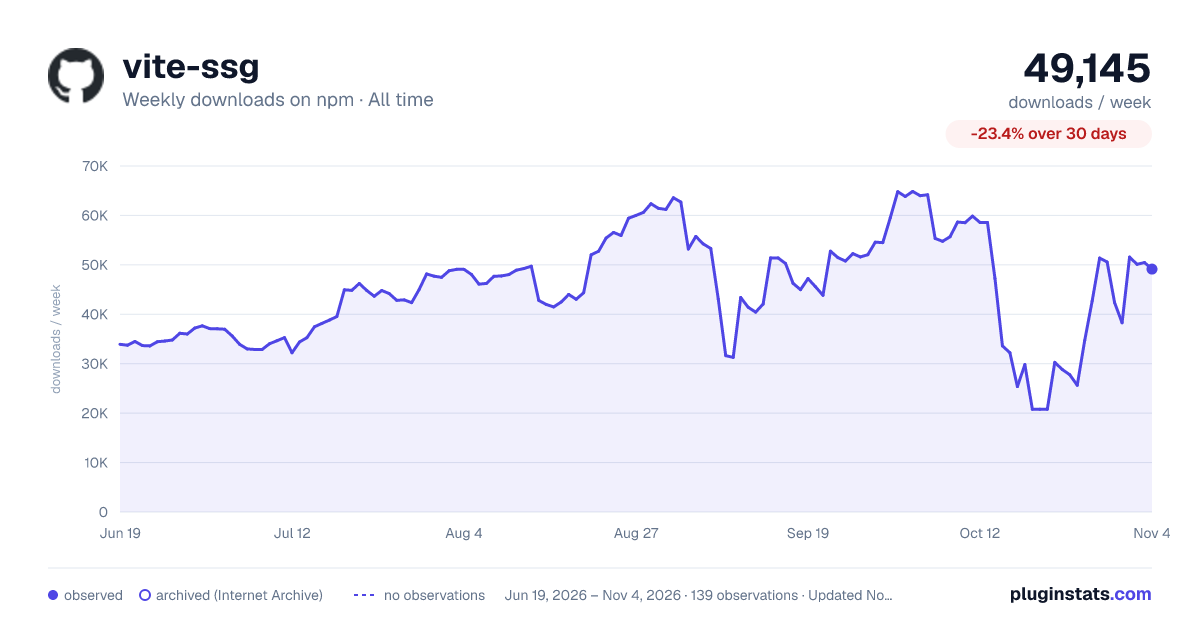

Adoption over time
7/30/90-day growth
Ranking history
Listing placement
Listing placement
Filled points are observed values; hollow points come from Internet Archive snapshots of the listing page. Dashed segments span periods with no observations — values between points are not interpolated.
Each band is one page of 20. Weekly downloads on a linear scale. Placement is projected from weekly downloads, so it can differ from the marketplace's own sort order. Hover a dot to see the listing.
Recent observations
Full history (122)Similar npm Vite plugins plugins
All 20 vite-ssg alternativesData source
Weekly downloads (trailing 7 complete days) come from the official npm downloads API. Downloads include CI and mirrors and are not equivalent to installs or users. npm publishes no ratings.
Listing: https://www.npmjs.com/package/vite-ssg. First seen Oct 16, 2026; last successful collection Oct 20, 2026. See the methodology.