 PluginStats
vite-plugin-legacy-swc weekly downloads statistics
By CyanSalt · npm · Vite plugins
Provides legacy browsers support for the production build with SWC
vite-plugin-legacy-swc has 1,969 recorded weekly downloads on npm, a decrease of 79.5% over the past 30 days, ranking #1290 of 2,256 tracked listings.
About vite-plugin-legacy-swc
vite-plugin-legacy-swc
Provides legacy browsers support for the production build with SWC.
This package is intended to replace @vitejs/plugin-legacy in performance-sensitive situations. It is basically an implementation of vitejs/vite#4105.
As for performance, for reference, the results of my tests on a huge private project (with { modernPolyfills: true }) are as follows:
| | Without legacy browsers support | With @vitejs/plugin-legacy | With vite-plugin-legacy-swc |
| CPU Time | 146.45s | 697.82s | 295.04s | | JS Asset Size* | 9.5M | 22M | 21M | | JS Asset Size Without Legacy Chunks | 9.5M | 9.6M | 9.6M |
Compared to @vitejs/plugin-legacy, vite-plugin-legacy-swc saves 58% of time and 4% of JS asset size.
* In my current tests, @vitejs/plugin-legacy does not generate source maps for legacy chunks correctly, so the asset size statistics exclude the source maps.
Vite's minimum browser support target is Native ESM, native ESM dynamic import, and import.meta. This plugin provides support for legacy browsers that do not support those features when building for production.
By default, this plugin will:
• Generate a corresponding legacy chunk for every chunk in the final bundle, transformed with @swc/core and emitted as SystemJS modules (code splitting is still supported!). • Generate a polyfill chunk including SystemJS runtime, and any necessary polyfills determined by specified browser targets and actual usage in the bundle. • Inject tags into generated HTML to conditionally load the polyfills and legacy bundle only in browsers without widely-available features support. • Inject the import.meta.env.LEGACY env variable, which will only be true in the legacy production build, and false in all other cases.
Usage
Options
targets
• Type: string | string[] | { [key: string]: string } • Default: 'last 2 versions and not dead, > 0.3%, Firefox ESR'
It's passed on to @swc/core when rendering legacy chunks.
The query is also Browserslist compatible. See Browserslist Best Practices for more details.
If it's not set, plugin-legacy-swc will load the browserslist config sources and then fallback to the default value.
[!NOTE] Some browserslist queries are not supported in targets and modernTargets since SWC uses browserslist-rs. See Limitations.
modernTargets
• Type: string | string[] • Default: 'edge>=79, firefox>=67, chrome>=64, safari>=12, chromeAndroid>=64, iOS>=12'
It's passed on to @swc/core when collecting polyfills for modern chunks. The value set here will override the build.target option.
The query is also Browserslist compatible. See Browserslist Best Practices for more details.
If it's not set, plugin-legacy-swc will fallback to the default value.
Note that this options should not be set unless renderLegacyChunks is set to false.
polyfills
• Type: boolean | string[] • Default: true
By default, a polyfills chunk is generated based on the target browser ranges and actual usage in the final bundle (detected via @swc/core's mode: 'usage').
Set to a list of strings to explicitly control which polyfills to include. See Polyfill Specifiers for details.
Set to false to avoid generating polyfills and handle it yourself (will still generate legacy chunks with syntax transformations).
additionalLegacyPolyfills
• Type: string[]
Add custom imports to the legacy polyfills chunk. Since the usage-based polyfill detection only covers ES language features, it may be necessary to manually specify additional DOM API polyfills using this option.
additionalModernPolyfills
• Type: string[]
Add custom imports to the modern polyfills chunk. Since the usage-based polyfill detection only covers ES language features, it may be necessary to manually specify additional DOM API polyfills using this option.
modernPolyfills
• Type: boolean | string[] • Default: false
Defaults to false. Enabling this option will generate a separate polyfills chunk for the modern build (targeting browsers that support widely-available features).
Set to a list of strings to explicitly control which polyfills to include. See Polyfill Specifiers for details.
If modernTargets is not set, it is not recommended to use the true value (which uses auto-detection) because core-js@3 is very aggressive in polyfill inclusions due to all the bleeding edge features it supports. Even when targeting native ESM support, it injects 15kb of polyfills!
If you don't have hard reliance on bleeding edge runtime features, it is not that hard to avoid having to use polyfills in the modern build altogether. Alternatively, consider setting modernTargets or using an on-demand service like to only inject necessary polyfills based on actual browser user-agents (most modern browsers will need nothing!).
renderLegacyChunks
• Type: boolean • Default: true
Set to false to disable legacy chunks. This is only useful if you are using modernPolyfills, which essentially allows you to use this plugin for injecting polyfills to the modern build only:
externalSystemJS
• Type: boolean • Default: false
Defaults to false. Enabling this option will exclude systemjs/dist/s.min.js inside polyfills-legacy chunk.
renderModernChunks
• Type: boolean • Default: true
Set to false to only output the legacy bundles that support all target browsers.
This is also useful when running the project locally using file: protocol, as loading modern chunks with type="module" may trigger CORS restrictions. To avoid this issue, simply set renderModernChunks to false to exclusively use legacy chunks instead.
Browsers that supports ESM but does not support widely-available features
The legacy plugin offers a way to use widely-available features natively in the modern build, while falling back to the legacy build in browsers with native ESM but without those features supported (e.g. Legacy Edge). This feature works by injecting a runtime check and loading the legacy bundle with SystemJS runtime if needed. There are the following drawbacks:…
Description from the npm listing.
- vite
- vite-plugin
- legacy
- swc
README badge
Show your rank in a README or on your website. The badge updates automatically.
Charts
Images: 30d · 1y · all time · 1600×900 dark


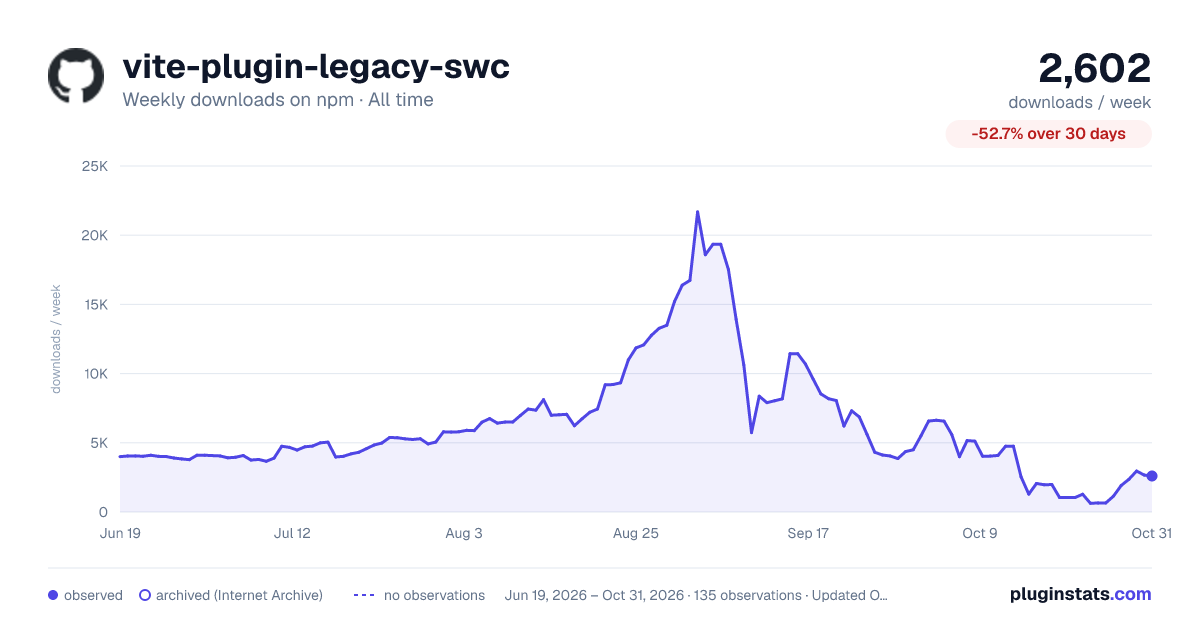

Adoption over time
7/30/90-day growth
Ranking history
Listing placement
Listing placement
Filled points are observed values; hollow points come from Internet Archive snapshots of the listing page. Dashed segments span periods with no observations — values between points are not interpolated.
Each band is one page of 20. Weekly downloads on a linear scale. Placement is projected from weekly downloads, so it can differ from the marketplace's own sort order. Hover a dot to see the listing.
Recent observations
Full history (121)Similar npm Vite plugins plugins
All 20 vite-plugin-legacy-swc alternativesData source
Weekly downloads (trailing 7 complete days) come from the official npm downloads API. Downloads include CI and mirrors and are not equivalent to installs or users. npm publishes no ratings.
Listing: https://www.npmjs.com/package/vite-plugin-legacy-swc. First seen Oct 16, 2026; last successful collection Oct 19, 2026. See the methodology.