 PluginStats
paqad-ai weekly downloads statistics
By Eliyce · npm · MCP servers
Spec-driven development framework — AI agents that think before they type
paqad-ai has 9,262 recorded weekly downloads on npm, a decrease of 50.2% over the past 30 days, ranking #930 of 2,310 tracked listings.
About paqad-ai
██████╗  █████╗  ██████╗  █████╗ ██████╗
██╔══██╗██╔══██╗██╔═══██╗██╔══██╗██╔══██╗
██████╔╝███████║██║   ██║███████║██║  ██║
██╔═══╝ ██╔══██║██║▄▄ ██║██╔══██║██║  ██║
██║     ██║  ██║╚██████╔╝██║  ██║██████╔╝
╚═╝     ╚═╝  ╚═╝ ╚══▀▀═╝ ╚═╝  ╚═╝╚═════╝
Don't trust the prompt. Trust the workflow.
The open-source, spec-driven framework for AI coding agents that have to be right, not just fast.






Works with Claude Code, Cursor, GitHub Copilot, Gemini, Codex, Windsurf, Junie, Continue, Antigravity, Aider, and JetBrains AI Assistant.
</div>A prompt is the most error-prone part of AI development. paqad-ai replaces "hope the prompt works" with something a team can stand behind. Your specs, rules, and workflows become version-controlled context that every AI agent has to follow, and every change is proven by automatic checks instead of by another AI guessing. One command sets up all your agents at once, and the whole thing runs on your machine, so your code never has to leave the building.
Install in 30 seconds
npm install -g paqad-ai
cd your-project
paqad-ai onboard
paqad-ai reads your lockfiles, detects your stack, asks you to confirm, then sets everything up:
✓ Detected:  laravel + react (inertia, tailwind, pest, docker)
✓ Generated: CLAUDE.md, AGENTS.md, GEMINI.md, .cursor/rules, copilot-instructions, .windsurfrules
✓ Generated: docs/instructions/rules/* and stack-specific tool guides
✓ Wrote:     .paqad/project-profile.yaml, onboarding-manifest.json, detection-report.json
✓ Configured: entry files and MCP settings for every tool you picked

Ready. Your AI agents now understand your project, and your rules.
No account, no API key, no subscription. Prefer not to install anything? Run npx paqad-ai onboard.
Install in Claude Code (plugin)
Inside Claude Code you can install paqad as a plugin, with no npm package and no separate setup:
/plugin marketplace add Eliyce/paqad-ai
/plugin install paqad@eliyce
Then use it:
/paqad:onboardif you are setting the project up for your team (the lead)./paqad:joinif the project is already onboarded and you are setting up your own machine.
A few things worth knowing:
- This is Claude Code only. If you also use Codex, Gemini, Cursor, or another tool on the same project, keep the npm package (
npm install -g paqad-ai) so those tools stay wired. Removing npm is fine when Claude Code is the only tool you use here. When both are installed, only one of them runs its hooks in a session, so nothing runs twice. - The plugin keeps itself current. Claude Code updates it through
/plugin, so you do not run an update command by hand. - The optional RAG engine installs on first use, in the background, only if you turn RAG on. To remove it later, delete
~/.paqad/(the shared model and engine cache). - To open the dashboard, run
paqad-ai dashboardfrom a terminal in the project. The plugin putspaqad-aion your shell path inside a Claude Code session. - Already on the npm setup? paqad can move you to the plugin automatically in the background, with nothing to do on your side. The npm package stays installed as a fallback, so paqad is never off at any point. It is off by default today;
plugin_migration=onorclaude_install_mode=pluginturns it on,paqad-ai plugin rollbackmoves a machine back to the npm setup and removes the plugin, andclaude_install_mode=settingsin your team config keeps a project on npm.- When
claudeis on your path, paqad runsclaude plugin marketplace add Eliyce/paqad-aiandclaude plugin install paqad@eliyce --scope user, then checks that Claude Code recorded the plugin. Otherwise, or if that fails, it adds the marketplace and the plugin to your own~/.claude/settings.json. It never edits a project file. - paqad then watches your next Claude Code sessions. Once the plugin runs, the move is done. A session only counts once Claude Code has installed the plugin, because the Desktop app can take a few starts to do that. Until then paqad waits, and if the plugin is still not installed 7 days later it undoes the move and tries again later. After the install, three sessions with no sign of the plugin also undo the move, and paqad tries again a day later, up to five attempts.
- If you turn the plugin off in your Claude settings, paqad records that you declined it and never turns it back on.
paqad-ai doctorshows where the move stands, including when it is still waiting for Claude Code to install the plugin, and~/.paqad-ai/logs/plugin-migration.loghas the details. If a settings file still wires the npm hooks, doctor names it: your own~/.claude/settings.json(or the one inCLAUDE_CONFIG_DIRwhen that is set), the project's.claude/settings.json, or both. That project keeps running the npm hooks while the plugin stays quiet.- Manual check: in a headless
claude -psession, Claude Code registered the marketplace from the settings but did not install the plugin over three sessions. Whether the Claude Code Desktop app installs a plugin declared in settings on its own is still a manual check, so paqad prefers theclaudecommand route wheneverclaudeis on your path.
- When
- **Organizations (Team or…
Description from the npm listing.
- ai
- ai-agents
- ai-coding
- claude-code
- cursor
- codex
- gemini-cli
- junie
- antigravity
- github-copilot
- mcp
- rag
- code-generation
- cli
- agent-framework
- spec-driven-development
- developer-tools
README badge
Show your rank in a README or on your website. The badge updates automatically.
Charts
Images: 30d · 1y · all time · 1600×900 dark


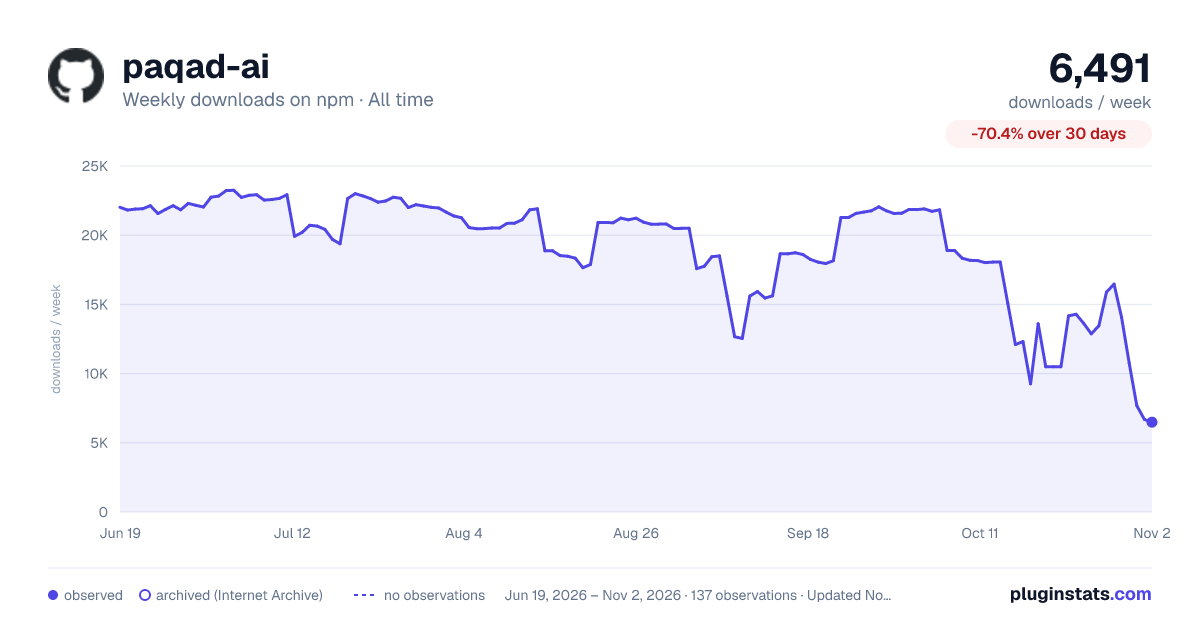

Adoption over time
7/30/90-day growth
Ranking history
Listing placement
Listing placement
Filled points are observed values; hollow points come from Internet Archive snapshots of the listing page. Dashed segments span periods with no observations — values between points are not interpolated.
Each band is one page of 20. Weekly downloads on a linear scale. Placement is projected from weekly downloads, so it can differ from the marketplace's own sort order. Hover a dot to see the listing.
Recent observations
Full history (122)Similar npm MCP servers plugins
All 20 paqad-ai alternativesData source
Weekly downloads (trailing 7 complete days) come from the official npm downloads API. Downloads include CI and mirrors and are not equivalent to installs or users. npm publishes no ratings.
Listing: https://www.npmjs.com/package/paqad-ai. First seen Oct 16, 2026; last successful collection Oct 20, 2026. See the methodology.