 PluginStats
vite-plugin-solid weekly downloads statistics
By solidjs (3 listings) · npm · Vite plugins
solid-js integration plugin for Vite
vite-plugin-solid has 720,112 recorded weekly downloads on npm, a decrease of 20.9% over the past 30 days, ranking #223 of 2,322 tracked listings.
About vite-plugin-solid
⚡ vite-plugin-solid
A simple integration to run solid-js with vite
<img alt="HMR gif demonstrationdemodemodemo" src=".github/hmr.gif">Got a question? / Need help?
Join solid discord and check the troubleshooting section to see if your question hasn't been already answered.
Features
- HMR with no configuration needed
- Drop-in installation as a vite plugin
- Minimal bundle size
- Support typescript (
.tsx) out of the box - Support code splitting out of the box
Requirements
This module 100% ESM compatible and requires NodeJS 14.18.0 or later.
You can check your current version of NodeJS by typing node -v in your terminal. If your version is below that one version I'd encourage you to either do an update globally or use a NodeJS version management tool such as Volta or nvm.
Quickstart
You can use the vite-template-solid starter templates similar to CRA:
$ npx degit solidjs/templates/js my-solid-project
$ cd my-solid-project
$ npm install # or pnpm install or yarn install
$ npm run start # starts dev-server with hot-module-reloading
$ npm run build # builds to /dist
Installation
Install vite, vite-plugin-solid as dev dependencies.
Install solid-js as dependency.
You have to install those so that you are in control to which solid version is used to compile your code.
# with npm
$ npm install -D vite vite-plugin-solid
$ npm install solid-js

# with pnpm
$ pnpm add -D vite vite-plugin-solid
$ pnpm add solid-js

# with yarn
$ yarn add -D vite vite-plugin-solid
$ yarn add solid-js
Add it as plugin to vite.config.js
// vite.config.ts
import { defineConfig } from 'vite';
import solidPlugin from 'vite-plugin-solid';

export default defineConfig({
  plugins: [solidPlugin()],
});
Run
Just use regular vite or vite build commands
{
  "scripts": {
    "dev": "vite",
    "build": "vite build"
  }
}
API
options
- Type: Object
- Default: {}
options.include
- Type: (string | RegExp)[] | string | RegExp | null
- Default: undefined
A picomatch pattern, or array of patterns, which specifies the files the plugin should operate on.
options.exclude
- Type: (string | RegExp)[] | string | RegExp | null
- Default: undefined
A picomatch pattern, or array of patterns, which specifies the files to be ignored by the plugin.
options.dev
- Type: Boolean
- Default: true
This will inject solid-js/dev in place of solid-js in dev mode. Has no effect in prod.
If set to false, it won't inject it in dev.
This is useful for extra logs and debug.
options.hot
- Type: Boolean
- Default: true
This will inject HMR runtime in dev mode. Has no effect in prod. If set to false, it won't inject the runtime in dev.
options.ssr
- Type: Boolean
- Default: false
This will force SSR code in the produced files.
options.babel
- Type: Babel.TransformOptions
- Default: {}
Pass any additional babel transform options. Those will be merged with the transformations required by Solid.
options.solid
- Type: babel-plugin-jsx-dom-expressions
- Default: {}
Pass any additional babel-plugin-jsx-dom-expressions. They will be merged with the defaults sets by babel-preset-solid.
options.typescript
- Type: @babel/preset-typescript
- Default: {}
Pass any additional @babel/preset-typescript.
options.extensions
- Type: (string, [string, { typescript: boolean }])[]
- Default: []
An array of custom extension that will be passed through the solid compiler.
By default, the plugin only transform jsx and tsx files.
This is useful if you want to transform mdx files for example.
Note on HMR
Starting from version 1.1.0, this plugin handle automatic HMR via solid-refresh.
At this stage it's still early work but provide basic HMR. In order to get the best out of it there are couple of things to keep in mind:
-
When you modify a file every state below this component will be reset to default state (including the current file). The state in parent component is preserved.
-
The entrypoint can't benefit from HMR yet and will force a hard reload of the entire app. This is still really fast thanks to browser caching.
If at least one of this point is blocking to you, you can revert to the old behavior by opting out the automatic HMR and placing the following snippet in your entry point:
const dispose = render(() => <App />, document.body);

if (import.meta.hot) {
  import.meta.hot.accept();
  import.meta.hot.dispose(dispose);
}
Troubleshooting
- It appears that Webstorm generate some weird triggers when saving a file. In order to prevent that you can follow this thread and disable the "Safe Write" option in "Settings | Appearance & Behavior | System Settings".…
Description from the npm listing.
- vite
- vite plugin
- vitejs
- vitejs plugin
- vite-plugin
- solid
README badge
Show your rank in a README or on your website. The badge updates automatically.
Charts
Images: 30d · 1y · all time · 1600×900 dark


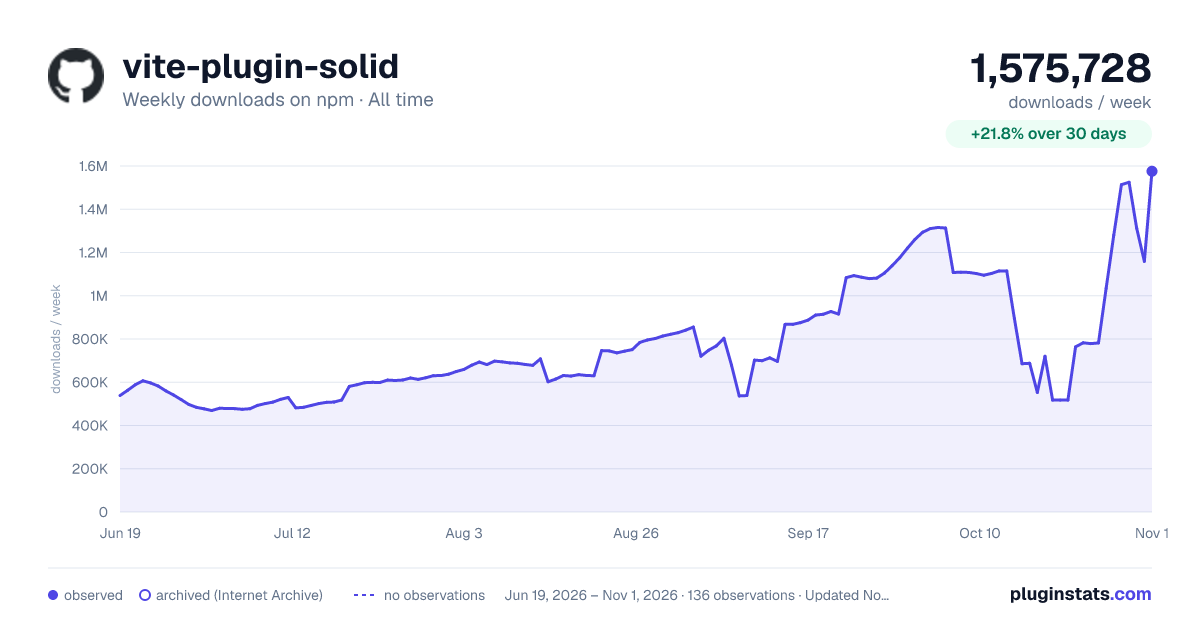

Adoption over time
7/30/90-day growth
Ranking history
Listing placement
Listing placement
Filled points are observed values; hollow points come from Internet Archive snapshots of the listing page. Dashed segments span periods with no observations — values between points are not interpolated.
Each band is one page of 20. Weekly downloads on a linear scale. Placement is projected from weekly downloads, so it can differ from the marketplace's own sort order. Hover a dot to see the listing.
Recent observations
Full history (122)Similar npm Vite plugins plugins
All 20 vite-plugin-solid alternativesData source
Weekly downloads (trailing 7 complete days) come from the official npm downloads API. Downloads include CI and mirrors and are not equivalent to installs or users. npm publishes no ratings.
Listing: https://www.npmjs.com/package/vite-plugin-solid. First seen Oct 16, 2026; last successful collection Oct 20, 2026. See the methodology.