 PluginStats
prettier-plugin-webc weekly downloads statistics
By d3v1an7 · npm · Prettier plugins
Prettier formatting for WebC files, including the JavaScript inside expression attributes, front matter and render templates.
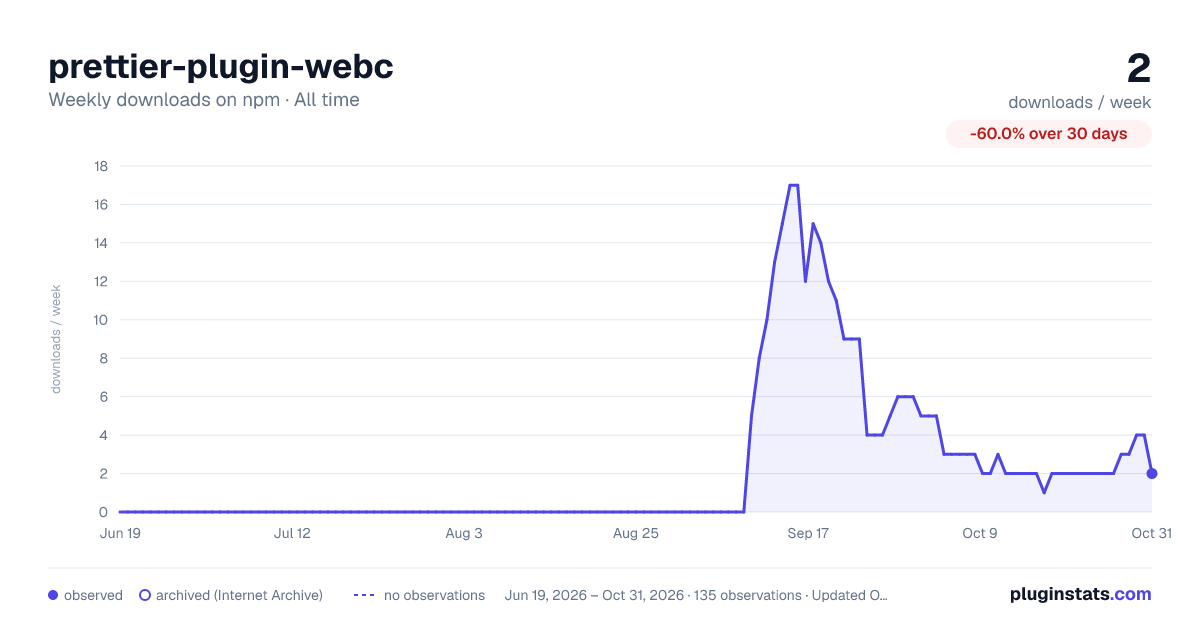
prettier-plugin-webc has 2 recorded weekly downloads on npm, a decrease of 85.7% over the past 30 days, ranking #2267 of 2,322 tracked listings.
About prettier-plugin-webc
prettier-plugin-webc
Prettier formatting for WebC files, including the JavaScript inside expression attributes, front matter and render templates.
The best thing about a .webc file is that it's pretty much HTML with extra :nail_care::sparkles:. This allows us to piggyback off Prettier's own HTML printer, adding "just enough" magic for the WebC parts to come out formatted too. Pairs well with WebC Syntax which handles syntax highlighting in VS Code.
AI disclaimer
- :robot: Plugin code and tests were mostly written by Claude Code.
- :man: Plugin docs and code comments were written or edited by a human.
Install
npm install --save-dev prettier prettier-plugin-webc
Usage
Add the plugin to your Prettier config:
{
  "plugins": ["prettier-plugin-webc"]
}
Or, for a zero config single run:
npx prettier --plugin prettier-plugin-webc --write "**/*.webc"
Features
Front matter
The following (case-insensitive) front matter formats are identified and formatted by default:
- YAML (
---,---yamlor---yml) with Prettier's YAML printer - JavaScript (
---jsor---javascript) with Prettier's JavaScript printer - JSON (
---json) with Prettier's JSON printer
Custom formats added via setFrontMatterParsingOptions (hello TOML) will be identified as generic front matter and not parsed.
Expression attributes
| Attribute | Value | Formatted as |
|---|---|---|
:* bindings (such as :name, :@prop) | required | JavaScript |
@attributes | optional | JavaScript |
@html | required | JavaScript |
@raw | required | JavaScript |
@text | required | JavaScript |
webc:bucket | required | string, kept as written |
webc:else | none | — |
webc:elseif | required | JavaScript |
webc:for | required | JavaScript loop head (see below) |
webc:if | required | JavaScript |
webc:ignore | none | — |
webc:import | required | string, kept as written |
webc:is | required | string, kept as written |
webc:keep | none | — |
webc:nokeep | none | — |
webc:raw | none | — |
webc:root | optional | string, kept as written |
webc:scoped | optional | string, kept as written |
webc:setup | none | — |
webc:type | required | string, kept as written |
11ty:type | required | string, kept as written |
@prop (any other @ attribute) | required | string, kept as written |
A webc:for value such as item of items or (key, value) in obj is a loop head rather than an expression: the binding on the left and the iterable on the right are each formatted, and the of / in keyword and any parentheses or destructuring stay as written. The iterable always starts on the same line as the keyword and only breaks inside itself (the way Prettier prints Vue's v-for), because WebC looks for a literal " of " / " in " and treats a loop head with a line break there as invalid.
Examples of JavaScript formatting
- Spacing, quoting and line breaking follow Prettier's JavaScript rules, the way Prettier prints Vue bindings.
{ color: theme.accent }is understood as an object literal and gets wrapping parentheses,({ color: theme.accent }), because WebC evaluates the value as a script and a bare{would start a block. Existing parentheses are kept.>or<are understood as operators, not tag closures.- A value that does not parse as a single JavaScript expression is printed exactly as written. The plugin never throws for an attribute value.
JavaScript templates
<template webc:type="js"> (and superseded webc:type="render") content is formatted as JavaScript, the same as <script webc:setup>, including when the start tag has been split across several lines. Content that does not parse is kept as written.
Eleventy templates
Markdown, Nunjucks or Liquid inside a webc:type="11ty" template is not HTML, so the whole element is copied through unchanged, attributes included.
Quotes
An expression attribute is always wrapped in double quotes and string literals inside it switch to single quotes. A " that has to survive, inside a template literal for instance, is written as ", and " / ' in the source are decoded before the expression is parsed.
Options…
Description from the npm listing.
- prettier
- prettier-plugin
- webc
- 11ty
- eleventy
- html
- formatter
README badge
Show your rank in a README or on your website. The badge updates automatically.
Charts
Images: 30d · 1y · all time · 1600×900 dark



Adoption over time
7/30/90-day growth
Ranking history
Listing placement
Listing placement
Filled points are observed values; hollow points come from Internet Archive snapshots of the listing page. Dashed segments span periods with no observations — values between points are not interpolated.
Each band is one page of 20. Weekly downloads on a linear scale. Placement is projected from weekly downloads, so it can differ from the marketplace's own sort order. Hover a dot to see the listing.
Recent observations
Full history (122)Similar npm Prettier plugins plugins
All 20 prettier-plugin-webc alternatives- 2 weekly downloads-81.8%
- 2 weekly downloads-71.4%
Data source
Weekly downloads (trailing 7 complete days) come from the official npm downloads API. Downloads include CI and mirrors and are not equivalent to installs or users. npm publishes no ratings.
Listing: https://www.npmjs.com/package/prettier-plugin-webc. First seen Oct 16, 2026; last successful collection Oct 20, 2026. See the methodology.