 PluginStats
tailwind-container-break-out-v4 weekly downloads statistics
By furioursus · npm · Tailwind plugins
A TailwindCSS v4 (and v3) compatible plugin for breaking child elements out of a `.container`. Fork of tailwind-container-break-out, fixed for v4's stricter utility-selector rules.
tailwind-container-break-out-v4 has 3 recorded weekly downloads on npm, a decrease of 78.6% over the past 30 days, ranking #2122 of 2,313 tracked listings.
About tailwind-container-break-out-v4
tailwind-container-break-out-v4
A Tailwind CSS v4-compatible fork of
tailwind-container-break-out.
Same utility classes, same math — fixed for v4's stricter plugin-selector
validation. It also still works under Tailwind v3, so it's a safe drop-in
replacement either way.
It gives you m{l|r|x}-break-out and p{l|r|x}-break-out utilities that let
a child element visually escape the bounds of a centered .container,
computed per breakpoint from your theme's screens/container.padding.
Why a fork
Upstream's src/tailwind-container-break-out.js registers its responsive
rules as:
addComponents([
	{ ".mx-break-out": {/* base rule */} },
	{ "@media (min-width: 40rem)": { ".mx-break-out": {/* ... */} } },
]);
i.e. the @media at-rule is the top-level key. Tailwind v3 accepted this,
but Tailwind v4's plugin compatibility layer validates that every top-level
key passed to addComponents/addUtilities is a plain class selector, and
rejects this shape with:
Error: `addUtilities({ '@media (min-width: 40rem)' : … })` defines an
invalid utility selector. Utilities must be a single class name and start
with a lowercase letter, eg. `.scrollbar-none`.
(This is upstream issue #8.)
The fix here nests the @media blocks inside each class declaration
instead:
{
  '.mx-break-out': {
    /* base rule */
    '@media (min-width: 40rem)': { /* ... */ }
  }
}
That shape is valid CSS-in-JS under both Tailwind v3 and v4, so the plugin logic (screen/padding math) is otherwise unchanged from upstream.
The other change is how container padding is discovered. Tailwind v4 removed
the container.padding / container.screens theme keys entirely when you
configure your theme CSS-first (via @theme in your CSS instead of
tailwind.config.js) — there's nothing for the plugin to read anymore in
that setup. So this fork also accepts explicit screens/padding plugin
options with the same shape Tailwind v3's theme.container.padding used,
and only falls back to reading theme('container.screens') /
theme('container.padding') when you don't pass one (which still works if
you're loading a legacy tailwind.config.js via @config).
Install
npm i tailwind-container-break-out-v4
Peer dependency: tailwindcss v3 or v4.
Usage with Tailwind v4 (CSS-first config)
/* app.css */
@import "tailwindcss";
@plugin "tailwind-container-break-out-v4";

@theme {
	--breakpoint-sm: 40rem;
	--breakpoint-md: 48rem;
	--breakpoint-lg: 64rem;
	--breakpoint-xl: 80rem;
	--breakpoint-2xl: 96rem;
}
Because v4 has no container.padding theme key, pass your container's
padding explicitly if you want the breakout math to account for it. The
@plugin directive doesn't take inline arguments, so pass options through a
tiny wrapper file:
// tailwind-container-break-out.config.js
module.exports = require("tailwind-container-break-out-v4")({
	padding: {
		DEFAULT: "1rem",
		sm: "2rem",
		lg: "4rem",
	},
	// screens: theme('screens') is used by default; pass `screens` here too
	// if you want to override which breakpoints get their own rule.
});
@plugin "./tailwind-container-break-out.config.js";
Without options, the utilities still work — they just don't shrink the breakout margin by your container's inner padding, they simply pull the element edge-to-edge with the viewport at each breakpoint.
Usage with Tailwind v3 (tailwind.config.js)
// tailwind.config.js
module.exports = {
	theme: {
		container: {
			center: true,
			padding: {
				DEFAULT: "1rem",
				sm: "2rem",
				lg: "4rem",
			},
		},
	},
	plugins: [require("tailwind-container-break-out-v4")],
};
This reads theme.container.padding/theme.container.screens automatically,
same as upstream.
Utilities
| Class | Effect |
|---|---|
.mx-break-out | Break out of the container on both sides |
.ml-break-out | Break out on the left only |
.mr-break-out | Break out on the right only |
.px-break-out | Break out on both sides, keeping inner content aligned to the container |
.pl-break-out | Break out on the left, keeping inner content aligned |
.pr-break-out | Break out on the right, keeping inner content aligned |
<div class="container">
	<!-- Extends full-bleed, e.g. for a background or image -->
	<div class="mx-break-out">
		<img src="banner.jpg" />
	</div>

	<!-- Extends full-bleed but keeps its own content aligned to the container -->
	<div class="px-break-out bg-slate-100">
		<p>Still lines up with the rest of the page.</p>
	</div>
</div>
As with upstream, these utilities don't account for any extra margin/padding
you've added elsewhere in your markup — they assume the breakout element is
a direct (or effectively direct) child of .container.
Scrollbar width
Same as upstream: the plugin reads a --twcb-scrollbar-width CSS variable
(default 0px) to compensate for the vertical scrollbar eating into
100vw. Pair this with
set-scrollbar-width,
or set it yourself:
:root {
	--twcb-scrollbar-width: 15px;
}
Plugin options
Passed to require('tailwind-container-break-out-v4')(options):…
Description from the npm listing.
- tailwindcss
- tailwindcss-plugin
- tailwind
- container
- break-out
- margins
- pull
- full-bleed
README badge
Show your rank in a README or on your website. The badge updates automatically.
Charts
Images: 30d · 1y · all time · 1600×900 dark


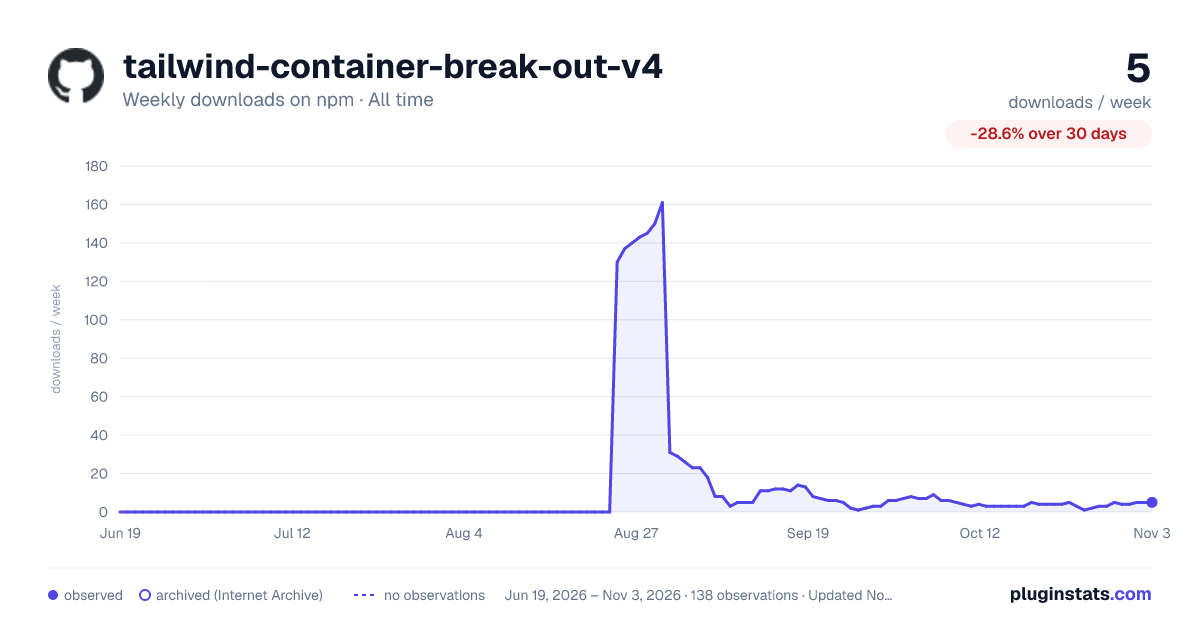

Adoption over time
7/30/90-day growth
Ranking history
Listing placement
Listing placement
Filled points are observed values; hollow points come from Internet Archive snapshots of the listing page. Dashed segments span periods with no observations — values between points are not interpolated.
Each band is one page of 20. Weekly downloads on a linear scale. Placement is projected from weekly downloads, so it can differ from the marketplace's own sort order. Hover a dot to see the listing.
Recent observations
Full history (122)Similar npm Tailwind plugins plugins
All 20 tailwind-container-break-out-v4 alternatives- 3 weekly downloads-76.9%
Data source
Weekly downloads (trailing 7 complete days) come from the official npm downloads API. Downloads include CI and mirrors and are not equivalent to installs or users. npm publishes no ratings.
Listing: https://www.npmjs.com/package/tailwind-container-break-out-v4. First seen Oct 16, 2026; last successful collection Oct 20, 2026. See the methodology.