 PluginStats
greptile weekly downloads statistics
By greptileai · npm · Claude Code
Greptile code review from your terminal
greptile has 8,634 recorded weekly downloads on npm, a decrease of 66.0% over the past 30 days.
It ranks #948 of 2,251 tracked npm listings by weekly downloads.
Over 90 days, weekly downloads changed by +34.3%.
PluginStats has 543 daily observations since Apr 23, 2025; the latest is from Oct 17, 2026.
About greptile
greptile
Greptile code review in your terminal. Runs the same review Greptile posts on your team's pull requests, on your local branch before you push.
• Install • Quick start • Commands • Reviewing • Authentication • Sensitive files • Settings • Agent skills • Diagrams • Fix in Claude Code • Updating • Telemetry • Reference
Install
ℹ️ Note: The npm and script installs need Node 22 or newer.
On macOS, run greptile fix install after installing the CLI to set up Greptile's "Fix in Claude Code" links.
Quick start
Comments appear in the terminal as they come in.
Commands
| Command | What it does |
| greptile review | Review committed changes from the branch merge base through HEAD. | | greptile review show [ID] | Fetch one review by UUID, or choose/list recent local history. | | greptile review status | Report the latest saved review for a commit with scriptable exits. | | greptile config [PATH] | Resolve the review config for the repository or one file. | | greptile init | Enable the current repository with an OAuth-signed-in admin account. | | greptile login | Sign in through your browser, or with --api-key. | | greptile logout | Remove stored credentials. | | greptile whoami | Show who you are signed in as and your organizations. | | greptile settings | Manage local preferences, organization review settings, repos, and team. | | greptile skills | List, install, and update Greptile-authored agent skills. | | greptile environment | Configure and build the repository's TREX environment. | | greptile fix | Set up or remove Fix in Claude Code on macOS. | | greptile update | Update the CLI to the latest version. |
Run any command with --help for its installed flag list. This README documents CLI 3.6.2; the installed help wins if it differs.
Reviewing
greptile review compares the merge base of the selected base and HEAD with HEAD. It sends committed, non-binary changes only. Uncommitted and binary files stay local and produce warnings.
Terminal output starts with a box containing confidence, a short verdict, and the change summary. Clean reviews include a list of available checks. Any diagram follows the box, before findings and diffs. Plain text output omits the box. JSON output keeps the full confidenceReasoning and securitySummary fields.
Review against a specific base branch or add one-run instructions:
Choose review effort for a new run:
--plus and --apex are mutually exclusive and cannot be combined with --resume. They require the organization's effort feature and an effort-specific routing rule. If either is unavailable, the review fails without running a fallback. Results include the effective effort. Saved settings do not change effort.
Show findings beside the changed code instead of as a comment list:
Continue a review that stopped partway:
Reopen an earlier review:
List recent reviews non-interactively (for scripts and agents):
Check whether the current commit has been reviewed (for a pre-push hook):
review status exits 0 when the commit has a completed review, 3 while one is still running, 4/5 for a failed/cancelled review, and 1 when there is no review (or you're signed out). Example pre-push hook:
Machine-readable output
A completed review prints one JSON object. This fictional example uses the exact emitted fields:
comments is empty on a review with no findings. A successful review exits 0 even when it has findings. After a dispatched review is interrupted or cannot finish locally, stderr gives its UUID and the follow-up command greptile review show .
Exit codes are stable for scripting; see Reference.
ℹ️ Note: greptile review show with no ID now prints the recent-reviews list when output is piped or --json/--text/--agent is set (previously it required an interactive terminal). In an interactive terminal it still opens the picker.
Working in multiple organizations
There is nothing to configure. Each repository belongs to one Greptile organization, and greptile review infers it from the repo's remote URL. As long as you're a member of that organization, the review runs against it. greptile whoami lists your organizations.
If you work in a sandboxed environment that routes git through a proxy (for example, remotes shaped like https:///proxy/github.com//), the CLI unwraps the proxy prefix automatically so the review resolves against the real host.
Authentication
greptile login signs you in through your browser (OAuth) and stores a refreshable token at ~/.greptile/auth.json. Tokens refresh automatically. If the browser can't reach the CLI on the same machine (SSH sessions, containers, remote/cloud dev environments) the browser shows a login code instead; paste it at the Paste code here if prompted: prompt to finish signing in.
For CI or headless environments, use an API key instead. Create one in the Greptile dashboard, then either export it or store it on the machine:
⚠️ Warning: Don't pass the API key as a command-line argument. Arguments are visible in shell history and process lists; use the prompt, stdin, or the environment variable instead.
When GREPTILE_API_KEY is set, it takes precedence over a stored sign-in.
ℹ️ Note: API keys are scoped to an organization, not a person, so reviews run under the organization's identity. Use OAuth sign-in if you want per-developer attribution.
greptile init and the organization-management surfaces use account OAuth. They reject API-key authentication because repository and organization changes must be attributed to a signed-in user. Run greptile login first, or make those changes in the dashboard.
Sensitive files
Before sending anything, greptile review holds back changed files that look like they contain secrets, so a mistakenly committed .env file or private key stays on your machine. When files are held back, the review prints a one-line note naming them. A file is held back when:…
Description from the npm listing.
- greptile
- code-review
- cli
- claude-code
- codex
Where greptile sits in the listing
Each band is one page of 20. Weekly downloads on a log scale. Placement is projected from weekly downloads, so it can differ from the marketplace's own sort order. Hover a dot to see the listing.


Charts
Images: 30d · 1y · all time · 1600×900 dark


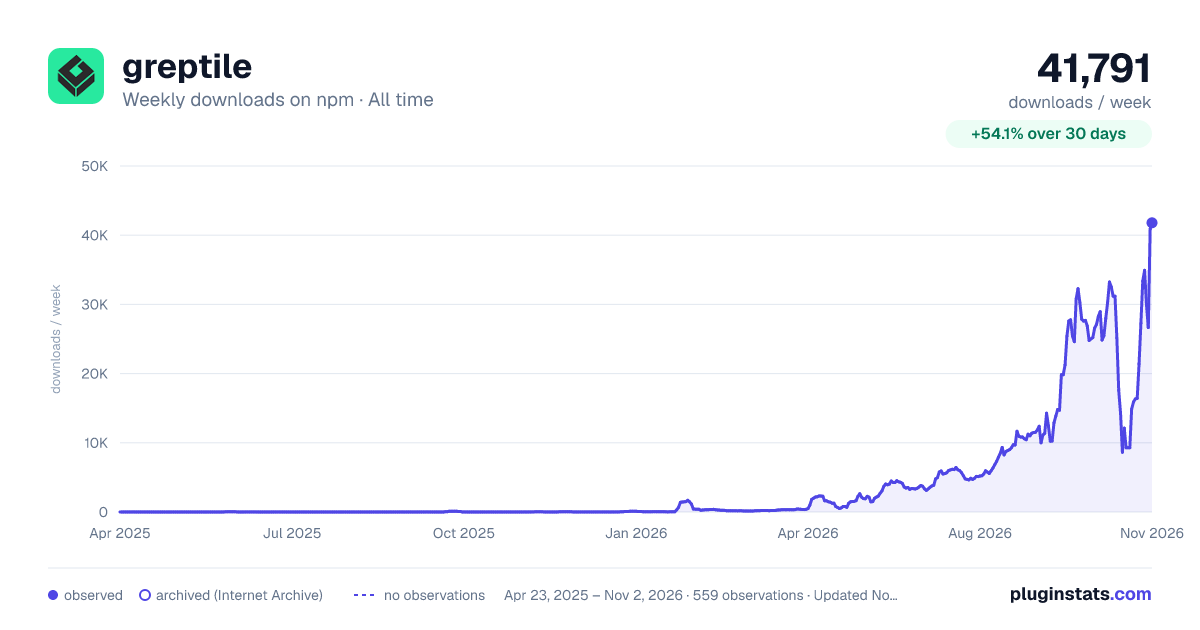

Adoption over time


7/30/90-day growth


Filled points are observed values; hollow points come from Internet Archive snapshots of the listing page. Dashed segments span periods with no observations — values between points are not interpolated.
Recent observations
Full history (543)Similar npm Claude Code plugins
Data source
Weekly downloads (trailing 7 complete days) come from the official npm downloads API. Downloads include CI and mirrors and are not equivalent to installs or users. npm publishes no ratings.
Listing: https://www.npmjs.com/package/greptile. First seen Oct 16, 2026; last successful collection Oct 18, 2026. See the methodology.