 PluginStats
@automattic/i18n-loader-webpack-plugin weekly downloads statistics
By automattic (6 listings) · npm · Webpack plugins
A Webpack plugin to load WordPress i18n when Webpack lazy-loads a bundle.
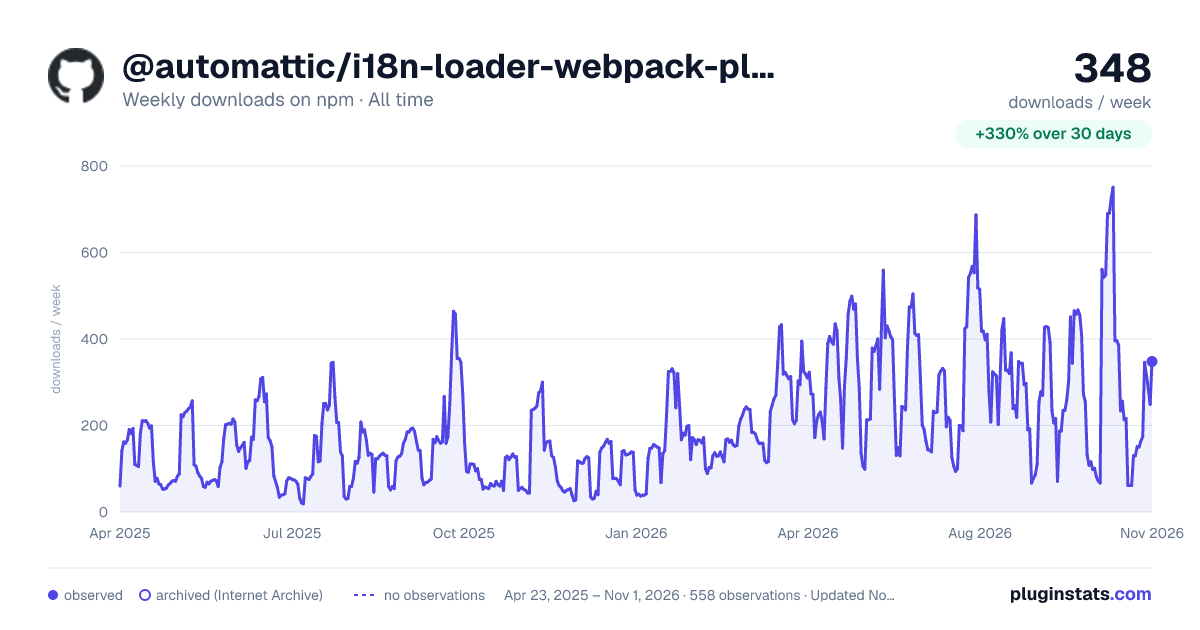
@automattic/i18n-loader-webpack-plugin has 216 recorded weekly downloads on npm, a decrease of 52.1% over the past 30 days, ranking #1663 of 2,322 tracked listings.
About @automattic/i18n-loader-webpack-plugin
i18n-loader-webpack-plugin
A Webpack plugin to load WordPress translation data for [@wordpress/i18n] when Webpack lazy-loads a bundle.
Installation
Generally you'll install this via your package manager, e.g.
npm install --save-dev @automattic/i18n-loader-webpack-plugin
Usage
Basic usage
This goes in the plugins section of your Webpack config, e.g.
{
	plugins: [
		new I18nLoaderWebpackPlugin( {
			textdomain: 'mydomain',
		} ),
	],
};
Parameters recognized by the plugin are:
-
textdomain: The text domain used in the JavaScript code. This is required, unless nothing in your JS actually uses [@wordpress/i18n]. -
loaderModule: The name of a module supplying the i18n loader. See Loader module below for details. -
loaderMethod: The name of the function fromloaderModuleto download the i18n. See Loader module below for details. -
target: The target of the build: 'plugin' (the default), 'theme', or 'core'. This is used to determine where in WordPress's languages directory to look for the translation files. -
path: See Webpack context below for details. -
ignoreModules: If some bundles in your build depend on [@wordpress/i18n] for purposes other than translating strings, i18n-loader-webpack-plugin will none the less count them as "using @wordpress/i18n" which may result in it trying to load translations for bundles that do not need it. This option may be used to ignore the relevant source files when examining the bundles.The value may be a function, which will be passed the file path relative to [Webpack's context] and the Webpack Module object and which should return true if the file should be ignored, or a string or RegExp to be compared with the relative file path, or an array of such strings, RegExps, and/or functions.
Use of [@wordpress/i18n]
For best results, each JavaScript file translating strings should import @wordpress/i18n directly to access __() and similar methods.
The use of @wordpress/i18n in the lazy bundle may not be detected if __() is imported indirectly or used by accessing the global wp.i18n.
Of course, you don't actually want @wordpress/i18n included in the bundle. The recommended way to handle this is to use [@wordpress/dependency-extraction-webpack-plugin] in your Webpack configuration. But if for some reason you want to do it manually, something like this in your Webpack config should work:
{
	externals: {
		'@wordpress/i18n': [ 'window wp', 'i18n' ],
	}
}
Loader module
In order to load the translations, the generated bundle needs to call a method to do the actual downloading at runtime. This is handled by loading a module that must be externalized by your Webpack configuration.
The default module name is @wordpress/jp-i18n-loader, which will automatically be externalized by [@wordpress/dependency-extraction-webpack-plugin], which will also register it as a dependency for "wp-jp-i18n-loader" in the generated .asset.php file. That, in turn, is provided by the [automattic/jetpack-assets] Composer package (which also provides an Automattic\Jetpack\Assets::register_script() function to easily consume the .asset.php file).
But if for some reason you don't want to use those packages, you can set the plugin's loaderModule and loaderMethod options to point to a different module name, use [Webpack's externals configuration] to externalize it, and appropriate PHP code to provide the corresponding global variable for your externals configuration to retrieve.
The loader method might be documented like this:
/**
 * Download and register translations for a bundle.
 *
 * @param {string} path - Bundle path being fetched. May have a query part.
 * @param {string} domain - Text domain to register into.
 * @param {string} location - Location for the translation: 'plugin', 'theme', or 'core'.
 * @returns {Promise} Resolved when the translations are registered, or rejected with an `Error`.
 */
Most likely the method will separate any query part from the path, hash it, build the download url, fetch it, then register it via @wordpress/i18n's setLocaleData() method.
Webpack context
WordPress's translation infrastructure generates a file for each JS script named like "textdomain-locale-hash.json". The hash is an MD5 hash of the path of the script file relative to the plugin's root.
I18n-loader-webpack-plugin assumes that [Webpack's context] is the base of the WordPress package or plugin in which the bundles will be included, and that the loader module will handle mapping from package root to plugin root.
If this is not the case, you'll need to set the plugin's path parameter to the relative path from the plugin's root to Webpack's output.path.
Other useful Webpack configuration
If you're having Webpack minify your bundle, you'll likely also want to do the following:
- Be sure that you're not naming the output files with an extension
.min.js, as that will cause the WordPress translation infrastructure to ignore them. - Set
optimization.concatenateModulesto false, as that optimization can mangle the i18n method names. - Configure Terser to not mangle
__,_n,_nx, and_x. - Use @automattic/babel-plugin-preserve-i18n to help further preserve those method names.
- Configure Terser to preserve comments starting with "Translators" or "translators" in the output.
- Check your code to avoid certain constructs that will dissociate translator comments from the i18n method calls when the minifier rearranges the code.
Use in Composer packages
Composer packages are useful for holding shared code, but when it comes to WordPress plugin i18n there are some problems.…
Description from the npm listing.
- webpack
- plugin
- loader
- webpack-plugin
- wordpress
- gettext
- i18n
README badge
Show your rank in a README or on your website. The badge updates automatically.
Charts
Images: 30d · 1y · all time · 1600×900 dark



Adoption over time
7/30/90-day growth
Ranking history
Listing placement
Listing placement
Filled points are observed values; hollow points come from Internet Archive snapshots of the listing page. Dashed segments span periods with no observations — values between points are not interpolated.
Each band is one page of 20. Weekly downloads on a linear scale. Placement is projected from weekly downloads, so it can differ from the marketplace's own sort order. Hover a dot to see the listing.
Recent observations
Full history (544)Similar npm Webpack plugins plugins
All 20 @automattic/i18n-loader-webpack-plugin alternatives- 228 weekly downloads-72.5%
- 228 weekly downloads-50.4%
- 260 weekly downloads-69.4%
- 177 weekly downloads-52.4%
- 274 weekly downloads-33.7%
Data source
Weekly downloads (trailing 7 complete days) come from the official npm downloads API. Downloads include CI and mirrors and are not equivalent to installs or users. npm publishes no ratings.
Listing: https://www.npmjs.com/package/@automattic/i18n-loader-webpack-plugin. First seen Oct 16, 2026; last successful collection Oct 20, 2026. See the methodology.