 PluginStats
@usenotra/geo weekly downloads statistics
By usenotra · npm · MCP servers
Request capture SDK for AI traffic attribution and agent feedback collection
@usenotra/geo has 14,280 recorded weekly downloads on npm, an increase of 302% over the past 30 days, ranking #872 of 2,322 tracked listings.
About @usenotra/geo
@usenotra/geo
Request capture SDK for AI traffic attribution. It captures every page request your
site serves and sends a neutral request envelope to Notra. All classification, crawler
versus AI referral versus human, happens server side at ingest, so a stale local table
never costs you traffic. Requests classified as human are discarded at ingest and never
stored. The core tracker ships no signature table. Only the optional
Next.js tagLinks path bundles the matcher, because it has to decide at the edge which
responses to rewrite for AI agents.
Zero dependencies. No Node APIs in the core, so it runs on edge runtimes.
Install
bun add @usenotra/geo
Next.js
// proxy.ts on Next.js 16, middleware.ts before that
import { createGeoProxy } from "@usenotra/geo/next";
import { NextResponse } from "next/server";

const geo = createGeoProxy({ token: process.env.NOTRA_GEO_TOKEN ?? "" });

export function proxy(request: Request, event: { waitUntil(p: Promise<unknown>): void }) {
  geo(request, event);
  return NextResponse.next();
}
geo(request, event) never throws and never blocks the response. When an event with
waitUntil is passed, the send is registered on it so it survives the response.
Nuxt and Nitro
// server/middleware/geo.ts
import { createGeoHandler } from "@usenotra/geo/nuxt";

const geo = createGeoHandler({ token: process.env.NOTRA_GEO_TOKEN ?? "" });

export default defineEventHandler(async (event) => {
  await geo(event);
});
The handler accepts an H3 event with a node.req, or any object exposing a standard
web request. Geo headers are usually absent behind Nitro, so those fields stay
undefined and ingest falls back to IP based lookup.
TanStack Start
// src/start.ts
import { createMiddleware, createStart } from "@tanstack/react-start";
import { createGeoMiddleware } from "@usenotra/geo/tanstack";

const geo = createMiddleware().server(createGeoMiddleware({
  token: process.env.NOTRA_GEO_TOKEN!,
  endpoint: "https://ingest.usenotra.com",
}));

export const startInstance = createStart(() => ({
  requestMiddleware: [geo],
}));
The middleware captures requests alongside your route handler and waits for the send before returning, so tracking completes on serverless hosts. It preserves the downstream response and errors. If src/start.ts already exists, add geo to its existing requestMiddleware array.
Astro
// src/middleware.ts
import { createGeoMiddleware } from "@usenotra/geo/astro";

export const onRequest = createGeoMiddleware({
  token: import.meta.env.NOTRA_GEO_TOKEN ?? "",
  endpoint: "https://ingest.usenotra.com",
});
The middleware captures requests alongside your route handler and waits for the send before returning. If src/middleware.ts already exists, compose with sequence from astro:middleware. Astro must serve pages from a server adapter (output: "server" or hybrid) so requests exist at runtime; a static build has nothing to capture after deploy.
SvelteKit
// src/hooks.server.ts
import { env } from "$env/dynamic/private";
import { createGeoHandle } from "@usenotra/geo/sveltekit";

export const handle = createGeoHandle({
  token: env.NOTRA_GEO_TOKEN ?? "",
  endpoint: "https://ingest.usenotra.com",
});
The handle captures requests alongside resolve and waits for the send before returning. If src/hooks.server.ts already has a handle, compose with sequence from @sveltejs/kit/hooks.
Netlify Edge Functions
// netlify/edge-functions/geo.ts
import { createGeoHandler } from "@usenotra/geo/netlify";

const geo = createGeoHandler({ token: Deno.env.get("NOTRA_GEO_TOKEN") ?? "" });

export default (request: Request, context: Context) => {
  geo(request, context);
};

export const config = { path: "/*" };
Netlify's context.geo is mapped into the envelope and context.waitUntil keeps the
send alive.
Options
| Option | Default | Meaning |
|---|---|---|
token | required | Per organization ingest token |
endpoint | https://ingest.usenotra.com | Ingest origin, the SDK appends /api/geo/ingest |
exclude | ["/api"] | Paths to skip. Pass [] to disable |
sample | 1 | Fraction of eligible requests to send, 0 to 1 |
onError | none | Called for network failures and non-success HTTP responses, including 401, 429 and 502. The SDK never throws |
fetch | global fetch | Injectable fetch, for tests |
Requests go directly to https://ingest.usenotra.com when endpoint is omitted.
The SDK does not automatically retry through the dashboard. To switch back to
the dashboard ingestion route, set endpoint: "https://app.usenotra.com" and
redeploy your site. Self-hosted installations must set endpoint to their own
ingestion origin.
What gets captured
Only GET requests that look like pages. Asset requests are skipped: anything under
/_next/, /_nuxt/, /_vercel/, /_astro/, /_app/immutable/, /static/, and any path ending in a
common static extension such as .css, .js, .png, .svg, .xml or .txt.
llms.txt and llms-full.txt are the exception: they are always captured.
exclude entries can be:
- a string, matching that path and everything below it, so
"/api"also excludes/api/users - a
RegExp, tested against the pathname - a function
(request, url) => boolean
Passing exclude: [] removes the default and captures every page path.
Payload
Each capture POSTs this JSON to ${endpoint}/api/geo/ingest with an
authorization: Bearer <token> header, keepalive, and a 2 second timeout.
type GeoRequestPayload = {
  timestamp?: string;
  method: string;
  url: string;
  ip?: string;
  geo?: {
    country?: string;
    region?: string;
    city?: string;
    timezone?: string;
    latitude?: string;
    longitude?: string;
  };
  referer?: string;
  userAgent?: string;
  accept?: string;
  acceptLanguage?: string;
  requestId?: string;
};
```…
Description from the npm listing.
- agents
- ai
- analytics
- astro
- attribution
- crawler
- edge
- feedback
- geo
- llms.txt
- mcp
- netlify
- nextjs
- nuxt
- sveltekit
- tanstack
README badge
Show your rank in a README or on your website. The badge updates automatically.
Charts
Images: 30d · 1y · all time · 1600×900 dark


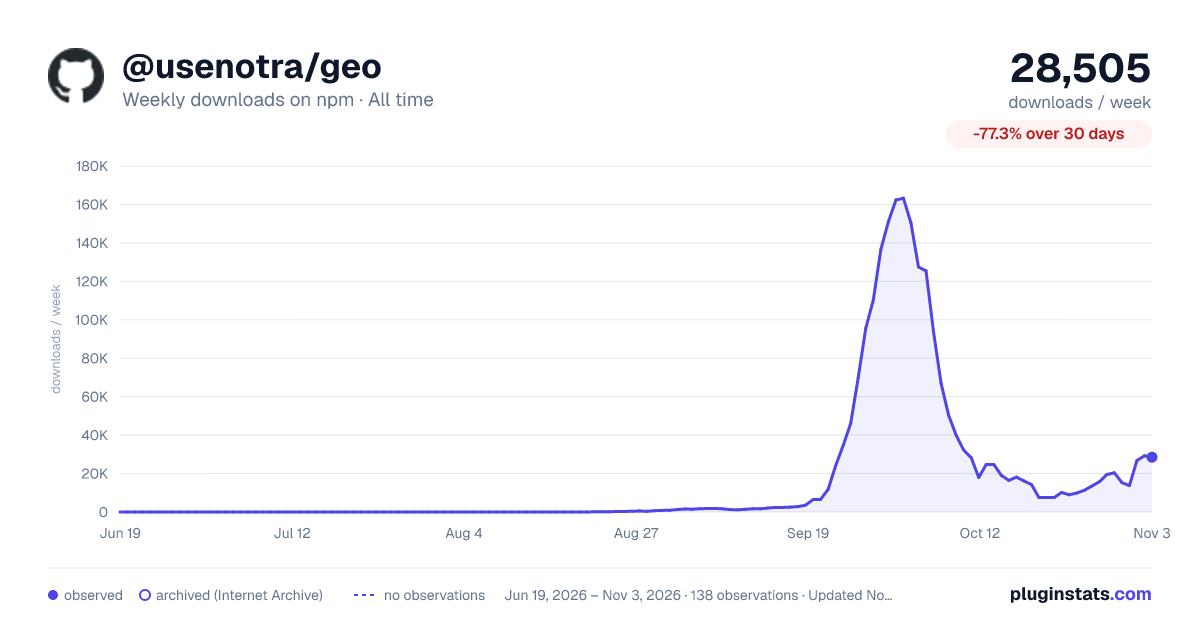

Adoption over time
7/30/90-day growth
Ranking history
Listing placement
Listing placement
Filled points are observed values; hollow points come from Internet Archive snapshots of the listing page. Dashed segments span periods with no observations — values between points are not interpolated.
Each band is one page of 20. Weekly downloads on a linear scale. Placement is projected from weekly downloads, so it can differ from the marketplace's own sort order. Hover a dot to see the listing.
Recent observations
Full history (122)Similar npm MCP servers plugins
All 20 @usenotra/geo alternativesData source
Weekly downloads (trailing 7 complete days) come from the official npm downloads API. Downloads include CI and mirrors and are not equivalent to installs or users. npm publishes no ratings.
Listing: https://www.npmjs.com/package/@usenotra/geo. First seen Oct 16, 2026; last successful collection Oct 20, 2026. See the methodology.