 PluginStats
vite-plugin-svg-spritemap weekly downloads statistics
By g-makarov · npm · Vite plugins
Generates a SVG spritemap from multiple .svg files
vite-plugin-svg-spritemap has 8,847 recorded weekly downloads on npm, a decrease of 12.2% over the past 30 days, ranking #989 of 2,322 tracked listings.
About vite-plugin-svg-spritemap
vite-plugin-svg-spritemap



A Vite plugin that bundles a directory of .svg files into a single spritemap of <symbol> elements.
- Optionally generates a TypeScript union of the icon names, so a typo is a build error
- Optimizes icons with SVGO
- Hoists
<defs>to the top level and namespaces their ids, so gradients, patterns and masks keep working and never collide - Optional
<view>output for<img>and CSSbackground-image - Content hashing for long-term caching
- HMR: editing an icon swaps it in place, without reloading the page
Requirements
Vite 5–8, Node 20.19+. ESM only.
Installation
npm install -D vite-plugin-svg-spritemap
Usage
// vite.config.ts
import { defineConfig } from 'vite';
import { svgSpritemap } from 'vite-plugin-svg-spritemap';

export default defineConfig({
  plugins: [svgSpritemap({ pattern: 'src/icons/*.svg' })],
});
Each file becomes a <symbol> whose id is the filename without extension — src/icons/arrow.svg → #arrow.
<svg>
  <use href="/spritemap.svg#arrow"></use>
</svg>
The sprite is written to the build output directory and served at the same path in dev. Use the deprecated xlink:href instead of href if you need to support legacy browsers.
React
export const Icon = ({ name }: { name: string }) => (
  <svg>
    <use href={`/spritemap.svg#${name}`} />
  </svg>
);
Turn on types to make name a union of the actual icon names
instead of string.
Options
| Option | Type | Default | Description |
|---|---|---|---|
pattern | string | — | Glob of the SVG files to include. Required. |
filename | string | spritemap.svg | Output filename. Supports [hash]. |
symbolId | string | (file, name) => string | [name] | Template for the symbol ids. Tokens: [name], [dir]. A function gets the file path and the base name. |
svgo | SVGOConfig | boolean | true | SVGO optimization. Pass a config object to customize it. |
currentColor | boolean | false | Replace colors with currentColor so icons inherit CSS color. |
view | boolean | false | Also emit <view> elements, so icons work in <img> and CSS background-image. |
hmr | boolean | true | Update icons in place in dev. Set to false to reload the whole page instead. |
types | boolean | string | false | Generate a module with the icon names. true writes src/spritemap-icons.ts; pass a path to change it. |
The sprite is emitted as a Rollup asset, so other plugins — compression, for instance — see it like any other build output.
Duplicate names
Ids have to be unique within the sprite. With a recursive glob, icons/ui/close.svg
and icons/nav/close.svg both want #close; the plugin keeps the first and warns
about the second. Set symbolId to tell them apart:
svgSpritemap({ pattern: 'src/icons/**/*.svg', symbolId: '[dir]-[name]' });
// → #ui-close, #nav-close
A literal prefix is just part of the template — symbolId: 'icon-[name]' gives #icon-arrow.
Ids declared inside an icon (gradients, masks, clip paths) are namespaced
automatically, so two icons that both define id="a" no longer overwrite each other.
Long-term caching
Put [hash] in filename and the name changes only when the icons do:
svgSpritemap({ pattern: 'src/icons/*.svg', filename: 'sprite-[hash].svg', types: true });
The generated module exports the resolved URL, so nothing has to be hardcoded:
import { iconHref, spritemapUrl } from './spritemap-icons';

spritemapUrl; // '/sprite-a1b2c3d4.svg'
iconHref('arrow'); // '/sprite-a1b2c3d4.svg#arrow'
The dev server keeps a stable [hash] of dev, so references do not go stale on edit.
Icons in <img> and CSS
A <symbol> is never rendered, which is why an <img> pointing at one comes out blank.
Turn view on and each icon also gets a <view> framing it, addressable with a
-view suffix:
<img src="/spritemap.svg#arrow-view" width="24" height="24" />
.icon {
  background-image: url('/spritemap.svg#arrow-view');
}
Icons used this way cannot inherit currentColor — the browser renders them as an
independent document.
Typed icon names
Turn types on and the plugin writes a module listing every symbol in the sprite:
svgSpritemap({ pattern: 'src/icons/*.svg', types: true });
// src/spritemap-icons.ts — generated, do not edit
export const spritemapUrl = '/spritemap.svg';

export const iconNames = ['arrow', 'close'] as const;

export type IconName = (typeof iconNames)[number];…
Description from the npm listing.
- vite-plugin
- vite
- plugin
- svg
- spritemap
- svg-spritemap
- symbol
- symbols
- svg-symbol
- svg-sprite
- sprite
- sprites
- icon
- icons
- typescript
README badge
Show your rank in a README or on your website. The badge updates automatically.
Charts
Images: 30d · 1y · all time · 1600×900 dark


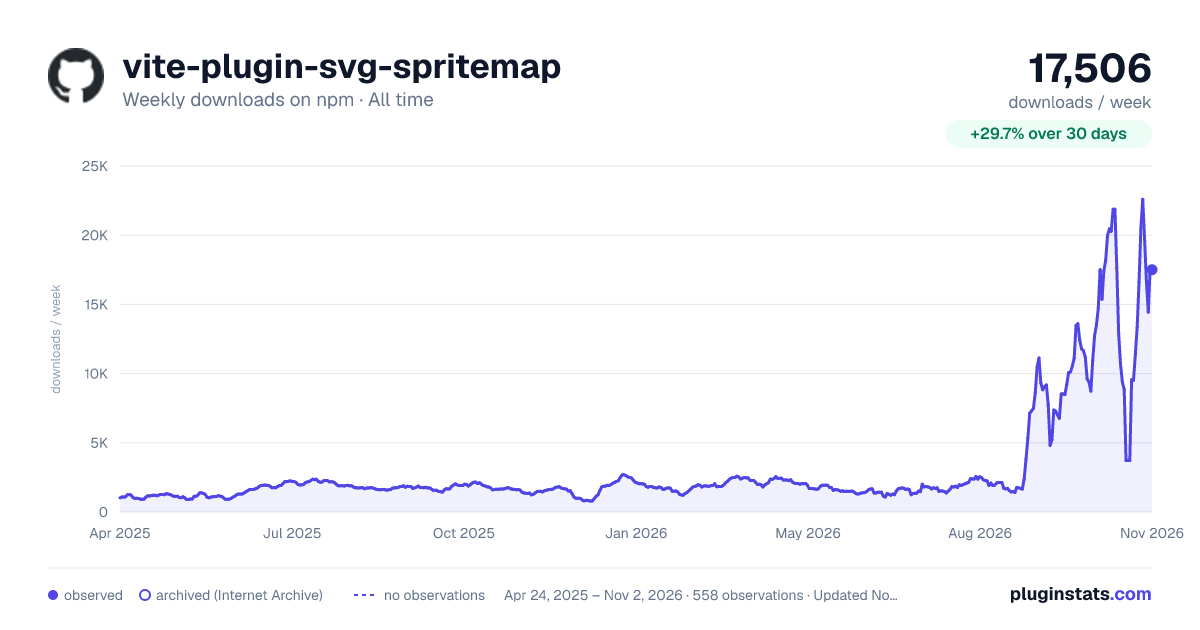

Adoption over time
7/30/90-day growth
Ranking history
Listing placement
Listing placement
Filled points are observed values; hollow points come from Internet Archive snapshots of the listing page. Dashed segments span periods with no observations — values between points are not interpolated.
Each band is one page of 20. Weekly downloads on a linear scale. Placement is projected from weekly downloads, so it can differ from the marketplace's own sort order. Hover a dot to see the listing.
Recent observations
Full history (543)Similar npm Vite plugins plugins
All 20 vite-plugin-svg-spritemap alternatives- 8.1K weekly downloads-47.8%
Data source
Weekly downloads (trailing 7 complete days) come from the official npm downloads API. Downloads include CI and mirrors and are not equivalent to installs or users. npm publishes no ratings.
Listing: https://www.npmjs.com/package/vite-plugin-svg-spritemap. First seen Oct 16, 2026; last successful collection Oct 20, 2026. See the methodology.