 PluginStats
@interactive-inc/claude-funnel weekly downloads statistics
By interactive-inc · npm · Claude Code
Hub CLI that routes external events (Slack / GitHub / Discord) to Claude Code agents through subscription channels over MCP.
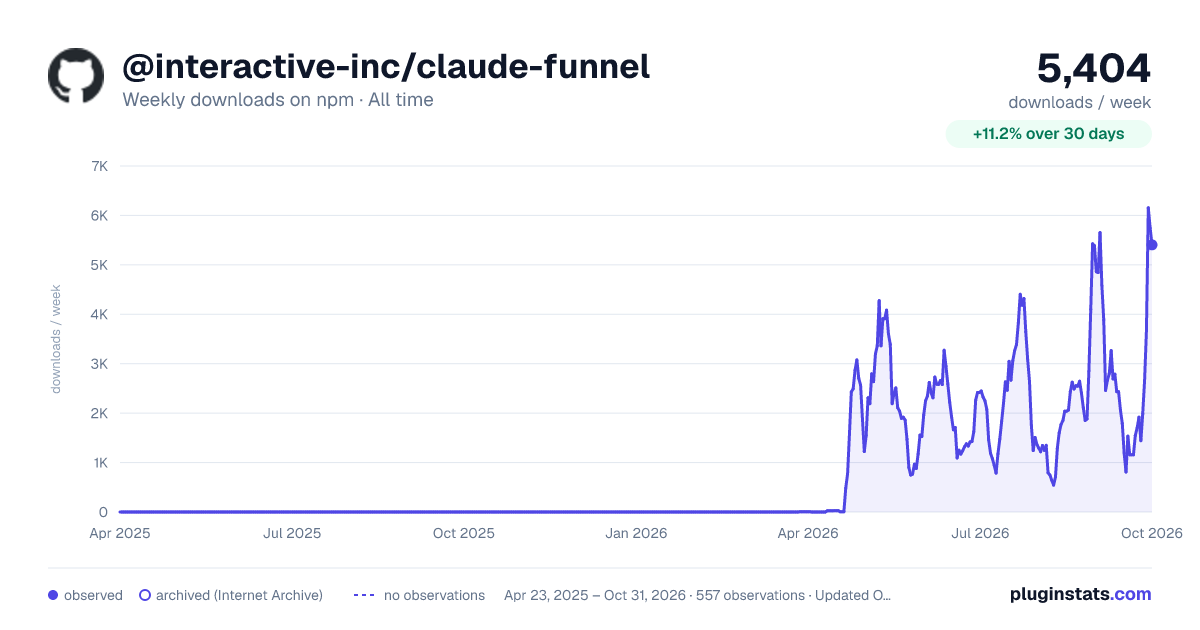
@interactive-inc/claude-funnel has 1,535 recorded weekly downloads on npm, a decrease of 41.5% over the past 30 days, ranking #1371 of 2,322 tracked listings.
About @interactive-inc/claude-funnel


Open Claude Funnel
Slack のメンション、GitHub の Issue、毎朝 9 時の cron。こうした外部の出来事を Claude Code エージェントに届け、エージェントの返信を同じ経路で外へ返すハブ。
   Slack    ─┐                       ┌─→  Claude エージェント A
   GitHub   ─┤                       │
   Discord  ─┼──→  funnel daemon  ──→┼─→  Claude エージェント B
   cron     ─┘                       │
                                     └─→  Claude エージェント C

   funnel daemon が外部接続を1か所に常駐保持し、購読中の各エージェントへ配信する。
   返信は同じコネクタを逆向きに通る(エージェント → MCP tool → 外部サービス)。
コマンドは funnel(短縮形 fnl)。Claude Code を中心に作っているが、アーキテクチャはエージェント非依存。現在のバージョンは 0.53.0。
funnel がやること
- 外部の出来事(チャットのメンション、新しい Issue、cron の tick)を、起動中のエージェントセッションにそのまま届ける
- エージェントの返信を受信と同じコネクタで外へ返す。bash サブシェルも CLI のコールドスタートもなく、実質同期
- 外部接続は常駐デーモンが 1 か所で持つ。エージェントを何個起こしても接続は 1 回だけ。ヘルスチェックと自動再起動で監視する
- 複数のエージェントで 1 つのソースを共有(fanout)するか、ワーカーとして分担(exclusive)するかを選べる
対応コネクタは Slack(Socket Mode)、GitHub(gh 経由の poll)、Discord(Gateway)、cron スケジュールの 4 種類。
必要なもの
- Bun 1.3 以降
- Claude Code CLI
- 接続する外部サービスのトークンまたは CLI(Slack アプリ、
gh認証、Discord bot など)
リポジトリで使う(推奨)
設定を funnel.json としてリポジトリに commit し、チームで共有・バージョン管理できる。グローバルに何も入れないので、リポジトリの lock ファイルでバージョンが固定される。
インストール
bun add -D @interactive-inc/claude-funnel
これで bunx funnel(または bunx fnl)が使える。
設定
リポジトリ直下に funnel.json を置く。transport(channels[])と起動レシピ(profiles[])を宣言する。
{
  "$schema": "./node_modules/@interactive-inc/claude-funnel/funnel.schema.json",
  "channels": [
    {
      "name": "ops",
      "connectors": [{ "type": "slack", "name": "my-slack" }]
    },
    {
      "name": "review"
    }
  ],
  "profiles": [
    {
      "name": "pm",
      "channel": "ops",
      "options": ["--brief", "--agent", "pm"],
      "env": { "ANTHROPIC_MODEL": "claude-sonnet-4-6" },
      "resume": true
    },
    {
      "name": "reviewer",
      "channel": "review",
      "options": ["--agent", "reviewer"]
    }
  ]
}
channels は購読箱(transport)。各チャネルは connectors を持てる。connectors 配列はそのチャネルの真実の源で、起動時に宣言にないコネクタは削除され、足りないコネクタは作られる(名前で照合)。connectors フィールド自体が無ければ既存のコネクタはそのまま残る。
profiles は起動レシピ。各プロファイルは一意な name を持ち、channel でチャネルを名前指定でバインドし、次を持つ。
options— claude の argv 先頭に積む(ユーザーが渡す CLI 引数はその後ろ。--brief/--agent <name>/--model <name>などに使う)env— 起動する claude プロセスに被せる(衝突時は起動シェルのprocess.envが勝つ)resume— claude セッションの再利用可否
同じチャネルに複数のプロファイルをバインドしてよく、name で区別する。チャネル側がプロファイルを選ぶことはない(プロファイルがチャネルを bind する一方向)。
トークンは funnel.json に書かない(スキーマが弾く)。リポジトリ内で次のどちらか。
fnl channels ops connectors set my-slack --bot-token=xoxb-... --app-token=xapp-...で設定する- 省略して
fnl claude起動時の TTY プロンプトで答える。次回以降は引き継がれ再度聞かれない
いずれもトークンは ~/.funnel/projects/<id>/settings.json(リポジトリ外)に保存され、commit されない。
funnel.json に書けないものが 2 つある。delivery モード(fanout / exclusive)は CLI で設定する(funnel.json のチャネルは fanout 固定)。schedule の cron エントリも CLI で足す(funnel.json には schedule コネクタの存在だけ宣言できる)。
セッション再開には resume の明示が要る。funnel.json の resume はデフォルト値を持たず、書かないと再開されない(未指定が false 扱いになる)。前回の claude セッションを引き継ぎたいなら必ず "resume": true を書く。再開のための session id は funnel が ~/.funnel/projects/<id>/claude/local-sessions.json に自動で保存・読み出しするので、funnel.json には書かない。
使い方
bunx fnl gateway start              # 常駐デーモンを起動(外部接続を持つ)
bunx fnl claude --profile pm        # cd + チャネルのバインド + レシピを一発で
--profile なしの bunx fnl claude は、funnel.json の先頭チャネルで起動する。--channel review で名前指定すると、そのチャネルを transport だけバインドして起動する(レシピなし)。
これでコネクタが見たイベントが、起動中のエージェントセッションに届く。エージェントは my-slack という MCP ツールで返信できる。
cron 起動を足す(schedule コネクタを宣言したうえで、エントリは CLI で)。
bunx fnl channels ops connectors add daily --type=schedule
bunx fnl channels ops connectors daily schedules add morning \
    --cron="0 9 * * *" --prompt="morning standup"
bunx fnl channels ops connectors daily schedules add release \
    --run-at="2026-08-01T09:00:00+09:00" --prompt="release check"
cron は一致する tick ごと、一回実行は run-at 以降の最初の tick でプロンプトを発火する。発火済みの一回実行は state に記録されるため、設定削除の hook が失敗しても再発火しない。デーモン停止中に逃した枠は次回起動時に catch-up する(meta.catchup = "true"。cron の探索は最大 24 時間)。
cron は標準の 5 フィールド規則に従う。day-of-month と day-of-week を両方限定した場合は OR、日曜は 0 と 7 の両方を受け付ける。不正な式は登録時に拒否される。
funnel.json を持つリポジトリは自分自身にスコープされる。初回起動時に funnel は funnel.json の先頭へ不変の id(uuid) を書き戻し、以降このリポジトリの funnel state を ~/.funnel/projects/<id>/ 配下に隔離する。グローバルの ~/.funnel には一切触らない(イベントログと一時ファイルだけが /tmp/funnel/ で共有)。このスコープはリポジトリ内で実行する全 CLI コマンドに効く。
トップレベルの $schema(任意)は JSON Schema を指し、エディタの検証と補完が効く。ローカルインストールでは ./node_modules/@interactive-inc/claude-funnel/funnel.schema.json を推奨する(ネットワーク往復なし)。https://interactive-inc.github.io/open-claude-funnel/funnel.schema.json でも公開しており、fnl schema > funnel.schema.json でローカルコピーを再生成できる。
グローバルで使う
触るすべてのリポジトリで 1 つの CLI を共有したいときはグローバルに入れる。設定は funnel.json ではなく CLI で組み、~/.funnel/settings.json(グローバル)に保存される。
bun add -g @interactive-inc/claude-funnel
これで funnel / fnl がどこでも使える。ソース 1 つをエージェント 1 つにつなぐ最短手順。
fnl channels add ops
fnl channels ops connectors add my-slack --type=slack \
    --bot-token=xoxb-... --app-token=xapp-...
fnl gateway start
fnl claude --channel ops
delivery モードはチャネル作成時に選ぶ。tap=all は廃止されており、WS 購読は ?id=<uuid> の targeted delivery のみ。
fnl channels add reviews                       # fanout(デフォルト): 全エージェントが全イベント
fnl channels add ingest --delivery=exclusive   # exclusive: 1 イベントを 1 エージェントが round-robin
ワンコマンド起動のためにプロファイルとして保存する。プロファイルは起動レシピを持つ。
fnl profiles add cto --path=/repo/myapp --channel=ops --agent=pm --options="--brief"
fnl claude --profile cto
公開パッケージはビルド済みの dist/ を同梱しているので、どちらのインストールでも funnel / fnl がすぐ使える(post-install ステップなし)。リポジトリ単位で入れたなら、以降の fnl は bunx funnel に読み替える。…
Description from the npm listing.
- bun
- claude
- claude-code
- cli
- discord
- github
- mcp
- slack
README badge
Show your rank in a README or on your website. The badge updates automatically.
Charts
Images: 30d · 1y · all time · 1600×900 dark



Adoption over time
7/30/90-day growth
Ranking history
Listing placement
Listing placement
Filled points are observed values; hollow points come from Internet Archive snapshots of the listing page. Dashed segments span periods with no observations — values between points are not interpolated.
Each band is one page of 20. Weekly downloads on a linear scale. Placement is projected from weekly downloads, so it can differ from the marketplace's own sort order. Hover a dot to see the listing.
Recent observations
Full history (544)Similar npm Claude Code plugins
All 20 @interactive-inc/claude-funnel alternativesData source
Weekly downloads (trailing 7 complete days) come from the official npm downloads API. Downloads include CI and mirrors and are not equivalent to installs or users. npm publishes no ratings.
Listing: https://www.npmjs.com/package/@interactive-inc/claude-funnel. First seen Oct 16, 2026; last successful collection Oct 20, 2026. See the methodology.