 PluginStats
whatshell weekly downloads statistics
By iamjr15 · npm · Claude Code
Whatshell: a Rust WhatsApp Web CLI for coding agents
whatshell has 105,305 recorded weekly downloads on npm, a decrease of 48.4% over the past 30 days.
It ranks #445 of 2,251 tracked npm listings by weekly downloads.
Over 90 days, weekly downloads changed by +513%.
PluginStats has 543 daily observations since Apr 23, 2025; the latest is from Oct 17, 2026.
About whatshell
whatshell
whatshell is a Rust WhatsApp Web CLI designed for coding agents and terminal workflows. It uses the personal WhatsApp Web multi-device protocol through whatsapp-rust, stores a local SQLite message index, and keeps command output predictable for automation.
This is not the WhatsApp Business Cloud API. It links like WhatsApp Web and depends on WhatsApp's unofficial Web protocol behavior.
Install
From npm:
From this directory:
The npm postinstall script builds the Rust release binary with Cargo and installs a small Node launcher. You can also use Cargo directly:
The npm install also installs the Whatshell Agent Skill globally for coding agents:
• Claude Code: ~/.claude/skills/whatshell • Codex and OpenCode agent-compatible discovery: ~/.agents/skills/whatshell
OpenCode also discovers the Claude-compatible and agent-compatible locations and de-duplicates by skill name, so Whatshell does not install a third OpenCode-native copy by default. Set WHATSHELL_INSTALL_OPENCODE_SKILL=1 if you explicitly want ~/.config/opencode/skills/whatshell too. Set WHATSHELL_INSTALL_CODEX_HOME_SKILL=1 if you explicitly want a $CODEX_HOME/skills/whatshell copy. Set WHATSHELL_SKIP_SKILL_INSTALL=1 to skip skill installation.
Authenticate
Scan the QR code in WhatsApp: Settings > Linked Devices > Link a Device.
Phone-number pairing is supported when WhatsApp allows it:
Status and local logout:
auth logout removes the local session files. If you need to revoke the linked device remotely, remove it from WhatsApp's Linked Devices screen.
Operational Model
Whatshell keeps a local SQLite index built from WhatsApp Web sync data. Read commands are fastest and most useful after a sync:
Use --json for automation and preserve returned message IDs, chat JIDs, group JIDs, status IDs, and invite links when you may need to reply, revoke, clean up, or verify an action later.
Live WhatsApp commands use a per-store process lock. Run live commands serially against the same store; if you need an isolated account or test profile, use a separate store:
Use --read-only when you want Whatshell to reject side-effecting commands.
Whatshell Commands
Sync and listen:
Send messages:
Query the local index:
Message actions:
Groups, profile, and status:
Current WhatsApp Web Surface
Implemented now:
• Auth: QR and phone-number pairing, status, local logout. • Read/index: history sync, live listen, all-message listing, chat filters, FTS search, show, context, JSON/JSONL/CSV export, analytics. • Reply/send: text, quoted replies, file/media upload, reactions, polls, locations, contact cards. • Message actions: edit own messages, revoke, delete-for-me, star/unstar. • Media: list indexed media and download/decrypt stored media messages. • Contacts: indexed contact/chats list, live number registration check, live contact info lookup. • Chats: list, archive/unarchive, pin/unpin, mute/unmute, mark read/unread, delete chat. • Groups: list joined groups, group info/invite info, invite link/reset, leave, create, rename, description, participant add/remove/promote/demote, approval requests, lock/unlock, announcement mode, disappearing messages, member-add mode. • Presence: online/offline, typing, recording, paused indicators. • Profile: set push name, set about text, set/remove own profile picture. • Blocking: list, block, unblock, check blocked state. • Status/stories: text, image, video, revoke with explicit recipient lists. • Packaging: Rust binary with npm launcher/install script.
Remaining parity boundaries:
• MCP server mode for direct Claude/Codex tool registration. • Newsletters/channels and communities are intentionally not exposed until the underlying protocol calls can be made reliable. • Joining groups by invite is intentionally not exposed until it is proven in a reversible live test. • Full voice/video call audio participation is not realistically supported by current public WhatsApp Web protocol libraries. • Link previews and stickers are best-effort through normal media/text sends; WhatsApp may derive previews client-side or server-side depending on account and protocol behavior.
Diagnostics:
Storage
By default, whatshell stores session and index data in the platform data directory. Override it per command or with WHATSHELL_STORE:
Files:
• session.db: WhatsApp Web session managed by whatsapp-rust • index.db: local chat/message index with SQLite FTS5 when available • LOCK: process lock for commands that touch the live WhatsApp session • media/: local media downloads
Research Basis
The command model borrows from the strongest public WhatsApp CLI and agent-oriented projects:
• vicentereig/whatsapp-cli: personal WhatsApp Web CLI patterns for Claude/Codex workflows • tulir/whatsmeow: mature Go WhatsApp Web implementation and operational patterns • WhiskeySockets/Baileys: TypeScript WhatsApp Web protocol coverage • jlucaso1/whatsapp-rust: Rust WhatsApp Web client used as the runtime protocol implementation
Notes
WhatsApp Web automation can break when WhatsApp changes its private protocol. Keep the linked device limited to accounts where this automation is acceptable, and avoid sending spam or high-volume automated traffic.
Description from the npm listing.
- whatsapp-web
- cli
- agent
- codex
- claude-code
- opencode
- rust
Where whatshell sits in the listing
Each band is one page of 20. Weekly downloads on a log scale. Placement is projected from weekly downloads, so it can differ from the marketplace's own sort order. Hover a dot to see the listing.


Charts
Images: 30d · 1y · all time · 1600×900 dark


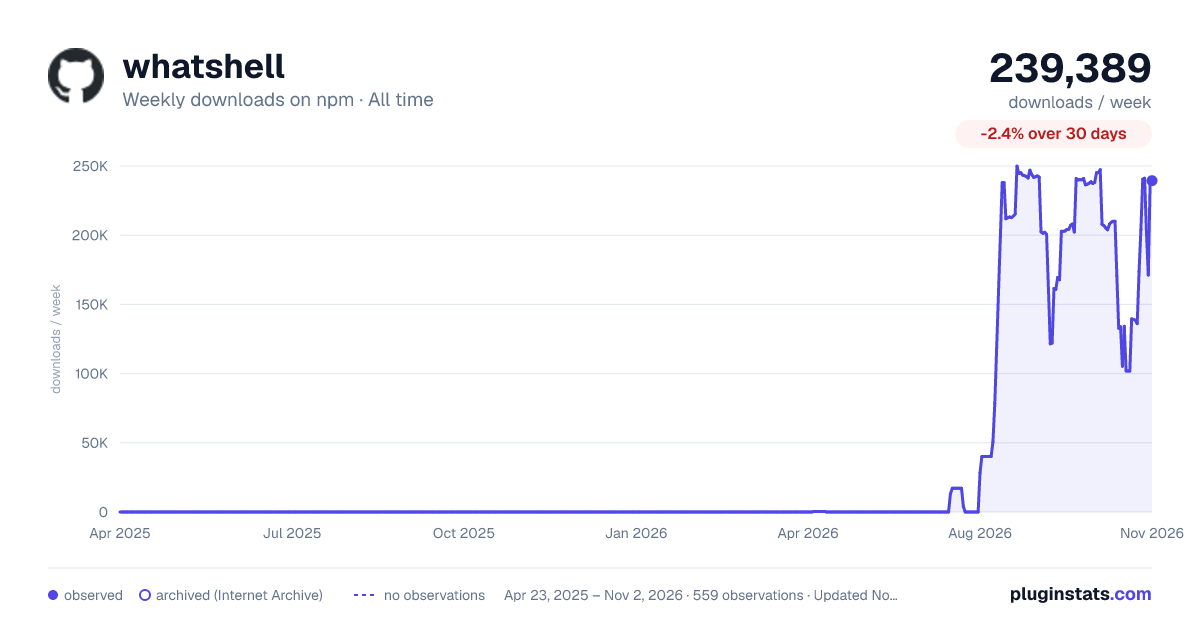

Adoption over time


7/30/90-day growth


Filled points are observed values; hollow points come from Internet Archive snapshots of the listing page. Dashed segments span periods with no observations — values between points are not interpolated.
Recent observations
Full history (543)Similar npm Claude Code plugins
Data source
Weekly downloads (trailing 7 complete days) come from the official npm downloads API. Downloads include CI and mirrors and are not equivalent to installs or users. npm publishes no ratings.
Listing: https://www.npmjs.com/package/whatshell. First seen Oct 16, 2026; last successful collection Oct 18, 2026. See the methodology.