 PluginStats
@ynode/sqrl-lint weekly downloads statistics
By ynode · npm · Prettier plugins
Tag-aware linter, formatter, and Prettier plugin for Squirrelly (.sqrl) templates
@ynode/sqrl-lint has 117 recorded weekly downloads on npm, an increase of 37.6% over the past 30 days.
It ranks #1657 of 2,256 tracked npm listings by weekly downloads.
Over 90 days, weekly downloads changed by +67.1%.
PluginStats has 121 daily observations since Jun 19, 2026; the latest is from Oct 17, 2026.
About @ynode/sqrl-lint
@ynode/sqrl-lint
Copyright (c) 2026 Michael Welter
A dedicated linter and formatter for Squirrelly (.sqrl) templates, built specifically for the @ynode Fastify ecosystem. It combines a tag-aware formatter with Squirrelly engine validation and targeted semantic rules based on real template failures. Surrounding HTML, CSS, and JavaScript remain untouched.
Features
• Strict Formatting: Enforces consistent spacing for helpers ({{@, {{#), base brackets ({{, }}), raw outputs ({{*), whitespace controls, execution tags ({{!), and block closures ({{/). • Semantic Guardrails: Catches bare logical OR expressions, dead elseif spellings, output assignments, unsafe JSON rendering, invalid native branches, malformed templates, and optional project policies. • Engine Validation: Compiles each finalized template with Squirrelly so malformed JavaScript, comments, and helper structure fail during linting instead of at request time. • Actionable Diagnostics: Emits stable rule IDs with one-based line and column locations in text, JSON, and SARIF 2.1.0 reports. • Read-Only Checks: Fails CI pipelines with exit code 1 for formatting or semantic violations. • Quality of Life: Automatically ignores node_modules by default and presents beautiful, colorized error logs and success reports. • Conservative Auto-Repair: --fix applies formatting and semantics-preserving repairs while leaving judgment calls as diagnostics. • Fast-Glob Powered: Built-in fast-glob processing natively supports arbitrary inclusion and exclusion targeting.
Node.js support
This package requires Node.js 20.19.0 or newer. CI exercises the exact 20.19.0, 22.13.0, and 24.0.0 boundaries. Node.js 20 remains tested only to preserve the current major-version contract even though upstream support has ended; use Node.js 22 or 24 for supported production deployments. A newly released Node.js major is not considered supported until it is added to CI, even when the open engines range admits it.
Installation
Supported runtimes are Node.js 20 at 20.19 or newer, Node.js 22 at 22.12 or newer, or Node.js 23+, matching the CLI's yargs runtime dependency.
Usage
You can use the linter either manually via npx or wire it directly into your package.json scripts block.
Check Formatting (Read-Only)
If any files need formatting or contain semantic errors, diagnostics are logged to stderr and the process exits with a non-zero code (see Exit Codes).
Auto-Fix Formatting
Applies formatting plus safe semantic repairs. Non-fixable findings, such as an assignment in an output tag, remain diagnostics and still produce exit code 1 after fix mode.
JSON Reporting
In file mode, this emits a machine-readable JSON summary to stdout, suitable for CI/log parsers. In --stdin mode, formatted template content uses stdout, so the JSON report is written to stderr instead. Both modes use the same summary schema: mode and success, aggregate file/error counts, concurrency and duration, plus a results array with per-file statuses and diagnostics. Each diagnostic includes ruleId, severity, message, index, line, column, and fixable. Check-mode locations refer to the invocation's original input. After --fix writes safe repairs, unresolved diagnostics are recalculated against the finalized file or stdout content.
SARIF Reporting
SARIF 2.1.0 output integrates with code-scanning systems while keeping rule IDs and source locations stable. Semantic diagnostics retain their normal IDs, and formatting differences use the dedicated formatting rule at the first changed source position. Successful --fix runs omit resolved findings. Project files use portable %SRCROOT%-relative artifact URIs, and operational failures appear as invocation notifications.
As with JSON reporting, file-mode SARIF is written to stdout; stdin template data stays on stdout, so --stdin --report sarif writes the report to stderr.
Disable ANSI Colors
Disables ANSI color styling in text output.
Diffs (Check Mode)
Unified diffs are enabled by default for each file that needs formatting, making CI failures actionable. Use --no-diff to suppress them.
Ignore Additional Files
Adds one or more glob patterns to the built-in ignores. If no input files match after ignores are applied, the command reports an operational error and exits with code 2.
Parallel Processing
Processes files with bounded parallelism for faster runs on large repositories.
Stdin / Editor Integration
Reads template content from stdin and writes the formatted output to stdout, making it ideal for editor "format on save" integrations, shell pipelines, and git hooks. Anonymous stdin uses the base lint configuration. Use --stdin-filepath to control the filename shown in error messages and diffs and opt that virtual path into matching configuration overrides.
Quiet Mode
Suppresses reports and diagnostics, including JSON and SARIF reports; only the exit code indicates the result. In --stdin mode, the formatted template content remains on stdout because it is the command's data output.
Version
Prints the installed package version and exits.
Exit Codes
| Code | Meaning |
| 0 | All files are formatted and no semantic lint errors remain | | 1 | One or more files need formatting or have semantic lint errors | | 2 | Operational error (I/O failure, invalid arguments, permission denied) |
Formatting Rules
The linter enforces consistent spacing inside Squirrelly tag boundaries. Rules are applied in order; the first match wins.
| Tag Type | Before | After |
| Helper / Macro open | {{@extends()}} | {{@ extends() }} | | Native branch | {{#elif(user)}} | {{# elif(user) }} | | Self-closing helper | {{@partial("x")/}} | {{@ partial("x") /}} | | Execution | {{!it.ready=true;}} | {{! it.ready=true; }} | | Block close | {{/if}} | {{/ if }} | | Expression | {{name}} | {{ name }} | | Raw output | {{*rawHtml}} | {{* rawHtml }} | | Whitespace controls | {{-name-}} | {{- name -}} |
Content outside {{ ... }} boundaries (HTML, CSS, JS) is never modified.…
Description from the npm listing.
- squirrelly
- sqrl
- template
- linter
- formatter
- lint
- format
- prettier
- prettier-plugin
- code-style
- template-linter
- ynode
Where @ynode/sqrl-lint sits in the listing
Each band is one page of 20. Weekly downloads on a log scale. Placement is projected from weekly downloads, so it can differ from the marketplace's own sort order. Hover a dot to see the listing.


Charts
Images: 30d · 1y · all time · 1600×900 dark


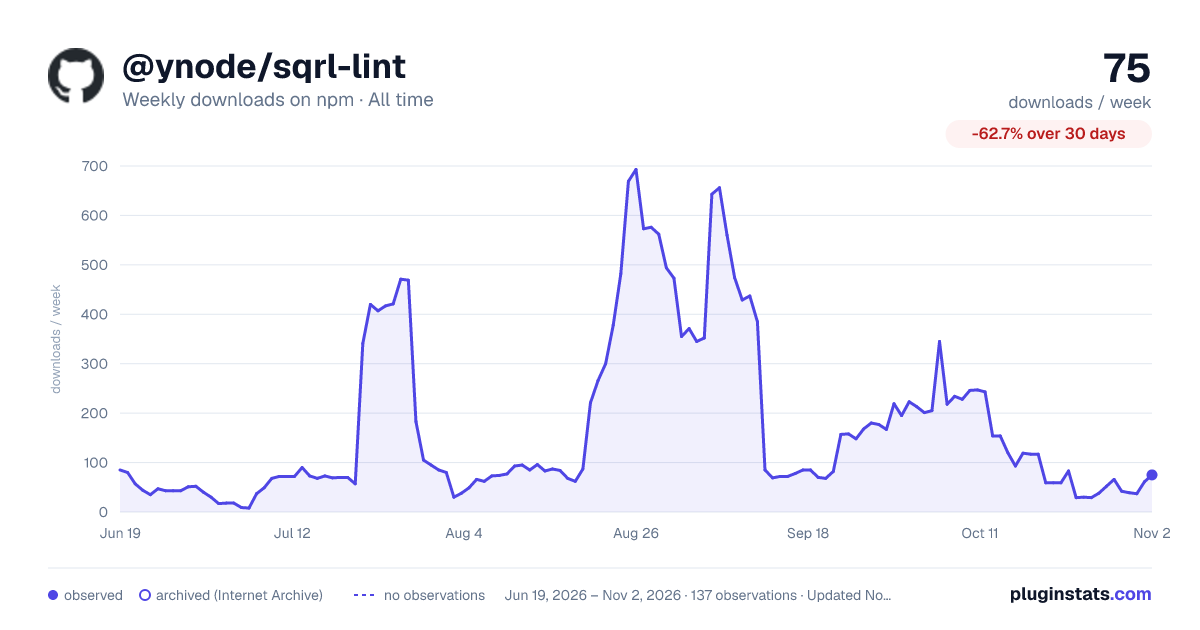

Adoption over time


7/30/90-day growth


Filled points are observed values; hollow points come from Internet Archive snapshots of the listing page. Dashed segments span periods with no observations — values between points are not interpolated.
Recent observations
Full history (121)Similar npm Prettier plugins plugins
Data source
Weekly downloads (trailing 7 complete days) come from the official npm downloads API. Downloads include CI and mirrors and are not equivalent to installs or users. npm publishes no ratings.
Listing: https://www.npmjs.com/package/@ynode/sqrl-lint. First seen Oct 16, 2026; last successful collection Oct 19, 2026. See the methodology.