 PluginStats
eslint-plugin-perfectionist weekly downloads statistics
By azat-io (2 listings) · npm · ESLint plugins
ESLint plugin for sorting various data such as objects, imports, types, enums, JSX props, etc.
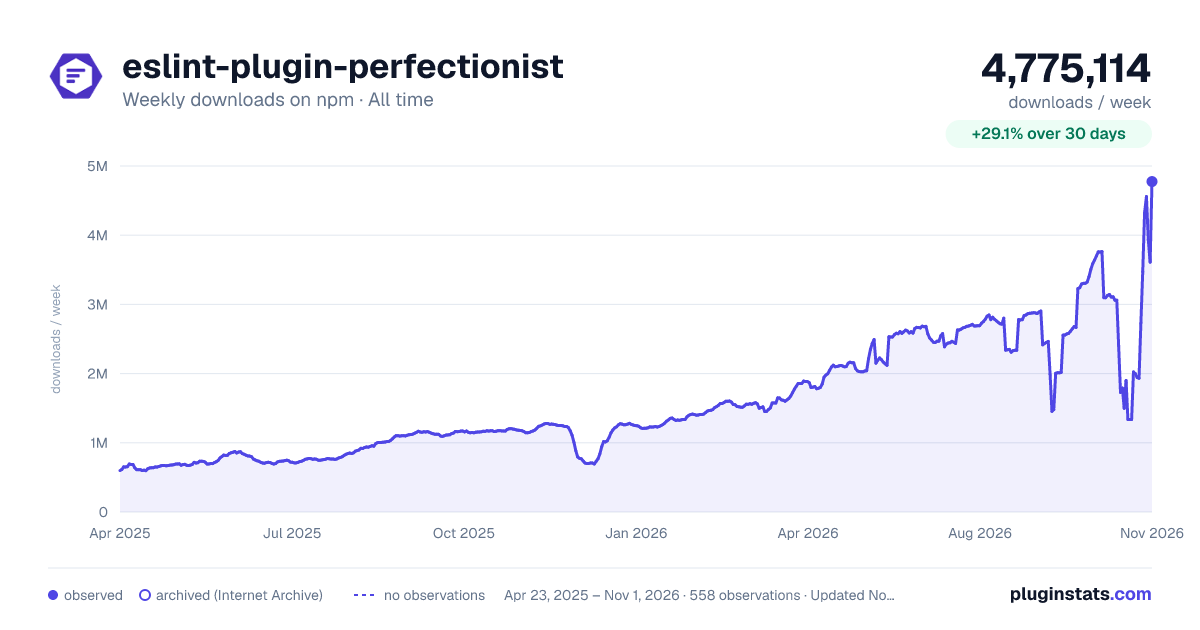
eslint-plugin-perfectionist has 1,497,944 recorded weekly downloads on npm, a decrease of 42.0% over the past 30 days, ranking #169 of 2,308 tracked listings.
About eslint-plugin-perfectionist
ESLint Plugin Perfectionist
<img src="https://raw.githubusercontent.com/azat-io/eslint-plugin-perfectionist/main/docs/public/logo.svg" alt="ESLint Plugin Perfectionist logo" align="right" height="160" />




An ESLint plugin that sets rules to format your code and make it consistent.
This plugin defines rules for sorting various data, such as objects, imports, TypeScript types, enums, JSX props, Svelte attributes, etc. alphabetically, naturally, or by line length.
All rules are automatically fixable. It's safe!
Why
Sorting imports and properties in software development offers numerous benefits:
-
Readability: Finding declarations in a sorted, large list is a little faster. Remember that you read the code much more often than you write it.
-
Maintainability: Sorting imports and properties is considered a good practice in software development, contributing to code quality and consistency across the codebase.
-
Code Review and Collaboration: If you set rules that say you can only do things one way, no one will have to spend time thinking about how to do it.
-
Code Uniformity: When all code looks exactly the same, it is very hard to see who wrote it, which makes achieving the lofty goal of collective code ownership easier.
-
Aesthetics: This not only provides functional benefits, but also gives the code an aesthetic appeal, visually pleasing and harmonious structure. Take your code to a beauty salon!
Documentation
See docs.
Try it on your own code in the Playground.
Alphabetical Sorting
<picture> <source srcset="https://raw.githubusercontent.com/azat-io/eslint-plugin-perfectionist/main/docs/public/examples/example-alphabetical-light.webp" media="(prefers-color-scheme: light)" /> <source srcset="https://raw.githubusercontent.com/azat-io/eslint-plugin-perfectionist/main/docs/public/examples/example-alphabetical-dark.webp" media="(prefers-color-scheme: dark)" /> <img src="https://raw.githubusercontent.com/azat-io/eslint-plugin-perfectionist/main/docs/public/examples/example-alphabetical-light.webp" alt="ESLint Plugin Perfectionist alphabetical usage example" /> </picture>Sorting by Line Length
<picture> <source srcset="https://raw.githubusercontent.com/azat-io/eslint-plugin-perfectionist/main/docs/public/examples/example-line-length-light.webp" media="(prefers-color-scheme: light)" /> <source srcset="https://raw.githubusercontent.com/azat-io/eslint-plugin-perfectionist/main/docs/public/examples/example-line-length-dark.webp" media="(prefers-color-scheme: dark)" /> <img src="https://raw.githubusercontent.com/azat-io/eslint-plugin-perfectionist/main/docs/public/examples/example-line-length-light.webp" alt="ESLint Plugin Perfectionist line length usage example" /> </picture>Installation
You'll first need to install ESLint v8.45.0 or greater:
npm install --save-dev eslint
Next, install eslint-plugin-perfectionist:
npm install --save-dev eslint-plugin-perfectionist
Usage
Add eslint-plugin-perfectionist to the plugins section of the ESLint
configuration file and define the list of rules you will use.
Flat Config (eslint.config.js)
import perfectionist from 'eslint-plugin-perfectionist'

export default [
  {
    plugins: {
      perfectionist,
    },
    rules: {
      'perfectionist/sort-imports': [
        'error',
        {
          type: 'natural',
          order: 'asc',
        },
      ],
    },
  },
]
Legacy Config (.eslintrc.js)
<!-- prettier-ignore -->
module.exports = {
  plugins: [
    'perfectionist',
  ],
  rules: {
    'perfectionist/sort-imports': [
      'error',
      {
        type: 'natural',
        order: 'asc',
      }
    ]
  }
}
Configs
The easiest way to use eslint-plugin-perfectionist is to use ready-made
configs. Config files use all the rules of the current plugin, but you can
override them.
Flat Config (eslint.config.js)
<!-- prettier-ignore -->
import perfectionist from 'eslint-plugin-perfectionist'

export default [
  perfectionist.configs['recommended-natural'],
]
Legacy Config (.eslintrc.js)
<!-- prettier-ignore -->
module.exports = {
  extends: [
    'plugin:perfectionist/recommended-natural-legacy',
  ],
}
List of Configs…
Description from the npm listing.
- eslint
- eslint-plugin
- perfectionist
README badge
Show your rank in a README or on your website. The badge updates automatically.
Charts
Images: 30d · 1y · all time · 1600×900 dark



Adoption over time
7/30/90-day growth
Ranking history
Listing placement
Listing placement
Filled points are observed values; hollow points come from Internet Archive snapshots of the listing page. Dashed segments span periods with no observations — values between points are not interpolated.
Each band is one page of 20. Weekly downloads on a linear scale. Placement is projected from weekly downloads, so it can differ from the marketplace's own sort order. Hover a dot to see the listing.
Recent observations
Full history (544)Similar npm ESLint plugins plugins
All 20 eslint-plugin-perfectionist alternatives- 1.4M weekly downloads-36.3%
Data source
Weekly downloads (trailing 7 complete days) come from the official npm downloads API. Downloads include CI and mirrors and are not equivalent to installs or users. npm publishes no ratings.
Listing: https://www.npmjs.com/package/eslint-plugin-perfectionist. First seen Oct 16, 2026; last successful collection Oct 20, 2026. See the methodology.