 PluginStats
@upship/agents weekly downloads statistics
An agent platform where agents are data: versioned rows with a prompt, a model tier, tools, and an optional pipeline. API, CLI, and web UI in one install.
@upship/agents has 54 recorded weekly downloads on npm, a decrease of 96.3% over the past 30 days, ranking #1801 of 2,322 tracked listings.
About @upship/agents
Agent Platform
Docs and project site: https://khtdr.com/agents/
Agents are data, not code. An agent is a Postgres row (or SQLite row, or JSON file) with a system prompt, a tier, and a list of tool names — created, edited, versioned, and run through an HTTP API, a CLI, or a web UI. Nothing about adding an agent requires a rebuild.
Tools are the other half: those are code, registered at startup, with their
descriptions and runtime config stored as data rows layered on top. And since an
agent is addressable by name just like a tool, one agent can list another in its
tools array — orchestration falls out of the same lookup.
Install
npm install -g @upship/agents
agent serve                 # asks for your OpenRouter key once, then API + UI on :2137
Everything an install owns lives under ~/.agents (AGENTS_HOME to move it):
its .env, a SQLite database, and the directories tools read from and write
to. Agents read the install's data directory and the places your projects live
(DATA_DIR in that .env, a list; first run fills in ~/code and friends if
they exist, and agent add-data-dir . adds where you stand), so cd into a
project and run an agent against it. Then, from any
other terminal:
agent new                   # it asks what you want, then drafts an agent
agent list
agent <name> "some input"
Or run the server in the background and manage it from anywhere:
agent start                 # same server, detached; waits until it answers
agent open                  # the web UI in a browser
agent status                # up? where? since when?
agent logs -f               # what it has been doing
agent stop
Needs Node 24 or newer. Everything below is for working on the platform itself.
Quick start (from a checkout)
npm install
cp .env.example .env        # fill in OPENROUTER_API_KEY
npm run db:push             # set up whatever STORE_DRIVER points at
npm run dev                 # API on :2137
npm run dev:ui              # UI on :2139
The shortest useful .env is two lines:
OPENROUTER_API_KEY=sk-or-...
STORE_DRIVER=sqlite
STORE_DRIVER=sqlite needs no database to stand up (Node 24+, which is where
node:sqlite stabilized). Set it in .env rather than per-command — the server,
the CLI, and the seed script each resolve it independently, so a value typed on
one command line configures only that process.
Seed some example agents with npm run seed. To run both processes under pm2
instead of two terminals, npm run pm2:start.
Then make your first agent — from here or from anywhere else:
agent new                                           # it asks what you want, then drafts one
agent skill install                                 # or teach Claude Code to author here: /new-agent
agent brief                                         # or just read what this install can do
Or make the runtime part of your own app rather than a service beside it:
cd ~/my-app
agent bundle && npm install ./lib/agents             # vendors the runtime; see lib/agents/README.md
Concepts
An agent
{
  "name": "researcher",
  "systemPrompt": "You research topics and report findings with sources.",
  "model": "default",
  "tools": ["web_search", "write_file"]
}
Run it:
agent researcher "what changed in HTTP/3 this year"
tools entries resolve through three tiers, in order: a DB tool definition →
the ToolRegistry → an agent name. That last tier is what makes an
orchestrator just another agent.
Tiers, not models
Agents name a tier — default, fast, or reasoning — never a model id. What a
tier points at is data: shipped defaults, then MODEL_DEFAULT/MODEL_FAST/
MODEL_REASONING env vars, then a stored binding written from the /models
settings page. Repoint a tier and every agent using it moves, with no redeploy.
Prices ride along with the binding, because a model id and its price have to
agree — a mismatch is how a run silently reads as free. An agent that must not
move sets model to an explicit id, which wins over the tier.
Execution modes
Which optional fields an agent sets decides how it runs. Three of them pick an execution mode and the rest wrap whichever one is in play:
| Field set | Behavior |
|---|---|
| (none) | Freeform LLM loop — the model picks tools and decides when it's done |
graph | Deterministic DAG — nodes execute in topological order, no orchestration tokens |
planning | The model writes its own graph first, optionally for a person to approve, then runs it |
debate | N candidates from this agent or a named panel, and a verdict by vote, weight, or judge |
graph and planning are mutually exclusive — a planning agent's graph is the
plan it writes — and a 400 on the save says so. The three wrappers apply to
whichever mode ran:
| Field set | Behavior |
|---|---|
outputSchema | The final message is parsed and validated against a JSON Schema |
reflect | Produce → critique → refine, until a critic agent signs off |
review | A critic reads the finished output once. Nothing re-runs — a run it doesn't approve ends needs_review |
Use a graph when the sequence is known in advance and you want lower cost and per-node error attribution. Use freeform when the model needs to make judgment calls mid-flow.
Graphs
Nodes reference tools or agents by name; edges define the topology. Independent
branches run concurrently, fan-in merges its parents' outputs, and an edge can
carry a condition that routes on the source node's output:…
Description from the npm listing.
- agents
- llm
- orchestration
- dag
- openrouter
- ai-sdk
- sqlite
- postgres
README badge
Show your rank in a README or on your website. The badge updates automatically.
Charts
Images: 30d · 1y · all time · 1600×900 dark


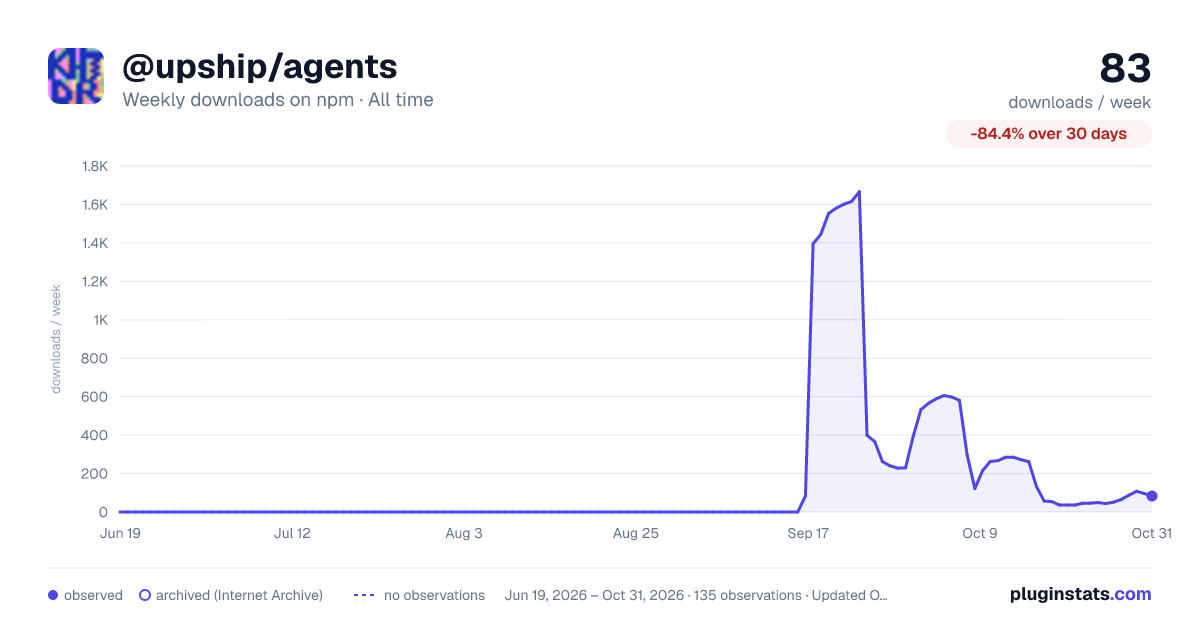

Adoption over time
7/30/90-day growth
Ranking history
Listing placement
Listing placement
Filled points are observed values; hollow points come from Internet Archive snapshots of the listing page. Dashed segments span periods with no observations — values between points are not interpolated.
Each band is one page of 20. Weekly downloads on a linear scale. Placement is projected from weekly downloads, so it can differ from the marketplace's own sort order. Hover a dot to see the listing.
Recent observations
Full history (122)Similar npm AI SDKs plugins
All 20 @upship/agents alternativesData source
Weekly downloads (trailing 7 complete days) come from the official npm downloads API. Downloads include CI and mirrors and are not equivalent to installs or users. npm publishes no ratings.
Listing: https://www.npmjs.com/package/@upship/agents. First seen Oct 16, 2026; last successful collection Oct 20, 2026. See the methodology.