 PluginStats
@automattic/i18n-check-webpack-plugin weekly downloads statistics
By automattic (6 listings) · npm · Webpack plugins
A Webpack plugin to check that WordPress i18n hasn't been mangled by Webpack optimizations.
@automattic/i18n-check-webpack-plugin has 25 recorded weekly downloads on npm, a decrease of 88.8% over the past 30 days, ranking #1937 of 2,391 tracked listings.
About @automattic/i18n-check-webpack-plugin
i18n-check-webpack-plugin
A Webpack plugin to check that WordPress i18n hasn't been mangled by Webpack optimizations.
Installation
Generally you'll install this via your package manager, e.g.
npm install --save-dev @automattic/i18n-check-webpack-plugin
Usage
This goes in the plugins section of your Webpack config, e.g.
{
	plugins: [
		new I18nCheckWebpackPlugin(),
	],
};
Parameters recognized by the plugin are:
-
filter: Allows for specifying which source modules to process for i18n strings. The default is to process all files with extensionsjs,jsx,ts,tsx,cjs, andmjs.The value may be a function, which will be passed the file path relative to [Webpack's context] and which should return true if the file should be processed, or a string or RegExp to be compared with the relative file path, or an array of such strings, RegExps, and/or functions.
-
expectDomain: Set to the expected text domain that should be used in the output assets. If the assets use some other domain, an error will be generated. -
warnOnly: Set true to produce warnings rather than errors when issues are found. -
extractorOptions: Supply options forGettextExtractor.babelOptions: Supply options for Babel.functions: Supply a custom list of i18n functions to recognize.
Export mangling
Webpack's optimization.mangleExports option, enabled by default in production mode, can on occasion mangle an export to the name of one of the i18n functions this module looks for.
If you want export mangling and run into this issue, a slightly modified copy of Webpack's internal MangleExportsPlugin is provided. Require it as
const I18nSafeMangleExportsPlugin = require( '@automattic/i18n-check-webpack-plugin/I18nSafeMangleExportsPlugin' );
or
import I18nSafeMangleExportsPlugin from '@automattic/i18n-check-webpack-plugin/I18nSafeMangleExportsPlugin';
and add it to the plugins section of your Webpack config like
{
	plugins: [
		new I18nSafeMangleExportsPlugin(),
	],
};
Parameters recognized by the plugin are:
deterministic: Set false to use the 'size' mode.
Known problematic code patterns
These are some code patterns that are known to cause translations to be mangled.
Lost comments due to expression movement
To avoid the minifier dropping or misplacing the translator comments, it's best to keep the comment as close to the function call as possible. For example, in
const a, b, c;

/* translators: This is a bad example. */
const example = __( 'Example', 'domain' );
the minifier will combine those into a single const statement and misplace the comment on the way. To fix it, move the comment to the variable declaration instead of the const statement:
const a, b, c;

const
	/* translators: This is a good example. */
	example = __( 'Example', 'domain' );
In some cases even the assignment may be dropped. In that case, you can attach the comment directly to the function call:
const example =
	/* translators: This is a good example. */
	__( 'Example', 'domain' );
Similarly in jsx, a comment placed like this may wind up misplaced:
<Tag
	/* translators: This is a bad example. */
	property={ __( 'Here's another example', 'domain' ) }
/>
Instead put it inside the property:
<Tag
	property={
		/* translators: This is an example of how to do it right. */
		__( 'Here's another example', 'domain' )
	}
/>
Conditional function call compaction
When a conditional calls the same function in each branch with only one argument different, Terser will transform it to a single call with the condition inside the argument. For example, either of these
example = flag ? __( 'Flag is set', 'domain' ) : __( 'Flag is not set', 'domain' );
if ( flag ) {
	example = __( 'Flag is set', 'domain' );
} else {
	example = __( 'Flag is not set', 'domain' );
}
will become
example = __( flag ? 'Flag is set' : 'Flag is not set', 'domain' );
which will result in neither string being detected for translation.
You can fix this by making the calls less similar, for example by adding a dummy argument to one call
example = flag ? __( 'Flag is set', 'domain' ) : __( 'Flag is not set', 'domain', /* dummy arg to avoid bad minification */ 0 );
or by specifying an unnecessary context in one call (or a different context in both)
example = flag ? __( 'Flag is set', 'domain' ) : _x( 'Flag is not set', '', 'domain' );
example = flag ? _x( 'Flag is set', 'Something', 'domain' ) : _x( 'Flag is not set', 'Something different', 'domain' );
Note that, as far as wp i18n is concerned, __( 'Something', 'domain' ) and _x( 'Something', '', 'domain' ) are the same message.
Pruned branches and common strings
In some cases, such as when process.env.NODE_ENV is tested or when ES module tree-shaking is done, code paths can be known to be unreachable. For example, only one branch in the following will be kept:
if ( process.env.NODE_ENV === 'production' ) {
	console.log( __( 'This is production mode', 'domain' ) );
} else {
	console.log( __( 'This is development mode', 'domain' ) );
}
The plugin tries to detect this sort of thing and avoid reporting the translations from the pruned branch as having been mangled. But this can fail if the relevant strings are still used untranslated:
if ( value === 'foo' ) {
	if ( process.env.NODE_ENV === 'development' ) {
		console.log( __( 'Found a value', 'domain' ), __( 'foo', 'domain' ) );
	}
	// Then do some other stuff...
}
In production mode the one use of __( 'foo', 'domain' ) is dropped, but the plugin will think it was only mangled because the string 'foo' is still present.…
Description from the npm listing.
- webpack
- plugin
- webpack-plugin
- wordpress
- gettext
- i18n
README badge
Show your rank in a README or on your website. The badge updates automatically.
Charts
Images: 30d · 1y · all time · 1600×900 dark


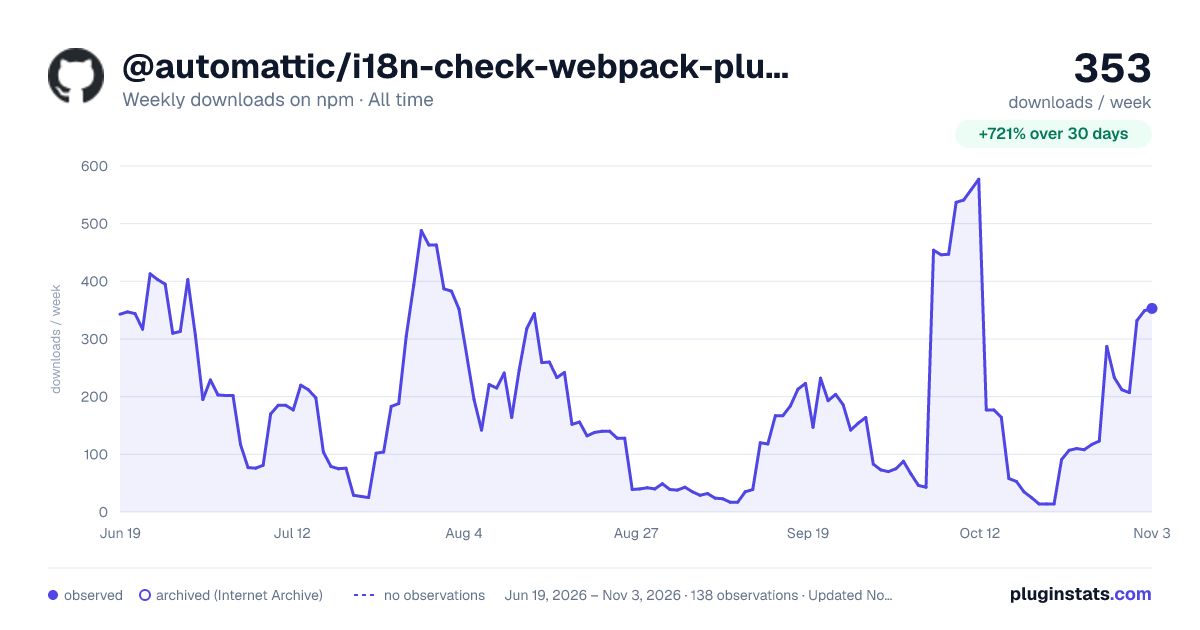

Adoption over time
7/30/90-day growth
Ranking history
Listing placement
Listing placement
Filled points are observed values; hollow points come from Internet Archive snapshots of the listing page. Dashed segments span periods with no observations — values between points are not interpolated.
Each band is one page of 20. Weekly downloads on a linear scale. Placement is projected from weekly downloads, so it can differ from the marketplace's own sort order. Hover a dot to see the listing.
Recent observations
Full history (122)Similar npm Webpack plugins plugins
All 20 @automattic/i18n-check-webpack-plugin alternatives- 26 weekly downloads-72.6%
- 26 weekly downloads-54.4%
- 26 weekly downloads+13.0%
- 27 weekly downloads-80.6%
Data source
Weekly downloads (trailing 7 complete days) come from the official npm downloads API. Downloads include CI and mirrors and are not equivalent to installs or users. npm publishes no ratings.
Listing: https://www.npmjs.com/package/@automattic/i18n-check-webpack-plugin. First seen Oct 16, 2026; last successful collection Oct 21, 2026. See the methodology.