 PluginStats
@ai-sdk-tools/artifacts weekly downloads statistics
By ai-sdk-tools (5 listings) · npm · AI SDKs
Advanced streaming interfaces for AI applications
@ai-sdk-tools/artifacts has 9,394 recorded weekly downloads on npm, a decrease of 60.9% over the past 30 days, ranking #926 of 2,256 tracked listings.
About @ai-sdk-tools/artifacts
@ai-sdk-tools/artifacts
Advanced streaming interfaces for AI applications. Create structured, type-safe artifacts that stream real-time updates from AI tools to React components.
Features
• Type-Safe Streaming - Full TypeScript support with Zod schema validation • Real-time Updates - Stream partial updates with progress tracking • Clean API - Minimal boilerplate, maximum flexibility • State Management - Built on @ai-sdk-tools/store for efficient message handling • Performance Optimized - Efficient state management and updates
Installation
Why do you need both packages?
• @ai-sdk-tools/artifacts - Provides the artifact streaming and management APIs • @ai-sdk-tools/store - Required for message state management and React hooks
The artifacts package uses the store package's useChatMessages hook to efficiently extract and track artifact data from AI SDK message streams, ensuring optimal performance and avoiding unnecessary re-renders.
Setup
-
Initialize Chat with Store
-
Use Artifacts from Any Component
The useArtifact hook automatically connects to the global chat store to extract artifact data from message streams - no prop drilling needed!
Quick Start
-
Define an Artifact
-
Create a Tool with Context
-
Set Up Route with Context
-
Consume in React
API Reference
artifact(id, schema)
Creates an artifact definition with Zod schema validation.
useArtifact(artifact, callbacks?)
React hook for consuming a specific streaming artifact.
Returns: • data - Current artifact payload • status - Current status ('idle' | 'loading' | 'streaming' | 'complete' | 'error') • progress - Progress value (0-1) • error - Error message if failed • isActive - Whether artifact is currently processing • hasData - Whether artifact has any data
Callbacks: • onUpdate(data, prevData) - Called when data updates • onComplete(data) - Called when artifact completes • onError(error, data) - Called on error • onProgress(progress, data) - Called on progress updates • onStatusChange(status, prevStatus) - Called when status changes
useArtifacts(options?)
React hook for listening to all artifacts across all types. Perfect for implementing switch cases to render different artifact types.
Options: • onData(artifactType, data) - Callback fired when any artifact updates • storeId - Optional store ID (defaults to global store)
Returns: • byType - All artifacts grouped by type: Record • latest - Latest version of each artifact type: Record • artifacts - All artifacts in chronological order: ArtifactData[] • current - Most recent artifact across all types: ArtifactData | null
Example:
Advanced Usage
Combining Both Hooks
You can use both hooks together for different purposes:
Hook Selection Guide
Use useArtifact when: • You need to display/work with a specific artifact type • You want detailed status, progress, and error handling • You need type-safe access to the artifact's payload
Use useArtifacts when: • You want to render different artifact types with switch cases • You need to listen to all artifacts for logging/analytics • You want to show an overview of all available artifacts • You're building a generic artifact renderer
Examples
See the src/examples/ directory for complete examples including: • Burn rate analysis with progress tracking • React component integration • Route setup and tool implementation • Using useArtifacts for multi-type artifact rendering
Contributing
Contributions are welcome! See the contributing guide for details.
License
MIT
Description from the npm listing.
- ai
- artifacts
- streaming
- react
- ai-sdk
- typescript
README badge
Show your rank in a README or on your website. The badge updates automatically.
Charts
Images: 30d · 1y · all time · 1600×900 dark


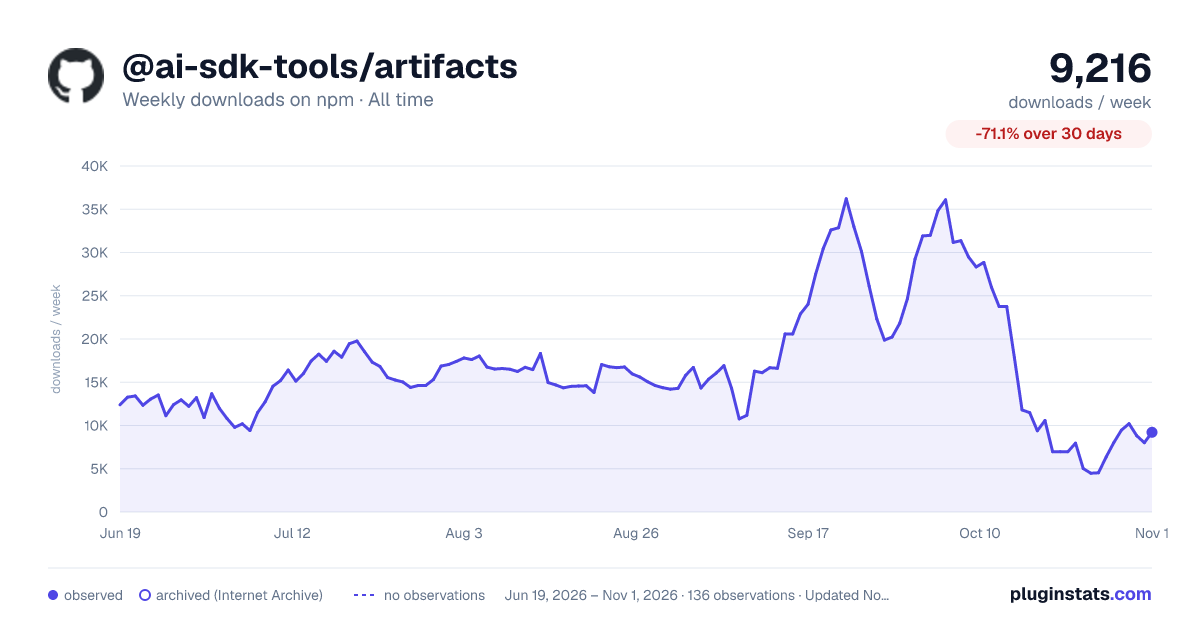

Adoption over time
7/30/90-day growth
Ranking history
Listing placement
Listing placement
Filled points are observed values; hollow points come from Internet Archive snapshots of the listing page. Dashed segments span periods with no observations — values between points are not interpolated.
Each band is one page of 20. Weekly downloads on a linear scale. Placement is projected from weekly downloads, so it can differ from the marketplace's own sort order. Hover a dot to see the listing.
Recent observations
Full history (121)Similar npm AI SDKs plugins
All 20 @ai-sdk-tools/artifacts alternativesData source
Weekly downloads (trailing 7 complete days) come from the official npm downloads API. Downloads include CI and mirrors and are not equivalent to installs or users. npm publishes no ratings.
Listing: https://www.npmjs.com/package/@ai-sdk-tools/artifacts. First seen Oct 16, 2026; last successful collection Oct 19, 2026. See the methodology.