 PluginStats
vite-plugin-lib-inject-css weekly downloads statistics
By emosheeep (2 listings) · npm · Vite plugins
Inject css at the top of chunk file in lib mode using `import` statement, support multiple entries.
vite-plugin-lib-inject-css has 146,673 recorded weekly downloads on npm, a decrease of 56.0% over the past 30 days.
It ranks #411 of 2,256 tracked npm listings by weekly downloads.
Over 90 days, weekly downloads changed by -51.7%.
PluginStats has 121 daily observations since Jun 19, 2026; the latest is from Oct 17, 2026.
About vite-plugin-lib-inject-css
vite-plugin-lib-inject-css
English | 简体中文
Inject css at the top of each chunk file in library mode using import statement, support multi-entries build, especially to help building component libraries.
Can css be styleInjected in library mode? vite#1579.
Features
Note that this plugin only works with library-mode.
• 💡 Multiple entires support. • ⚡️ Sourcemap support. • 💻 SSR build support. • 🛠 Out-of-box, tiny and pretty.
Quick Experience
View the cloud ide on stackblitz.com, and setup with the following scripts:
Usage
Motivation
Vite shines in Web project development, but it can also be used for library projects.
But when it comes to component library development, multiple entries are often involved. Although Vite 3.2+ later supports multiple entry points, it doesn't provide relevant options for us to associate css with component, which leads to the problem that we can't distinguish between the entry point and css files even though the bundle is successful.
Based on this, we need to write a plugin to try to find the relationship between the two, and inject styles correctly.
How does It Work
As a library(mostly component library), we want to import styles automatically when referencing the component.
The simplest way is to add a line import './style.css'; to the top of the generated file, multiple lines are multiple lines. As a library provider, we should provide flexibility as much as possible, and delegate the task of how to handle these css files to the user's build tool.
But most of the Vite plugins on the market that claim to automatically inject CSS are designed in a way use document.createElement ('style'), which is not graceful, and it assumes that the current is in the Browser's DOM environment, which makes the library SSR-incompatible.
Here's the reply(vite#issuecomment) of the author of Vite, Evan You.
So the main problem becomes to how do we know which style files are involved in one chunk file?
In fact, vite adds a property named viteMetadata on each chunk file in plugin lifecycle, you can check css.ts for further information.
We can get which resources(include CSS files) are associated with current chunk file by using this property. Based on this, the plugin injects styles by using renderChunk hook, which is the simplest and most effective way.
*Prefer to check plugin source code to get more information and welcome to make contribution*, which is simple enough(100+ lines).
Recipes of Creating Component Library
How do we create a component library with vite, which can auto import styles and has out-of-box tree-shaking functionality?
Most of component libraries provide two ways. One is totally import:
The other is import on demand, in common uses with a third-part plugin like babel-plugin-import:
But the best way is that when we use named imports, the style imports and tree-shaking can be applied automatically.
How Should We do
Fortunately, ES Module naturally has static analysis capabilities, and mainstream tools basically implement ESM-based Tree-shaking functions, such as webpack/rollup/vite.
Then we only need the following three steps: 1. Adjust the output format to ES Module → Out-of-the-box Tree-shaking functionality. 2. Use this plugin for style injection → auto import styles 3. The last and most important, add all of the entry files you’ve exported in main.js to your rollup.input configurations.
It should be noted that the import of CSS files has side effects, and we also need to declare the sideEffects field in the library's package.json file to prevent the CSS file from being accidentally removed by the user side builds.
Here's an example:
Questions
Why does Style Code Injection Fail?
Here're some possible reasons:
• When build.cssCodeSplit is false, all of css code will be collected into a standalone css file named style.css, style injection will be skipped. • *Before v2.2.0*, when rollupOptions.output.preserveModules is enabled, the style code injection will be skipped for some reasons. This problem has been solved, refers to #29.
About Rollup Option output.preserveModules
Anytime when you attempt using this option, there in common may has more efficient ways to help you. For example, you can turn every file into an entry point, like suggested in the Rollup docs:
If you want to convert a set of files to another format while maintaining the file structure and export signatures, the recommended way—instead of using output.preserveModules that may tree-shake exports as well as emit virtual files created by plugins—is to turn every file into an entry point. You can do so dynamically e.g. via the glob package:
Why do Additional Empty Imports Turn Up in Entry Chunks?
When using multiple chunks, imports of dependencies of entry chunks will be added as empty imports to the entry chunks themselves. This is rollup's default behavior in order for javascript engine performance optimizations, you can turn it off via output.hoistTransitiveImports: false.
Here's an example:
Further, see why-do-additional-imports-turn-up-in-my-entry-chunks-when-code-splitting.
As a third-part library, this behavior may cause sideEffects and make tree-shaking fail, so we set hoistTransitiveImports: false internally by default, you can still manually overwrite it.
Output Directory Structure is Ugly when Building with Multi-entries.
When we build our library with multi-entries, the output looks as follows in common:
Generally speaking, the users who use your library usually don't care about how does your dist directory structure looks like. Just don’t tangle this, we just need to ensure that the unused files will get tree-shaken when we use named imports from the library.
Indeed, you can customize filenames by using output.xxxFileNames options:
And then you'll get:
License
MIT License © 2023 秦旭洋
Description from the npm listing.
- vite
- plugin
- lib
- build
- vite-lib
- vite-plugin
- vite-build
- css
- style
- styles
- inject
- inline
Charts
Images: 30d · 1y · all time · 1600×900 dark


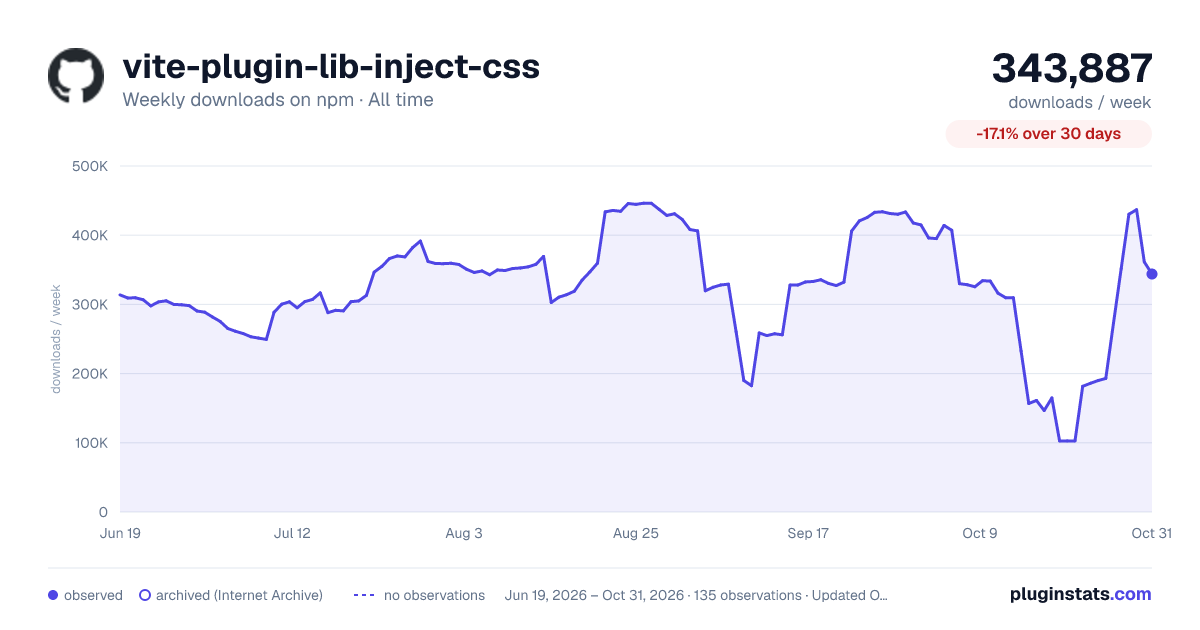

Adoption over time


7/30/90-day growth


Ranking history


Listing placement


Filled points are observed values; hollow points come from Internet Archive snapshots of the listing page. Dashed segments span periods with no observations — values between points are not interpolated.
Each band is one page of 20. Weekly downloads on a log scale. Placement is projected from weekly downloads, so it can differ from the marketplace's own sort order. Hover a dot to see the listing.
Recent observations
Full history (121)Similar npm Vite plugins plugins
All 20 vite-plugin-lib-inject-css alternativesData source
Weekly downloads (trailing 7 complete days) come from the official npm downloads API. Downloads include CI and mirrors and are not equivalent to installs or users. npm publishes no ratings.
Listing: https://www.npmjs.com/package/vite-plugin-lib-inject-css. First seen Oct 16, 2026; last successful collection Oct 19, 2026. See the methodology.