 PluginStats
frog has 9,773 recorded weekly downloads on npm, a decrease of 42.6% over the past 30 days, ranking #969 of 2,391 tracked listings.
About frog
Problem
An agent hits friction constantly, and notices all of it. That makes it the best friction logger you have, and the worst at keeping one: each workaround goes unrecorded, and the next agent starts from nothing.
Nobody who could fix the friction hears about it either. Keeping the log by hand does not work: you stop noticing what to write, and nothing removes the entries you did write. The list goes stale, and a stale list goes unread.
<p> <a href="https://x.com/steveruizok/status/2075303919664734295"> <picture> <source media="(prefers-color-scheme: dark)" srcset=".github/steve-ruiz-papercuts-dark.png"> <img src=".github/steve-ruiz-papercuts-light.png" alt="Steve Ruiz describing a papercuts CLI for agents" width="640"> </picture> </a> </p>Solution
Frog gives the agent somewhere to put it. Each entry is a directory in .agents/friction-log/ holding the
write-up and whatever reproduces it, committed with the code and written the moment friction is hit. The
agent reads them before it starts guessing.
Each entry is then reported as an issue, so somebody owns it, and deleted once that issue closes, so the log only ever holds what is still unresolved. Friction in a dependency can be reported to that project instead, if it has opted in.
Quick Prompt
Prompt your agent:
Read https://frog.fm, and set up Frog in my project.
Setup
1. Install Frog (optional)
Install a standalone executable:
curl -fsSL https://frog.fm/install | sh
irm https://frog.fm/install.ps1 | iex
Or install Frog globally:
npm install -g frog
pnpm add -g frog
bun add -g frog
2. Initialize Frog
If you installed Frog:
frog init
If you skipped installation, use your package manager:
npx frog init
pnpx frog init
bunx frog init
yarn dlx frog init
You can use these runners with any Frog command, e.g. npx frog list.
3. Choose Automation Method
Frog supports two automation methods. If an agent is doing the setup, it should prompt the user before changing repository access or adding a workflow:
- Install the Frog GitHub App and add the App mode workflow for pull-request comments, forks, and cross-repository reporting.
- Use the Action-only mode workflow for same-repository automation without granting a third-party App access.
Choose one method per repository. Running both can create duplicate issues.
Workflow
See the original lifecycle in wevm/frog-demo, where an agent adding
a health endpoint hit a config loader that turns a missing environment variable into the string
"undefined", and logged it on the way past. These linked setup commits predate the least-privilege App
workflow; use the current setup below.
| Step | What happens | Example |
|---|---|---|
| 1 | Agent hits friction while working and runs frog log | — |
| 2 | The entry commits alongside the change that provoked it | 0de4ab6 |
| 3 | Frog comments on the pull request, naming what it found | #1 |
| 4 | Frog reports the entry as an issue and writes its issue: link | #2 |
| 5 | You fix the friction and close the issue | #3 |
| 6 | Frog opens a pull request deleting the resolved entry | #4 |
| 7 | Merging leaves the log holding only what is still unresolved | e4ac13d |
Action-only uses the repository's workflow and GITHUB_TOKEN, without installing the Frog GitHub App:…
Description from the npm listing.
- agents
- dx
- friction-log
- github-issues
- mcp
README badge
Show your rank in a README or on your website. The badge updates automatically.
Charts
Images: 30d · 1y · all time · 1600×900 dark


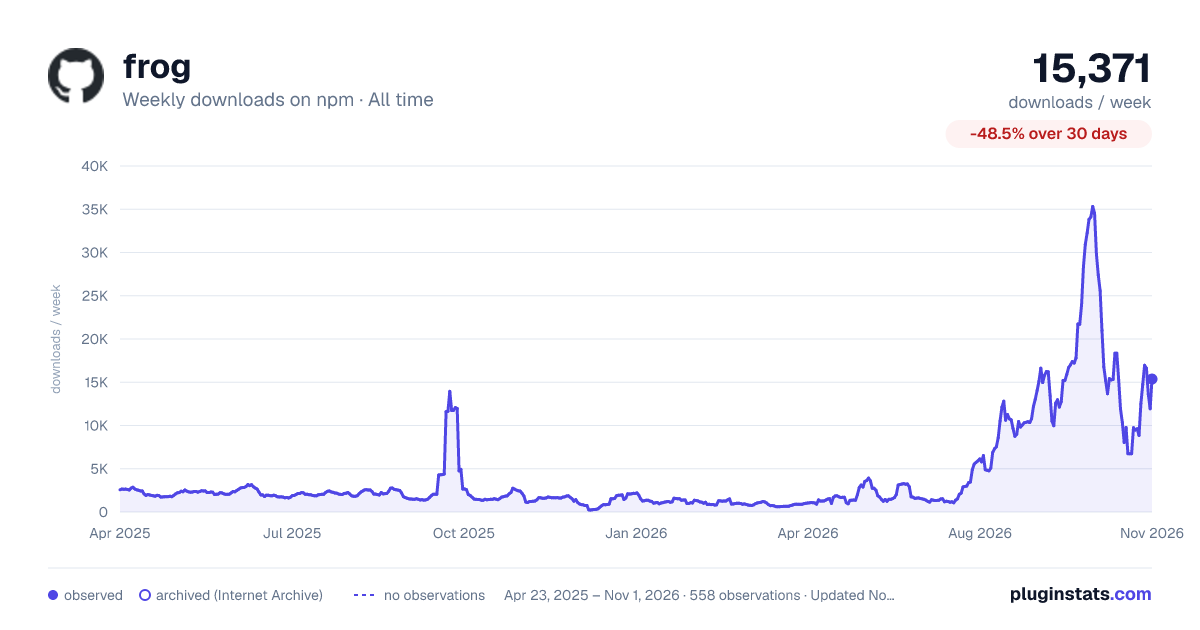

Adoption over time
7/30/90-day growth
Ranking history
Listing placement
Listing placement
Filled points are observed values; hollow points come from Internet Archive snapshots of the listing page. Dashed segments span periods with no observations — values between points are not interpolated.
Each band is one page of 20. Weekly downloads on a linear scale. Placement is projected from weekly downloads, so it can differ from the marketplace's own sort order. Hover a dot to see the listing.
Recent observations
Full history (544)Similar npm MCP servers plugins
All 20 frog alternativesData source
Weekly downloads (trailing 7 complete days) come from the official npm downloads API. Downloads include CI and mirrors and are not equivalent to installs or users. npm publishes no ratings.
Listing: https://www.npmjs.com/package/frog. First seen Oct 16, 2026; last successful collection Oct 21, 2026. See the methodology.