 PluginStats
aem-dialog-generator-plugin weekly downloads statistics
By ramirezcgn · npm · Webpack plugins
Webpack plugin that automatically generates AEM component dialog XML, design dialogs, and policies from JSON configurations
aem-dialog-generator-plugin has 11 recorded weekly downloads on npm, a decrease of 82.8% over the past 30 days, ranking #2039 of 2,322 tracked listings.
About aem-dialog-generator-plugin
AEM Dialog Generator Plugin
A Webpack plugin that automatically generates AEM component _cq_dialog.xml and _cq_design_dialog.xml files with associated policies from simple JSON configurations. Features intelligent automation including automatic style tab generation, policy-to-template mapping, and dynamic indentation for production-ready AEM components.



Features
- 30+ Field Types - textfield, textarea, select, pathfield, pagefield, checkbox, alert, multifield, RTE, fieldset, container, heading, text, tags, image, autocomplete, radiogroup, contentfragmentpicker, experiencefragmentpicker, assetpicker, hidden, button, well, include, styletab, and more
- Custom Resource Types - Override
sling:resourceTypeon any field viaresourceTypefor unsupported or project-specific components - Extended Datasource -
datasourceaccepts a string, an object with extra attributes (e.g.rootPath), or a shorthandtype("tags") for built-in AEM datasources; fieldset and container also supportdatasourceas the sole content source without requiring staticfields - Flexible Layouts - Tabs, simple layouts, accordion, or fieldsets for organization
- Auto-generation - XML files generated on every webpack build
- Simple JSON - Easy-to-read configuration instead of verbose XML
- Multifield Support - Both simple and composite multifields with delete confirmation and drag & drop reordering
- Rich Text Editor - Full RTE configuration with customizable features
- Folder Structure - Supports both
_cq_dialog/.content.xmland_cq_dialog.xmlformats - Show/Hide - Dynamic field visibility based on dropdown or checkbox values
- Image Upload - Built-in support for DAM integration and file uploads
- Page Selection - Native AEM page picker with content tree navigation
- Content Fragments - Full support for Content Fragment and Experience Fragment pickers
- Validation - Regex patterns, plain string validator keys, min/max values, required fields, maxLength
- Contextual Help - Inline help tooltips and documentation links
- Custom Styling - CSS classes, field width control, and Coral UI spacing
- Field Enhancements - Default values, descriptions, placeholder/emptyText, autoFocus, wrapperClass
- Enterprise Features - Custom IDs (
granite:id), analytics tracking (trackingFeature,trackingElement), render hidden, collapsible sections - Advanced Pickers - Filter support, freshness control for DAM assets
- typeHint - Force JCR data type on save (String, Boolean, Long, etc.)
- Design Dialogs - Generate design dialogs (
_cq_design_dialog) for component policies - Policy Generation - Automatically create component policies with RTE config, styles, and more
- Style System - Define style groups and variants for the AEM Style System
- Component Mapping - Configure asset-to-component drag & drop mappings
- Auto Style Tab - Automatic
cq:stylestab generation when styleGroups are present - Template Integration - Automatic policy-to-template mapping for seamless deployment
- Include / Styletab - Embed any Granite UI include node, with a
styletabshorthand for the AEM Style System edit tab - Dialog Root Attributes -
extraClientlibs,helpPath, andtrackingFeatureon thejcr:rootnode of both dialog and design dialog - Render Conditions -
renderConditionsupportssimple,privilege,feature,and,or,legacy:simple, full resource type paths, and explicitresourceTypeoverrides - graniteData child node -
graniteDataprop generates a<granite:data>child node with arbitrary attributes (distinct fromdata, which generates inlinegranite:data-*attributes) - Select Enhancements -
selectType: 'editable'creates a combobox-style input; options supportselectedandhide(→granite:hide) attributes
Installation
npm install aem-dialog-generator-plugin --save-dev
Quick Start
1. Configure webpack
const AemDialogGeneratorPlugin = require('aem-dialog-generator-plugin');
const path = require('path');

module.exports = {
  plugins: [
    new AemDialogGeneratorPlugin({
      sourceDir: path.resolve(__dirname, 'src/main/webpack/components'),
      targetDir: path.resolve(__dirname, '../ui.apps/src/main/content/jcr_root/apps/mysite/components'),
      appName: 'mysite',
      generatePolicies: true,
      policiesTargetDir: path.resolve(__dirname, '../ui.content/src/main/content/jcr_root/conf/mysite/settings/wcm/policies'),
      templatePoliciesDir: path.resolve(__dirname, '../ui.content/src/main/content/jcr_root/conf/mysite/settings/wcm/templates'),
      autoMapPoliciesToTemplates: true
    })
  ]
};
2. Create a dialog.json file
Create src/main/webpack/components/button/dialog.json:
{
  "title": "Button Component",
  "tabs": [
    {
      "title": "Properties",
      "fields": [
        {
          "type": "textfield",
          "name": "./text",
          "label": "Button Text",
          "required": true
        },
        {
          "type": "pathfield",
          "name": "./link",
          "label": "Link",
          "rootPath": "/content"
        },
        {
          "type": "select",
          "name": "./style",
          "label": "Button Style",
          "options": [
            {
              "value": "primary",
              "text": "Primary"
            },
            {
              "value": "secondary",
              "text": "Secondary"
            }
          ]
        }
      ]
    }
  ]
}
```…
Description from the npm listing.
- aem
- adobe-experience-manager
- webpack
- webpack-plugin
- dialog
- design-dialog
- policy
- style-system
- rte
- granite-ui
- touch-ui
- component-dialog
- xml-generator
README badge
Show your rank in a README or on your website. The badge updates automatically.
Charts
Images: 30d · 1y · all time · 1600×900 dark


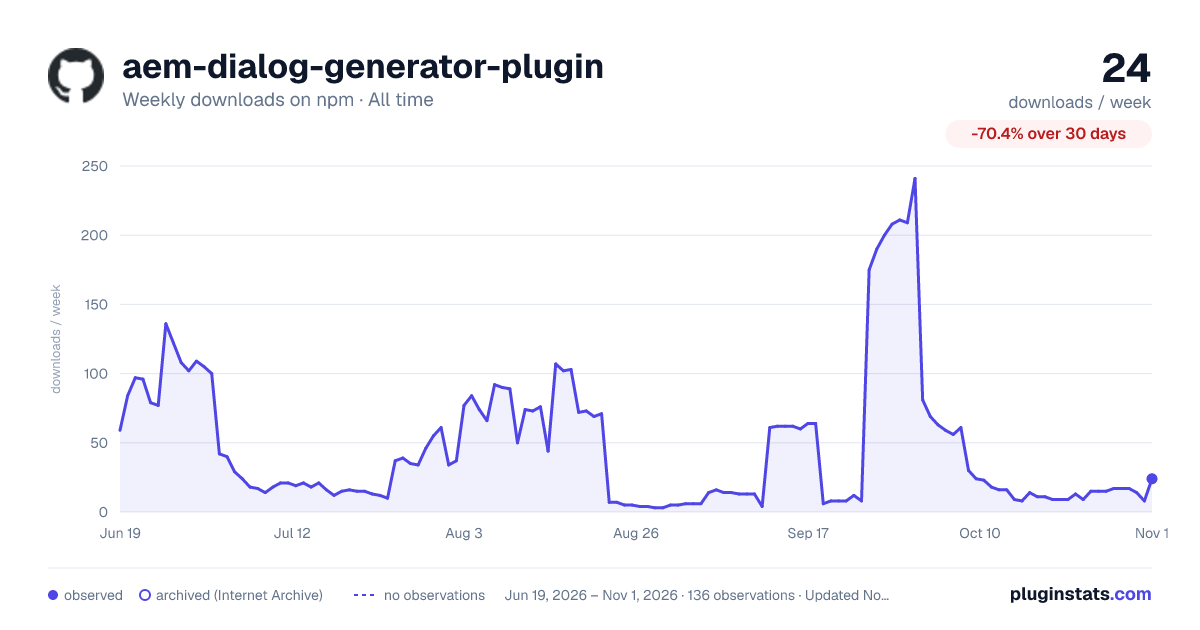

Adoption over time
7/30/90-day growth
Ranking history
Listing placement
Listing placement
Filled points are observed values; hollow points come from Internet Archive snapshots of the listing page. Dashed segments span periods with no observations — values between points are not interpolated.
Each band is one page of 20. Weekly downloads on a linear scale. Placement is projected from weekly downloads, so it can differ from the marketplace's own sort order. Hover a dot to see the listing.
Recent observations
Full history (122)Similar npm Webpack plugins plugins
All 20 aem-dialog-generator-plugin alternatives- 12 weekly downloads-88.6%
Data source
Weekly downloads (trailing 7 complete days) come from the official npm downloads API. Downloads include CI and mirrors and are not equivalent to installs or users. npm publishes no ratings.
Listing: https://www.npmjs.com/package/aem-dialog-generator-plugin. First seen Oct 16, 2026; last successful collection Oct 20, 2026. See the methodology.