 PluginStats
prettier-plugin-gml weekly downloads statistics
By TaylorAbraham · npm · Prettier plugins
Adds GML language support to Prettier
prettier-plugin-gml has 4 recorded weekly downloads on npm, a decrease of 50.0% over the past 30 days, ranking #2210 of 2,322 tracked listings.
About prettier-plugin-gml
Prettier GML Plugin
Overview
This plugin enhances Prettier, a tool for automatically formatting your code in an opinionated way. This adds Game Maker Language (.gml file) support in the context of Game Maker Studio 2.
Example
Before
var enemy = argument0; var damage = argument1

with(enemy)
{

	  self.hp-=damage
	if(self.hp<=0){instance_destroy(self)}
}
After
var enemy = argument0;
var damage = argument1;

with (enemy) {
  self.hp -= damage;
  if (self.hp <= 0) {
    instance_destroy(self);
  }
}
Beautiful! 🌼
Installation
Install the prequisites, then follow either the global or local install below.
Prerequisites
Node and npm must be installed. They can be installed together from here: https://nodejs.org/
You can then verify that Node and npm have been installed correctly by entering the following commands into any terminal such as Powershell:
node -v
npm -v
If you see a version number for each of them, success! Otherwise, try uninstalling your current version of Node and reinstall it.
Global Install
This will install Prettier and the Prettier GML plugin globally on your machine, meaning it can be used for all of your projects.
npm install -g --save-exact prettier prettier-plugin-gml
Local Install
This will install Prettier and the Prettier GML plugin ONLY for a single Game Maker project. Open up a terminal in the directory of your Game Maker project and run the following commands:
npm init
npm install --save-dev --save-exact prettier prettier-plugin-gml
Usage
⚠️IMPORTANT NOTICE⚠️
This extension is still experimental, please be sure to commit your code into version control or have a backup before using this! There may be uncaught bugs that have the potential to delete code. If using VS Code, this is fixable with an "undo" command after saving.
VS Code
Prettier integrates directly into VS Code! Once you have done the above setup, just install the "Prettier" and "GML Support" VS Code extensions. You may need to enable "editor.formatOnSave" in your VS Code preferences, and now when you save a GML file it should automatically format itself!
WARNING: If you followed the global install, this will cause Prettier to start formatting all files you open with VS Code that are supported with Prettier (such as HTML, JS, and CSS files).
Command Line
To use without VS Code, simply follow the installation above and open up a terminal in the directory of your Game Maker project. Then just run
prettier --write .
For more advanced configurations, the Prettier docs have fantastic explanations of the command line options: https://prettier.io/docs/en/cli.html
Troubleshooting
- One of the most common fixes may be to simply reinstall Node and npm from https://nodejs.org/
- If your Node and/or npm versions are very old (<12 or <6.14 respectively), uninstall and reinstall them with more up to date versions
- If you cannot find an answer to your issue after carefully reading through the installation and usage instructions, file an issue right here!
Description from the npm listing.
- prettier
- prettier-plugin
- gml
- game-maker
README badge
Show your rank in a README or on your website. The badge updates automatically.
Charts
Images: 30d · 1y · all time · 1600×900 dark


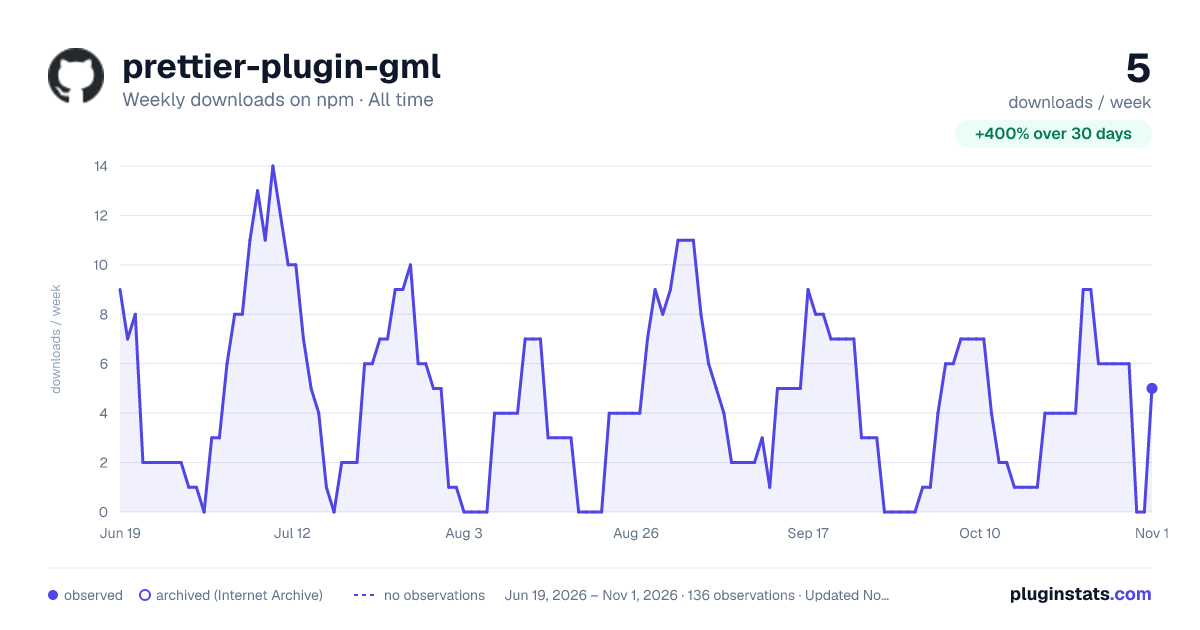

Adoption over time
7/30/90-day growth
Ranking history
Listing placement
Listing placement
Filled points are observed values; hollow points come from Internet Archive snapshots of the listing page. Dashed segments span periods with no observations — values between points are not interpolated.
Each band is one page of 20. Weekly downloads on a linear scale. Placement is projected from weekly downloads, so it can differ from the marketplace's own sort order. Hover a dot to see the listing.
Recent observations
Full history (122)Similar npm Prettier plugins plugins
All 20 prettier-plugin-gml alternativesData source
Weekly downloads (trailing 7 complete days) come from the official npm downloads API. Downloads include CI and mirrors and are not equivalent to installs or users. npm publishes no ratings.
Listing: https://www.npmjs.com/package/prettier-plugin-gml. First seen Oct 16, 2026; last successful collection Oct 20, 2026. See the methodology.