 PluginStats
vite-plugin-devtools-json weekly downloads statistics
By ChromeDevTools · npm · Vite plugins
Vite plugin for generating `com.chrome.devtools.json` on the fly in the devserver.
vite-plugin-devtools-json has 174,320 recorded weekly downloads on npm, a decrease of 37.4% over the past 30 days, ranking #385 of 2,256 tracked listings.
About vite-plugin-devtools-json
Vite Plugin for DevTools Project Settings (devtools.json)
Vite plugin for generating the Chrome DevTools project settings file on-the-fly in the devserver.
This enables seamless integration with the new Chrome DevTools features
- DevTools Project Settings (devtools.json), and 1. Automatic Workspace folders.
Installation
Usage
Add it to your Vite config
While the plugin can generate a UUID and save it in vite cache, you can also specify it in the options like in the following:
Options
| Name | Type | Default | Description |
| projectRoot | string | config.root | Absolute path that will be reported to DevTools. Useful for monorepos or when the Vite root is not the desired folder. | | normalizeForWindowsContainer | boolean | true | Convert Linux paths to UNC form so Chrome on Windows (WSL / Docker Desktop) can mount them (e.g. via WSL or Docker Desktop). Pass false to disable. Alias: normalizeForChrome (deprecated)_ | | uuid | string | auto-generated | Fixed UUID if you prefer to control it yourself. |
Example with all options:
The /.well-known/appspecific/com.chrome.devtools.json endpoint will serve the project settings as JSON with the following structure
where root is the absolute path to your {projectRoot} folder, and uuid is a random v4 UUID, generated the first time that you start the Vite devserver with the plugin installed (it is henceforth cached in the Vite cache folder).
Checkout [bmeurer/automatic-workspace-folders-vanilla] for a trivial example project illustrating how to use the plugin in practice.
Publishing
The package is published to npm by the publish-on-tag GitHub Actions workflow, which uses npm trusted publishing (no npm tokens involved) and generates provenance attestations.
To publish a new version:
- Bump the version in package.json and land that change on main. 2. Tag the release commit and push the tag:
Pushing the tag triggers the workflow, which builds and tests the package and then runs npm publish.
License
The code is under MIT License.
Description from the npm listing.
- vite
- vite-plugin
- chrome-devtools
- devtools
- chrome
README badge
Show your rank in a README or on your website. The badge updates automatically.
Charts
Images: 30d · 1y · all time · 1600×900 dark


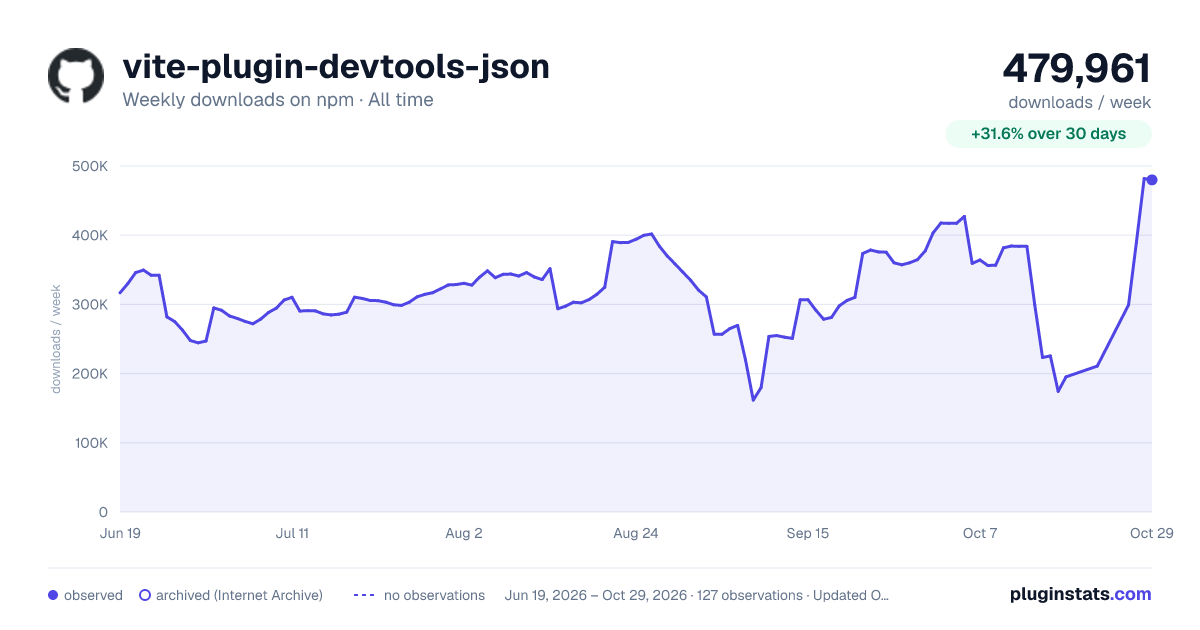

Adoption over time
7/30/90-day growth
Ranking history
Listing placement
Listing placement
Filled points are observed values; hollow points come from Internet Archive snapshots of the listing page. Dashed segments span periods with no observations — values between points are not interpolated.
Each band is one page of 20. Weekly downloads on a linear scale. Placement is projected from weekly downloads, so it can differ from the marketplace's own sort order. Hover a dot to see the listing.
Recent observations
Full history (121)Similar npm Vite plugins plugins
All 20 vite-plugin-devtools-json alternativesData source
Weekly downloads (trailing 7 complete days) come from the official npm downloads API. Downloads include CI and mirrors and are not equivalent to installs or users. npm publishes no ratings.
Listing: https://www.npmjs.com/package/vite-plugin-devtools-json. First seen Oct 16, 2026; last successful collection Oct 19, 2026. See the methodology.