 PluginStats
@launchdarkly/mcp-server weekly downloads statistics
By launchdarkly (4 listings) · npm · MCP servers
The local [Model Context Protocol (MCP)](https://modelcontextprotocol.io/) server for [LaunchDarkly](https://launchdarkly.com/) federal and European Union (EU) environments.
@launchdarkly/mcp-server has 27,462 recorded weekly downloads on npm, a decrease of 65.8% over the past 30 days, ranking #715 of 2,322 tracked listings.
About @launchdarkly/mcp-server
LaunchDarkly local MCP server
The local Model Context Protocol (MCP) server for LaunchDarkly federal and European Union (EU) environments.
<div align="left"> <a href="https://opensource.org/licenses/MIT"> <img src="https://img.shields.io/badge/License-MIT-blue.svg" style="width: 100px; height: 28px;" /> </a> </div><!-- No Summary [summary] --> <!-- Start Table of Contents [toc] -->[!IMPORTANT] Use the LaunchDarkly hosted MCP server where available
LaunchDarkly strongly recommends using the hosted MCP server where it is available. The hosted server is more feature complete and receives more frequent updates than this self-managed server.
LaunchDarkly provides this self-managed MCP server for LaunchDarkly EU or Federal instances, which do not yet support the hosted MCP.
Table of Contents
<!-- $toc-max-depth=2 --> <!-- End Table of Contents [toc] --> <!-- No SDK Installation [installation] -->Installation
This MCP server can be installed in any AI client that supports the MCP protocol. Refer to your AI client's instructions if it isn't listed here.
Cursor installation steps
Create a .cursor/mcp.json file in your project root with the following content:
{
  "mcpServers": {
    "LaunchDarkly": {
      "command": "npx",
      "args": [
        "-y", "--package", "@launchdarkly/mcp-server", "--", "mcp", "start",
        "--api-key", "api-xxxxxxxx-xxxx-xxxx-xxxx-xxxxxxxxxxxx"
      ]
    }
  }
}
Specify your API key as found on LaunchDarkly's Authorization page.
Claude installation steps
Add the following server definition to your claude_desktop_config.json file:
{
  "mcpServers": {
    "LaunchDarkly": {
      "command": "npx",
      "args": [
        "-y", "--package", "@launchdarkly/mcp-server", "--", "mcp", "start",
        "--api-key", "api-xxxxxxxx-xxxx-xxxx-xxxx-xxxxxxxxxxxx"
      ]
    }
  }
}
Specify your API key as found on LaunchDarkly's Authorization page.
Qodo Gen installation steps
- Open Qodo Gen chat panel in VSCode or IntelliJ.
- Click
Connect more tools. - Click
+ Add new MCP. - Add the following configuration:
{
  "mcpServers": {
    "LaunchDarkly": {
      "command": "npx",
      "args": [
        "-y", "--package", "@launchdarkly/mcp-server", "--", "mcp", "start",
        "--api-key", "api-xxxxxxxx-xxxx-xxxx-xxxx-xxxxxxxxxxxx"
      ]
    }
  }
}
Specify your API key as found on LaunchDarkly's Authorization page.
- Click
Save.
GitHub Copilot CLI installation steps
Use the Copilot CLI to interactively add the MCP server:
/mcp add
Or create/edit ~/.copilot/mcp-config.json with the following content:
{
  "mcpServers": {
    "LaunchDarkly": {
      "command": "npx",
      "args": [
        "-y", "--package", "@launchdarkly/mcp-server", "--", "mcp", "start",
        "--api-key", "api-xxxxxxxx-xxxx-xxxx-xxxx-xxxxxxxxxxxx"
      ]
    }
  }
}
Specify your API key as found on LaunchDarkly's Authorization page.
For more information, see the GitHub Copilot CLI documentation.
Standalone binary installation steps
You can also run the MCP server as a standalone binary with no additional dependencies. You must pull these binaries from available GitHub releases while specifying the appropriate tag value:
curl -L -o mcp-server https://github.com/launchdarkly/mcp-server/releases/download/{tag}/mcp-server-bun-darwin-arm64 && \
chmod +x mcp-server
Installation steps from a local clone
You can also run the MCP server locally by cloning this repository. Once cloned, you'll need to install dependencies (npm install) and build the server (npm run build).
Then, configure your server definition to reference your local clone. For example:
{
  "mcpServers": {
    "launchdarkly": {
      "command": "node",
      "args": [
        "/path/to/mcp-server/bin/mcp-server.js", "start",
        "--api-key", "api-xxxxxxxx-xxxx-xxxx-xxxx-xxxxxxxxxxxx"
      ]
    }
  }
}
Installation steps using environment variables
Some AI clients allow for accessing environment variables within MCP configurations. In AI clients where this is supported, you can configure your MCP server to read from an environment variable like MCP_LD_TOKEN as follows:
{
  "mcpServers": {
    "launchdarkly": {
      "command": "npx",
      "args": [
        "-y", "--package", "@launchdarkly/mcp-server", "--", "mcp", "start",
        "--api-key", "$LD_ACCESS_TOKEN"
      ],
      "env": {
        "LD_ACCESS_TOKEN": "MCP_LD_TOKEN"
      }
    }
  }
}
Installation steps for Docker
If installing the MCP server from the AWS Markeplace, pull the image using an authenticated role using the provided instructions in the marketplace listing.
To run the container:
docker run --rm -p 127.0.0.1:8080:8080 709825985650.dkr.ecr.us-east-1.amazonaws.com/launchdarkly/mcp --api-key api-xxxxxxxx-xxxx-xxxx-xxxx-xxxxxxxxxxxx --auth-token "$MCP_AUTH_TOKEN"
```…
Description from the npm listing.
- feature-flags
- feature-toggles
- launchdarkly
- mcp
- modelcontextprotocol
README badge
Show your rank in a README or on your website. The badge updates automatically.
Charts
Images: 30d · 1y · all time · 1600×900 dark


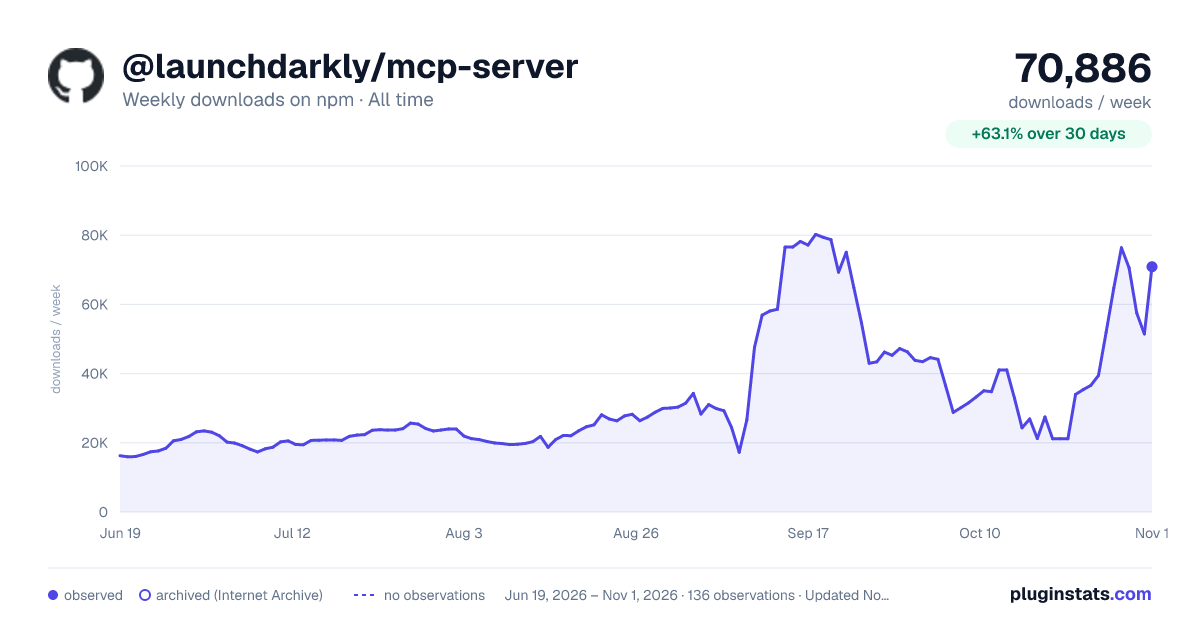

Adoption over time
7/30/90-day growth
Ranking history
Listing placement
Listing placement
Filled points are observed values; hollow points come from Internet Archive snapshots of the listing page. Dashed segments span periods with no observations — values between points are not interpolated.
Each band is one page of 20. Weekly downloads on a linear scale. Placement is projected from weekly downloads, so it can differ from the marketplace's own sort order. Hover a dot to see the listing.
Recent observations
Full history (122)Similar npm MCP servers plugins
All 20 @launchdarkly/mcp-server alternativesData source
Weekly downloads (trailing 7 complete days) come from the official npm downloads API. Downloads include CI and mirrors and are not equivalent to installs or users. npm publishes no ratings.
Listing: https://www.npmjs.com/package/@launchdarkly/mcp-server. First seen Oct 16, 2026; last successful collection Oct 20, 2026. See the methodology.