 PluginStats
babel-plugin-preval weekly downloads statistics
By kentcdodds (2 listings) · npm · Babel plugins
Pre-evaluate code at build-time
babel-plugin-preval has 35,074 recorded weekly downloads on npm, a decrease of 43.9% over the past 30 days, ranking #657 of 2,322 tracked listings.
About babel-plugin-preval
<!-- prettier-ignore-start -->
[![Build Status][build-badge]][build] [![Code Coverage][coverage-badge]][coverage] [![version][version-badge]][package] [![downloads][downloads-badge]][npmtrends] [![MIT License][license-badge]][license]
<!-- ALL-CONTRIBUTORS-BADGE:START - Do not remove or modify this section -->
[![PRs Welcome][prs-badge]][prs] [![Code of Conduct][coc-badge]][coc] [![Babel Macro][macros-badge]][babel-plugin-macros] [![Examples][examples-badge]][examples]
<!-- prettier-ignore-end -->The problem
You need to do some dynamic stuff, but don't want to do it at runtime. Or maybe you want to do stuff like read the filesystem to get a list of files and you can't do that in the browser.
This solution
This allows you to specify some code that runs in Node and whatever you
module.exports in there will be swapped. For example:
const x = preval`module.exports = 1`

//      ↓ ↓ ↓ ↓ ↓ ↓

const x = 1
Or, more interestingly:
const x = preval`
  const fs = require('fs')
  const val = fs.readFileSync(__dirname + '/fixture1.md', 'utf8')
  module.exports = {
    val,
    getSplit: function(splitDelimiter) {
      return x.val.split(splitDelimiter)
    }
  }
`

//      ↓ ↓ ↓ ↓ ↓ ↓

const x = {
  val: '# fixture\n\nThis is some file thing...\n',
  getSplit: function getSplit(splitDelimiter) {
    return x.val.split(splitDelimiter)
  },
}
There's also preval.require('./something') and
import x from /* preval */ './something' (which can both take some arguments)
or add // @preval comment at the top of a file.
See more below.
Table of Contents
<!-- START doctoc generated TOC please keep comment here to allow auto update --> <!-- DON'T EDIT THIS SECTION, INSTEAD RE-RUN doctoc TO UPDATE -->- Installation
- Usage
- Exporting a function
- Configure with Babel
- Use with
babel-plugin-macros - Examples
- Notes
- FAQ
- Inspiration
- Related Projects
- Other Solutions
- Issues
- Contributors ✨
- LICENSE
Installation
This module is distributed via [npm][npm] which is bundled with [node][node] and
should be installed as one of your project's devDependencies:
npm install --save-dev babel-plugin-preval
Usage
Important notes:
- All code run by
prevalis not run in a sandboxed environment - All code must run synchronously.
- Code that is run by preval is not transpiled so it must run natively in the version of node you're running. (cannot use es modules).
You may like to watch this YouTube video to get an idea of what preval is and how it can be used.
Template Tag
Before:
const greeting = preval`
  const fs = require('fs')
  module.exports = fs.readFileSync(require.resolve('./greeting.txt'), 'utf8')
`
After (assuming greeting.txt contains the text: "Hello world!"):
const greeting = 'Hello world!'
preval can also handle some simple dynamic values as well:
Before:
const name = 'Bob Hope'
const person = preval`
  const [first, last] = require('./name-splitter')(${name})
  module.exports = {first, last}
`
After (assuming ./name-splitter is a function that splits a name into
first/last):
const name = 'Bob Hope'
const person = {first: 'Bob', last: 'Hope'}
import comment
Before:
import fileList from /* preval */ './get-list-of-files'
After (depending on what ./get-list-of-files does, it might be something
like):
const fileList = ['file1.md', 'file2.md', 'file3.md', 'file4.md']
You can also provide arguments which themselves are prevaled!
Before:
import fileList from /* preval(3) */ './get-list-of-files'
After (assuming ./get-list-of-files accepts an argument limiting how many
files are retrieved:
const fileList = ['file1.md', 'file2.md', 'file3.md']
preval.require
Before:
const fileLastModifiedDate = preval.require('./get-last-modified-date')
After:
const fileLastModifiedDate = '2017-07-05'
And you can provide some simple dynamic arguments as well:
Before:
const fileLastModifiedDate = preval.require(
  './get-last-modified-date',
  '../../some-other-file.js',
)
After:
const fileLastModifiedDate = '2017-07-04'
preval file comment (// @preval)
Using the preval file comment will update a whole file to be evaluated down to an export.
Whereas the above usages (assignment/import/require) will only preval the scope of the assignment or file being imported.
Before:
// @preval

const id = require('./path/identity')
const one = require('./path/one')…
Description from the npm listing.
- babel
- babel-plugin
- eval
- precompile
- babel-plugin-macros
README badge
Show your rank in a README or on your website. The badge updates automatically.
Charts
Images: 30d · 1y · all time · 1600×900 dark


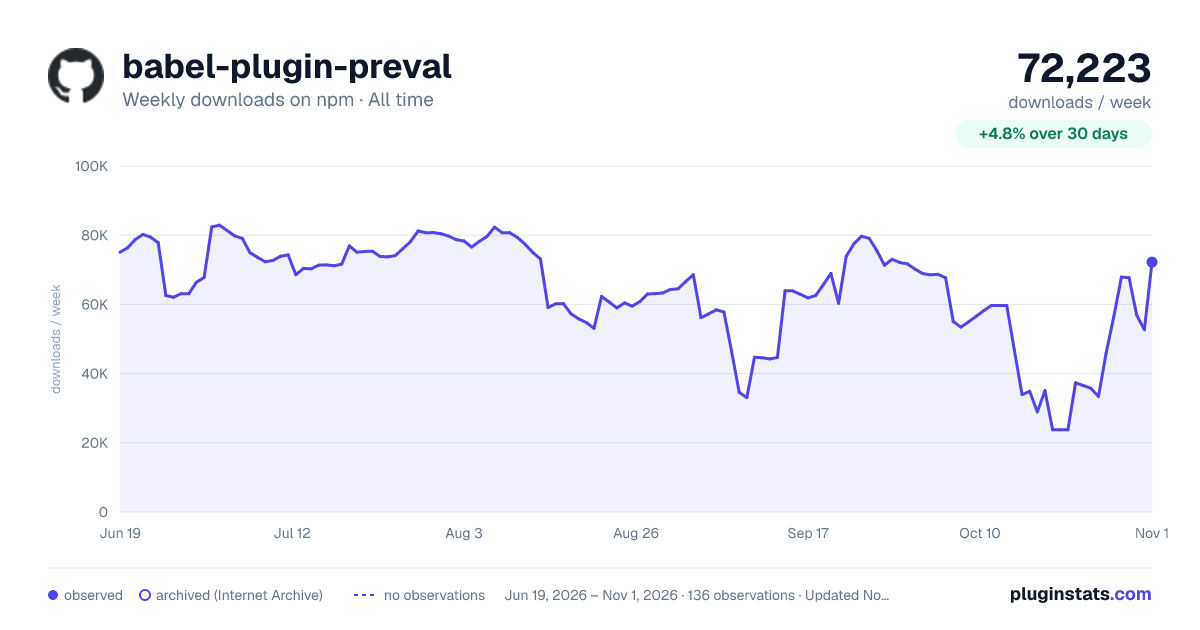

Adoption over time
7/30/90-day growth
Ranking history
Listing placement
Listing placement
Filled points are observed values; hollow points come from Internet Archive snapshots of the listing page. Dashed segments span periods with no observations — values between points are not interpolated.
Each band is one page of 20. Weekly downloads on a linear scale. Placement is projected from weekly downloads, so it can differ from the marketplace's own sort order. Hover a dot to see the listing.
Recent observations
Full history (122)Similar npm Babel plugins plugins
All 20 babel-plugin-preval alternatives- 35.3K weekly downloads-60.6%
- 30.9K weekly downloads—
Data source
Weekly downloads (trailing 7 complete days) come from the official npm downloads API. Downloads include CI and mirrors and are not equivalent to installs or users. npm publishes no ratings.
Listing: https://www.npmjs.com/package/babel-plugin-preval. First seen Oct 16, 2026; last successful collection Oct 20, 2026. See the methodology.