 PluginStats
tailwind-schemes weekly downloads statistics
By itsdezen · npm · Tailwind plugins
A TailwindCSS plugin for dynamic multi-theme color schemes, enabling easy customization and switching between themes like light and dark mode.
tailwind-schemes has 10 recorded weekly downloads on npm, a decrease of 81.8% over the past 30 days, ranking #2048 of 2,322 tracked listings.
About tailwind-schemes
Tailwind Color Schemes Plugin




This Tailwind CSS plugin provides a flexible way to define and use color schemes in your Tailwind CSS project. It allows you to configure global colors, scheme-specific colors, and use these colors throughout your project with optional opacity.
Tailwind CSS v4 compatibility: this plugin is built around the classic
tailwind.config.js(theme.extend,plugin.withOptions) approach and works best on Tailwind CSS v3 and below. Tailwind v4 moved plugin/theme config into CSS (@theme,@plugin), but v4 still supports JS-based config for backward compatibility via the@configdirective, sotailwind-schemescontinues to work there too.
Installation
-
Install Tailwind CSS if you haven't already:
npm install tailwindcss -D -
Install the plugin:
npm install tailwind-schemes -D
Usage
-
Configuration
Add the plugin to your
tailwind.config.js:// tailwind.config.js const { schemes, resetCSS } = require('tailwind-schemes') module.exports = { // ... other configurations plugins: [ schemes({ selector: 'data-theme', // Optional: "class" or any selector (default is 'data-theme' => [data-theme="dark/light/custom..."]) prefix: 'tw-schemes', // Optional: default is 'tw-schemes' schemes: { root: { primary: '#3490dc', secondary: '#ffed4a', // More root colors... }, light: { primary: '#ffffff', secondary: '#000000', // More colors for the light theme... }, dark: { primary: '#000000', secondary: '#ffffff', // More colors for the dark theme... }, customTheme: { primary: '#00ff00', secondary: '#ffff00', // More colors for the custom theme... }, }, }), resetCSS({ html: 'text-primary', // Defined in schemes body: { padding: 0, }, // More options... }), ], } -
Using the Colors
-
Tailwind Classes
Tailwind classes will be extended with your custom colors. You can use them directly in your HTML, including with opacity modifiers:
<div class="text-primary bg-secondary/50"> This text uses custom colors defined in the color schemes. </div> -
CSS Variables
The plugin stores each color as an
r, g, btriplet in a CSS variable, so wrap it inrgb()/rgba()when using it directly in custom CSS:.example-class { color: rgb(var(--tw-schemes-primary)); background-color: rgba(var(--tw-schemes-secondary), 0.5); }
-
-
Switching schemes at runtime
With the default
selector: 'data-theme', set the matching attribute on any ancestor element (commonly<html>) to switch which scheme's variables are active:document.documentElement.setAttribute('data-theme', 'dark')With
selector: 'class', toggle a class of the same name instead (e.g.document.documentElement.classList.add('dark')).
API
schemes
The main function to configure your color schemes.
- Parameters:
config(optional): An object with the following properties:selector(string): The CSS selector for the theme. Default is'data-theme'.prefix(string): The prefix for the CSS variables. Default is'tw-schemes'.schemes(object): An object where keys are theme names and values are color schemes.
shades
Generates a full 50-950 shade scale from a single base color.
-
Parameters:
color(string): A hex color, with or without the leading#(e.g.'#3490dc'or'3490dc'), or an"r, g, b"string (e.g.'52, 144, 220').
-
Returns: A color object with shades
50–950generated from the base color.
colorize
Fills in DEFAULT and foreground on a color/shade object, so it can be used directly as a schemes entry.
-
Parameters:
color(object|string): A color object (e.g. the output ofshades()) or a plain string.defaultKey(optional): The shade to use asDEFAULTif not already set. Default is500.foregroundKey(optional): The shade to use asforegroundif not already set. Default is950.
-
Returns: The color object with
DEFAULT/foregroundfilled in (a plain string is returned unchanged).
Combining shades + colorize to build a full scheme color from one brand color:
const { schemes, shades, colorize } = require('tailwind-schemes')

schemes({
  schemes: {
    root: {
      primary: colorize(shades('#3490dc')), // { 50: ..., ..., 950: ..., DEFAULT: '...' (500), foreground: '...' (950) }
    },
  },
})
resetCSS
A helper plugin to add global css
-
Parameters:
options(object): define any base options (using tailwind classnames or css-properties).
-
Recommended setting
 "tailwindCSS.experimental.classRegex": [
   ["resetCSS\\((([^()]*|\\([^()]*\\))*)\\)", "[\"'`]([^\"'`]*).*?[\"'`]"],
 ]
Contributing
See CONTRIBUTING.md for the development setup, changeset workflow, and release process.
Description from the npm listing.
- tailwind
- tailwindcss
- plugin
- theme
- multi-theme
- dynamic-color
- dark-mode
- light-mode
- tailwindcss-plugin
- CSS
- custom-themes
README badge
Show your rank in a README or on your website. The badge updates automatically.
Charts
Images: 30d · 1y · all time · 1600×900 dark


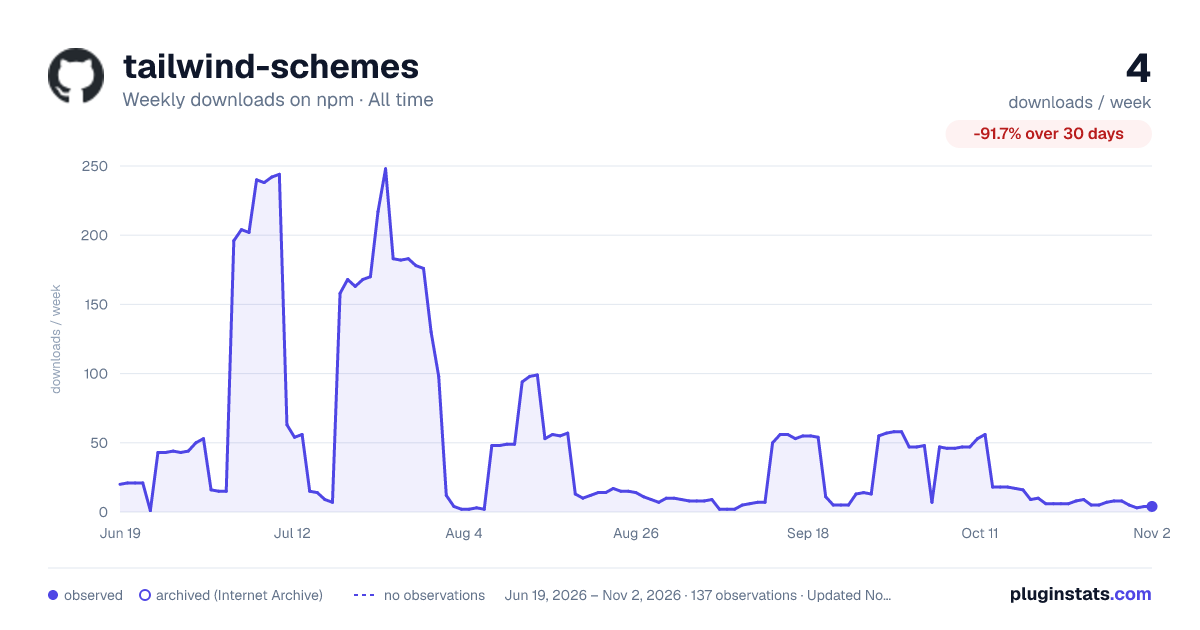

Adoption over time
7/30/90-day growth
Ranking history
Listing placement
Listing placement
Filled points are observed values; hollow points come from Internet Archive snapshots of the listing page. Dashed segments span periods with no observations — values between points are not interpolated.
Each band is one page of 20. Weekly downloads on a linear scale. Placement is projected from weekly downloads, so it can differ from the marketplace's own sort order. Hover a dot to see the listing.
Recent observations
Full history (122)Similar npm Tailwind plugins plugins
All 20 tailwind-schemes alternativesData source
Weekly downloads (trailing 7 complete days) come from the official npm downloads API. Downloads include CI and mirrors and are not equivalent to installs or users. npm publishes no ratings.
Listing: https://www.npmjs.com/package/tailwind-schemes. First seen Oct 16, 2026; last successful collection Oct 20, 2026. See the methodology.