 PluginStats
@hasna/projects weekly downloads statistics
By hasna (9 listings) · npm · MCP servers
High-level project management CLI, MCP server, SDK, and AI SDK agent loop for coding agents
@hasna/projects has 8,086 recorded weekly downloads on npm, a decrease of 34.7% over the past 30 days.
It ranks #973 of 2,251 tracked npm listings by weekly downloads.
Over 90 days, weekly downloads changed by +6317%.
PluginStats has 543 daily observations since Apr 23, 2025; the latest is from Oct 17, 2026.
About @hasna/projects
@hasna/projects
High-level project management CLI, MCP server, and SDK for AI coding agents. A project can be any repository, app, docs folder, scaffold, experiment, or remote-intended project in any folder. Projects tracks roots, recipes, agents, tmux profiles, immutable project events, and prompt-driven AI agent runs.
Project Resources
• Changelog • Security policy • Contributing guide • Code of conduct
Install
CLI
The app and binary are named projects, and the public command surface is project-first.
Terminal UI (projects ui)
A full-screen Solid/OpenTUI project manager: browse and search every project, open a project detail view with its events, locations, and agent assignments, and manage roots, recipes, and agents — with create, edit, archive, unarchive, and delete dialogs for projects. Registry state is the same store seam the CLI uses, so the TUI shows the exact same projects as projects list.
The TUI needs a real terminal: it refuses to start when stdin or stdout is not a TTY (non-interactive runs exit non-zero — use projects list, projects show, or projects create instead). projects ui opens the alternate screen and restores your terminal on exit.
Navigation uses the standard OpenTUI controls, and most actions are also available as visible buttons or through the shortcuts palette (Ctrl+P):
| Key | Action |
| Ctrl+P | Open the Keyboard Shortcuts / command palette | | Ctrl+R | Refresh the project list | | Esc | Back (project detail → list); exit from the list view | | Ctrl+C | Close a dialog; exit when nothing is open | | ↑/↓ | Move the selection | | Tab/Enter | Focus / activate the selected control |
The data source is exactly the CLI's: a credential from any tier of the @hasna/contracts resolver (Keychain, ~/.hasna/projects/config/credentials, or HASNA_PROJECTS_API_KEY) serves the hosted registry, and the explicit HASNA_PROJECTS_LOCAL=1 opt-in serves the on-box SQLite registry — see Credentials and Connection below. A station with neither fails closed, just like the CLI.
Theme follows auto/light/dark: force it with PROJECTS_TUI_THEME, or let it detect your terminal (COLORFGBG, macOS appearance). See docs/tui.md for the full design, keymap reference, and theming.
Screenshot: projects ui in a dark terminal, showing the sidebar and the project list with status badges.
Goal-continue Cursor hook (ralph-style)
A stop hook lives in .cursor/hooks.json + .cursor/hooks/goal-continue.sh. When an agent stops, it checks for an active goal and, if incomplete, blocks the stop with a continuation prompt that includes projects next suggestions — modeled on the codewith /goal slash command but driven as a Cursor hook.
Goal sources (first wins): ./.hasna/goal.md, $HASNA_GOAL_FILE, ~/.hasna/goal.md. Mark a goal complete by adding a line.
Env knobs: HASNA_GOAL_SKIP=1 (disable), HASNA_GOAL_CONTINUE=0 (status only, no continuation), HASNA_GOAL_MAX_SUGGESTIONS=N. The hook never fails closed.
Projects stores high-level management fields directly on the project record: stage, priority, owner, launch_profile, start_agent, start_command, start_session_policy, start_windows, todos links, and brief links. projects start and projects status use those launch defaults unless the command passes an explicit override. By default, projects start detects the current repo/project, creates or reuses the project tmux session, and ensures base windows named 01 and 02. Window 01 is the managed coding-agent/work window when a start command is launched; 02 is the secondary workspace. Existing unrelated tmux windows are left alone. Pass --windows-json or the MCP/API windows field to request the exact tmux window names for a single start/status operation.
Machine-readable outputs for projects list, projects show/projects get, projects status, projects start, projects sessions, projects roots list, and projects recipes list can emit validated JSON Render specs with --render-spec. Existing --json payloads preserve their operational fields and render specs are available from --render-spec and matching projects_render_* MCP tools. Claude starts are annotated with --name when safe. Codewith, Cursor, and OpenCode rename support is reported as manual or unsupported unless a stable programmatic rename path is available; Hasna Projects does not force text into unknown panes. Use projects start --rename-report or projects sessions --unrenamed to inspect rename status. Detailed execution still belongs in todos; long-form specs and decisions still belong in brief.
Workspace Store
Projects has one canonical physical workspace store under HASNA_PROJECTS_HOME, defaulting to ~/.hasna/projects (resolved by the in-package resolver to the XDG data home ~/.local/share/hasna/projects once the store has been migrated there or HASNA_DATA_HOME is set):
• canonical workspace path: $HASNA_PROJECTS_HOME/workspaces// • runtime data path: $HASNA_PROJECTS_HOME/data// • common runtime children: project.db, logs/, artifacts/, and context/
Rootless new projects default to the canonical workspace path. Explicit --path, registered roots, imports, and GitHub checkout roots keep their requested paths for compatibility until a user runs an explicit store migration. Slugs, names, and org labels are mutable metadata and never define the canonical folder name.…
Description from the npm listing.
- projects
- project-management
- mcp
- ai
- coding-agent
- agentic
- openrouter
- ai-sdk
- cli
- tmux
Where @hasna/projects sits in the listing
Each band is one page of 20. Weekly downloads on a log scale. Placement is projected from weekly downloads, so it can differ from the marketplace's own sort order. Hover a dot to see the listing.


Charts
Images: 30d · 1y · all time · 1600×900 dark


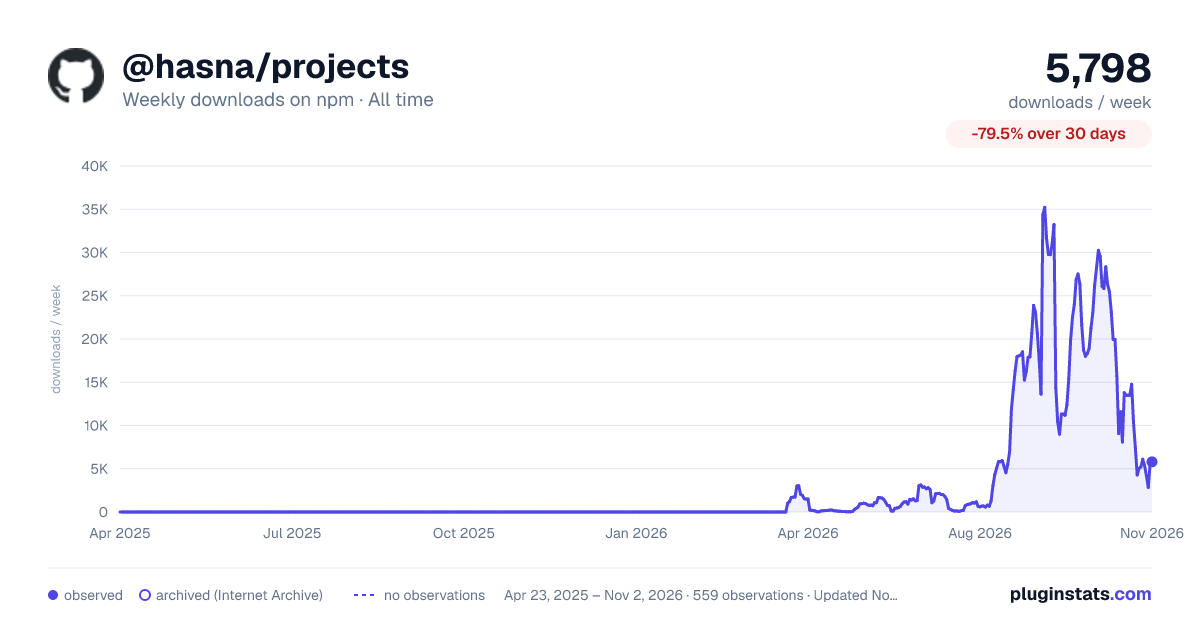

Adoption over time


7/30/90-day growth


Filled points are observed values; hollow points come from Internet Archive snapshots of the listing page. Dashed segments span periods with no observations — values between points are not interpolated.
Recent observations
Full history (543)Similar npm MCP servers plugins
Data source
Weekly downloads (trailing 7 complete days) come from the official npm downloads API. Downloads include CI and mirrors and are not equivalent to installs or users. npm publishes no ratings.
Listing: https://www.npmjs.com/package/@hasna/projects. First seen Oct 16, 2026; last successful collection Oct 18, 2026. See the methodology.