 PluginStats
webpack-extract-translation-keys-regex-plugin weekly downloads statistics
By ktunkiewicz · npm · Webpack plugins
Webpack plugin to extract list of used translation keys from included modules, using regular expressions.
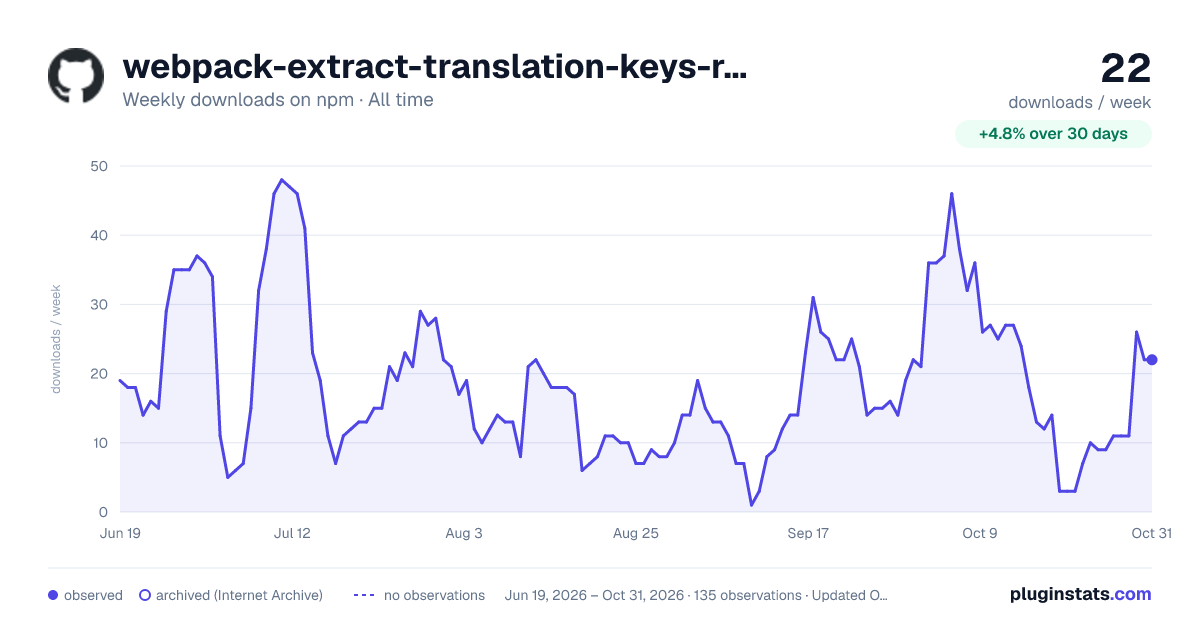
webpack-extract-translation-keys-regex-plugin has 14 recorded weekly downloads on npm, a decrease of 46.2% over the past 30 days, ranking #1991 of 2,322 tracked listings.
About webpack-extract-translation-keys-regex-plugin
Webpack Extract Translation Keys Plugin (Regex version)
This plugin is based on webpack-extract-translation-keys. It works in a completely different way, but it shares the concept and some of the source code, so I leave the original copyright info in files.
Webpack provides an official plugin for managing translation using i18n-webpack-plugin, but in only allows for build-time translations by replacing strings in the source code.
This plugin serves a similar purposes, but instead of replacing translation keys with actual string values it just collects translation keys allowing you to know exactly which translations are necessary for your client side.
Approach like this also allows to provide dynamically generated translation bundles to the client allowing you to get real-time updates to translation without regenerating whole client side bundle.
Differences from webpack-extract-translation-keys plugin
This plugin works directly on bundle's source code by searching (and optionally replacing) translation keys using regular expressions.
This approach has some advantages against using the webpack's parser very limited api. It can find the translation key anywhere in the bundle code. This comes with some small drawback, which may limit the use to particular use cases.
Pros:
- It finds translation keys everywhere, not only withing pure function calls. For example, the webpack parser cannot find translation key in this structure:
some_function_call(
  intl.translate("some key)
)
- It can extract keys from any structure - this depends only on the regex provided.
- It can extract translation keys per bundle and even per compilation child.
- The key generator has been changed to use only alphanumeric characters. Just in case.
Cons:
-
It is quite dumb... It is just smart enough not to search in anything else than js/jsx/ts files, and not inside
node_modulesfolder (this behaviour is configurable).Althrough it will still find/replace the translation key in anything that looks like a proper translation function. So you have to choose the function name wisely.
For example the
translate()method name is not the best choice. The plugin will run through everything in the bundle, including comments, embedded strings, etc. So if your pattern looks fortranslate(''), then things likejQuery("<div style=\"transform: translate('-50px')\">")will get matched too.
This version of plugin is particularly useful in large applications (splitting per bundle functionality) that use object oriented approach (for example react-intl). See examples below.
Usage
Configuration
First you need to install plugin:
npm install --save-dev webpack-extract-translation-keys-regex-plugin
And then include it in your configuration:
// webpack.config.js

var ExtractTranslationKeysPlugin = require('webpack-extract-translation-keys-regex-plugin');
module.exports = {
    plugins: [
        new extractTranslationKeysRegexPlugin({
            // matches first property in intl.formatMessage call
            // matching escaped quotes method from here: http://stackoverflow.com/a/5696141
            functionPattern: /intl\.formatMessage\(\s*{\s*id:\s*(?:"([^"\\]*(?:\\.[^"\\]*)*)(")|'([^'\\]*(?:\\.[^'\\]*)*)('))/gm,
            output: path.join(PATHS.build, 'translation-keys.json')
        })
    ]

    // rest of your configuration...
}
The above config works fine with formatMessage from react-intl: https://github.com/yahoo/react-intl/wiki/API#formatmessage
Now inside your module you can write something like this:
console.log(intl.formatMessage({ id: 'translation-key-1' }));
console.log(intl.formatMessage({ id: 'translation-key-1' }));
If you run webpack now, you should get dist/translation-keys.json file with following content:
{
    "translation-key-1": "translation-key-1",
    "translation-key-2": "translation-key-2"
}
It may seems like a waste to output a map with the keys and values being the same thing, the purpose is to keep the output format consistent with the times when the mangle option is enabled.
WARNING: the format of the output without mangling has changed from array to a map since version 2.x. If you want to have old behavior, you can implement it using
donecallback option.
Key Mangling
In some applications translation keys are quite long, so for the situations where you want to save some additional bytes in your application, you can enable mangling during the plugin initialization:
// ...
    plugins: [
        new extractTranslationKeysRegexPlugin({
            functionPattern: /intl\.formatMessage\(\s*{\s*id:\s*(?:"([^"\\]*(?:\\.[^"\\]*)*)(")|'([^'\\]*(?:\\.[^'\\]*)*)('))/gm,
            functionReplace: 'intl.formatMessage({id:$2$1$2',
            mangle: true,
            output: path.join(PATHS.build, 'translation-keys.json')
        })
    ]
// ...
This setting changes the behavior of the plugin to replace the key name with a minimal ascii-readable string.
In order to be able to map back to the original translation key, the plugin outputs mapping object with keys being mangle keys and the values being the original ones:
{"0": "translation-key-1", "1": "translation-key-2"}
It's recommended to only enable mangling for production builds, as it makes the debugging harder and also may break hot reloading, depending on your setup.
Options
- functionPattern
Default value: /gettext\(\s*(?:"([^"\\]*(?:\\.[^"\\]*)*)(")|'([^'\\]*(?:\\.[^'\\]*)*)('))/gm
This should be a regular expression object or simply a string. Plugin will internally enforce "g" and "m" flags on the provided regexp.
The expression must have at least one outputting group block.…
Description from the npm listing.
- webpack
- webpack-plugin
README badge
Show your rank in a README or on your website. The badge updates automatically.
Charts
Images: 30d · 1y · all time · 1600×900 dark



Adoption over time
7/30/90-day growth
Ranking history
Listing placement
Listing placement
Filled points are observed values; hollow points come from Internet Archive snapshots of the listing page. Dashed segments span periods with no observations — values between points are not interpolated.
Each band is one page of 20. Weekly downloads on a linear scale. Placement is projected from weekly downloads, so it can differ from the marketplace's own sort order. Hover a dot to see the listing.
Recent observations
Full history (122)Similar npm Webpack plugins plugins
All 20 webpack-extract-translation-keys-regex-plugin alternatives- 14 weekly downloads-98.9%
- 14 weekly downloads-72.0%
- 14 weekly downloads-73.6%
- 14 weekly downloads-57.6%
- 14 weekly downloads-77.8%
- 15 weekly downloads-96.7%
- 15 weekly downloads-88.0%
Data source
Weekly downloads (trailing 7 complete days) come from the official npm downloads API. Downloads include CI and mirrors and are not equivalent to installs or users. npm publishes no ratings.
Listing: https://www.npmjs.com/package/webpack-extract-translation-keys-regex-plugin. First seen Oct 16, 2026; last successful collection Oct 20, 2026. See the methodology.