 PluginStats
boneyard-js weekly downloads statistics
By 0xGF · npm · Vite plugins
Pixel-perfect skeleton loading screens. Wrap your component in <Skeleton> and boneyard snapshots the real DOM layout — no manual descriptors, no configuration.
boneyard-js has 42,295 recorded weekly downloads on npm, a decrease of 38.1% over the past 30 days, ranking #596 of 2,256 tracked listings.
About boneyard-js
boneyard
Pixel-perfect skeleton loading screens, extracted from your real DOM.
Wrap your component in , run the CLI, and get positioned bone rectangles that match your actual layout. No manual sizing, no guesswork.
Quick start
Frameworks
Config
Create boneyard.config.json in your project root. Controls both the CLI and runtime defaults.
All color values accept any valid CSS color (hex, rgba, hsl, etc.).
| Key | Default | Description |
| breakpoints | auto | Viewport widths for capture (auto-detects Tailwind) | | out | ./src/bones | Output directory for .bones.json and registry.js | | wait | 800 | ms to wait after page load before capturing | | color | #f0f0f0 | Bone fill color (light mode) | | darkColor | #222222 | Bone fill color (dark mode) | | animate | pulse | pulse, shimmer, or solid | | shimmerColor | #f7f7f7 | Shimmer highlight (light mode) | | darkShimmerColor | #2c2c2c | Shimmer highlight (dark mode) | | speed | 2s / 1.8s | Animation duration (shimmer / pulse) | | shimmerAngle | 110 | Shimmer gradient angle in degrees | | stagger | false | Delay between bones in ms (true = 80ms) | | transition | false | Fade out when loading ends in ms (true = 300ms) | | select | container | Width used to pick the responsive breakpoint: container (measured width) or viewport (window.innerWidth). Use viewport for app-shell layouts where the container is narrower than the window | | url | dev server | Capture origin for the Vite plugin, e.g. https://myapp.dev — use when the dev server sits behind a reverse proxy (portless, custom HTTPS origins) so auth cookies scoped to the real origin apply. Defaults to the server's own localhost:. Also available as a boneyardPlugin({ url }) option |
Per-component props override config. Config overrides package defaults.
Fixtures
When your component needs API data or auth to render, provide a fixture for the CLI to snapshot instead:
Use leafTags to treat elements as atomic bones — prevents the extractor from recursing into children and creating unwanted internal shapes. A leaf tag is atomic only while everything it holds is inline: Hello world
is one bone, but an li (or any listed tag) wrapping block-level content — a card inside a list item, say — is walked into like a container, so lists of cards keep their inner structure.
Dark mode
Detected via the .dark class on or any ancestor (standard Tailwind convention). Does not use prefers-color-scheme — gives you explicit control.
When .dark is present, darkColor and darkShimmerColor are used automatically.
CLI
The build command (and the Vite plugin) drive a headless Chromium via Playwright to snapshot your rendered UI. Playwright ships as a dependency of boneyard-js, so it's already in node_modules — but its browser binary is downloaded separately. Install it once before your first build:
Skipping this step is the most common first-run error. If Playwright reports a missing browser, run the command above. (Note: playwright install only works because Playwright is a dependency here — if you hit Command "playwright" not found in a strict pnpm/monorepo setup, use npx playwright install chromium.)
Prefer not to download a browser — e.g. in CI, or to reuse your logged-in session? See Reusing an existing browser.
Reusing an existing browser
Instead of launching (and downloading) Playwright's Chromium, boneyard can attach to a Chrome you're already running over the DevTools Protocol. This reuses your cookies and auth state, and skips the browser download — useful in CI or behind a login.
Chrome exposes two remote-debugging modes, and boneyard supports both:
Mode 1 — debug port (separate profile). Launch Chrome with a debugging port. Since Chrome 136, --remote-debugging-port is ignored on the default profile, so a non-default --user-data-dir is required:
Mode 2 — attach to your normal running Chrome (Chrome 144+). Enable chrome://inspect/#remote-debugging → "Allow remote debugging for this browser instance". This mode doesn't expose the HTTP discovery endpoint (/json/version returns 404) — instead Chrome writes a WebSocket endpoint to DevToolsActivePort in your user data directory. Pass that full ws:// endpoint to boneyard; Chrome will ask you to approve the incoming connection:
A 404 when connecting to http://localhost:9222/json/version means the port isn't exposing the DevTools HTTP endpoint — you're either on Chrome 136+ without --user-data-dir (Mode 1), or using the chrome://inspect toggle, which only exposes the WebSocket endpoint (use Mode 2's ws:// form).
Layout APIs
For advanced use cases — SSR, responsive tooling, or rendering skeletons without the component.
computeLayout(descriptor, width)
The first call compiles the descriptor tree and measures text nodes. Later calls with the same descriptor reuse the compiled tree.
compileDescriptor(descriptor) + computeLayout(compiled, width)
Explicit control over compilation:
Use compileDescriptor when you render the same skeleton at multiple breakpoints, keep a registry in memory, or want to benchmark cold vs hot performance.
If you mutate a descriptor in place, the engine detects the change and rebuilds automatically. To force an immediate rebuild, call invalidateDescriptor(descriptor).
Docs
boneyard.vercel.app
License
MIT
Description from the npm listing.
- skeleton
- skeleton-screen
- loading
- placeholder
- react
- react-native
- vue
- preact
- angular
- vite
- vite-plugin
- zero-layout-shift
README badge
Show your rank in a README or on your website. The badge updates automatically.
Charts
Images: 30d · 1y · all time · 1600×900 dark


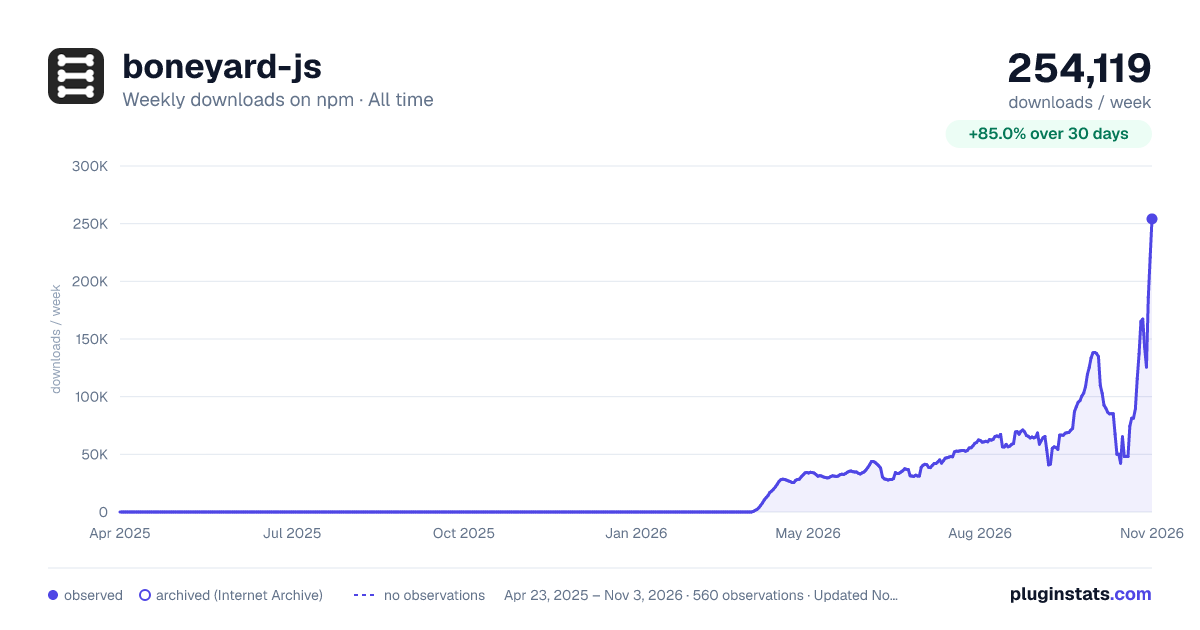

Adoption over time
7/30/90-day growth
Ranking history
Listing placement
Listing placement
Filled points are observed values; hollow points come from Internet Archive snapshots of the listing page. Dashed segments span periods with no observations — values between points are not interpolated.
Each band is one page of 20. Weekly downloads on a linear scale. Placement is projected from weekly downloads, so it can differ from the marketplace's own sort order. Hover a dot to see the listing.
Recent observations
Full history (543)Similar npm Vite plugins plugins
All 20 boneyard-js alternativesData source
Weekly downloads (trailing 7 complete days) come from the official npm downloads API. Downloads include CI and mirrors and are not equivalent to installs or users. npm publishes no ratings.
Listing: https://www.npmjs.com/package/boneyard-js. First seen Oct 16, 2026; last successful collection Oct 19, 2026. See the methodology.