 PluginStats
@owloops/claude-powerline weekly downloads statistics
By owloops · npm · Claude Code
Beautiful vim-style powerline statusline for Claude Code with real-time usage tracking, git integration, and custom themes
@owloops/claude-powerline has 4,160 recorded weekly downloads on npm, a decrease of 7.5% over the past 30 days, ranking #1181 of 2,322 tracked listings.
About @owloops/claude-powerline
Claude Powerline
A vim-style powerline statusline for Claude Code with real-time usage tracking, git integration, and custom themes.





Installation
Requires Node.js 18+, Claude Code, and Git 2.0+. For best display, install a Nerd Font or use --charset=text for ASCII-only symbols.
Setup Wizard (Recommended)
The interactive wizard walks you through theme, style, font, segment, and budget selection.
# run inside Claude Code, one at a time
/plugin marketplace add Owloops/claude-powerline
/plugin install claude-powerline@claude-powerline
/powerline
The wizard writes ~/.claude/claude-powerline.json and updates your settings.json automatically. Run /powerline again any time to reconfigure.
Manual Setup
Add to your Claude Code settings.json:
{
  "statusLine": {
    "type": "command",
    "command": "npx -y @owloops/claude-powerline@latest --style=powerline"
  }
}
Start a Claude session and the statusline appears at the bottom. Using npx automatically downloads and runs the latest version without manual updates.
Powerline Studio
<a href="https://powerline.owloops.com/"> <img src="images/powerline-studio.gif" alt="Powerline Studio visual configurator" width="700"> </a>powerline.owloops.com is a visual configurator for claude-powerline. Click segments in the preview to toggle options, switch styles and themes live, reorder, then copy or download the JSON into ~/.claude/claude-powerline.json. Paste an existing config to edit it.
6 built-in themes (dark, light, nord, tokyo-night, rose-pine, gruvbox) or create your own.
</details> <details> <summary><h2>Configuration</h2></summary>Config locations (in priority order):
./.claude-powerline.json- Project-specific~/.claude/claude-powerline.json- User config~/.config/claude-powerline/config.json- XDG standard
Override priority: CLI flags > Environment variables > Config files > Defaults
Config files reload automatically, no restart needed.
Get example config:
curl -o ~/.claude/claude-powerline.json https://raw.githubusercontent.com/Owloops/claude-powerline/main/.claude-powerline.json
CLI Options (both --arg value and --arg=value syntax supported):
--theme-dark(default),light,nord,tokyo-night,rose-pine,gruvbox,custom--style-minimal(default),powerline,capsule,tui--charset-unicode(default),text--config- Custom config file path--help- Show help
Examples:
claude-powerline --theme=nord --style=powerline
claude-powerline --theme=dark --style=capsule --charset=text
claude-powerline --config=/path/to/config.json
Environment Variables:
export CLAUDE_POWERLINE_THEME=dark
export CLAUDE_POWERLINE_STYLE=powerline
export CLAUDE_POWERLINE_CONFIG=/path/to/config.json
export CLAUDE_POWERLINE_DEBUG=1  # Enable debug logging
export CLAUDE_POWERLINE_CACHE_DIR=/path/to/cache  # Usage cache location (default: ~/.claude/powerline)
Segment Configuration
<details> <summary><strong>Directory</strong> - Shows current working directory name</summary>"directory": {
"enabled": true,
"style": "full"
}
Options:
style: Display format -full|fish|basenamefull: Show complete path (e.g.,~/projects/claude-powerline)fish: Fish-shell style abbreviation (e.g.,~/p/claude-powerline)basename: Show only folder name (e.g.,claude-powerline)
In --worktree sessions, the directory segment automatically shows the original repo path instead of the worktree folder (no config required).
"git": {
  "enabled": true,
  "showSha": true,
  "showWorkingTree": false,
  "showOperation": false,
  "showTag": false,
  "showTimeSinceCommit": false,
  "showStashCount": false,
  "showAheadBehind": true,
  "showUpstream": false,
  "showRepoName": false
}
Options:…
Description from the npm listing.
- claude
- powerline
- statusline
- typescript
- claude-code
README badge
Show your rank in a README or on your website. The badge updates automatically.
Charts
Images: 30d · 1y · all time · 1600×900 dark


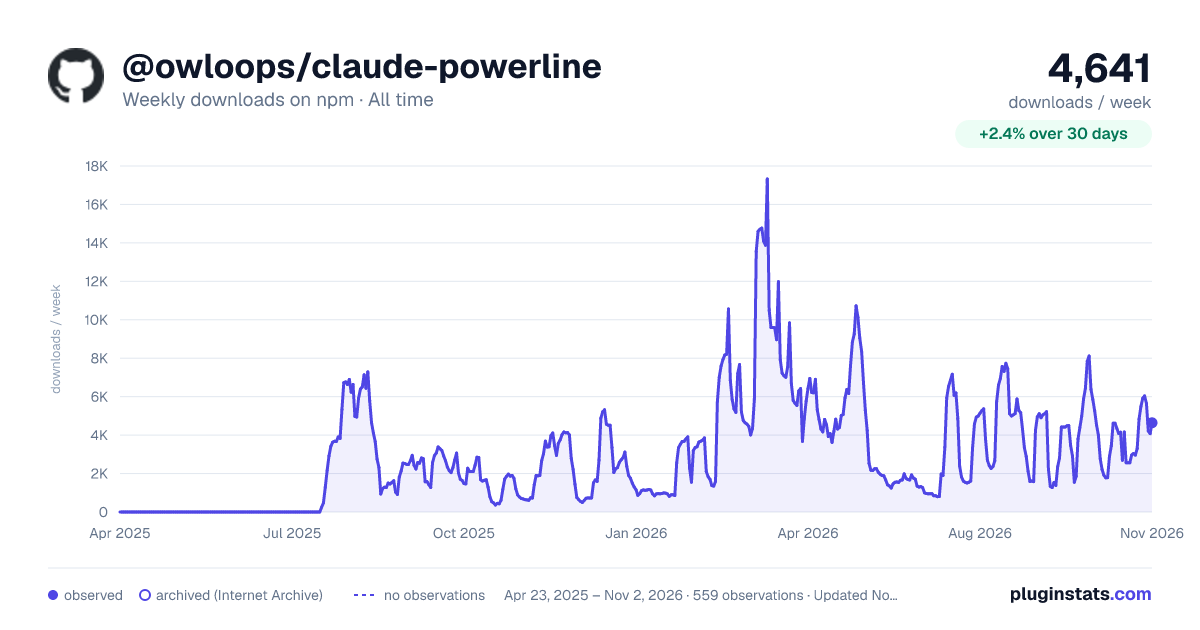

Adoption over time
7/30/90-day growth
Ranking history
Listing placement
Listing placement
Filled points are observed values; hollow points come from Internet Archive snapshots of the listing page. Dashed segments span periods with no observations — values between points are not interpolated.
Each band is one page of 20. Weekly downloads on a linear scale. Placement is projected from weekly downloads, so it can differ from the marketplace's own sort order. Hover a dot to see the listing.
Recent observations
Full history (544)Similar npm Claude Code plugins
All 20 @owloops/claude-powerline alternativesData source
Weekly downloads (trailing 7 complete days) come from the official npm downloads API. Downloads include CI and mirrors and are not equivalent to installs or users. npm publishes no ratings.
Listing: https://www.npmjs.com/package/@owloops/claude-powerline. First seen Oct 16, 2026; last successful collection Oct 20, 2026. See the methodology.