 PluginStats
@runpod/mcp-server weekly downloads statistics
By runpod (2 listings) · npm · MCP servers
MCP server for interacting with Runpod API
@runpod/mcp-server has 9,527 recorded weekly downloads on npm, ranking #920 of 2,256 tracked listings.
About @runpod/mcp-server
Runpod MCP server
The official Runpod Model Context Protocol (MCP) server. It lets MCP clients such as Claude Code, Claude Desktop, Cursor, Windsurf, VS Code, opencode, and Pi manage your Runpod Pods, Serverless endpoints, templates, network volumes, and more.
We host it for you at https://mcp.getrunpod.io/ — point your client at that URL and sign in with Runpod. Nothing to install, no API key on disk. Or run it locally from npm as @runpod/mcp-server.
Quick start
The guided installer detects the clients you have installed, asks which to configure, and writes the config for you:
It offers two connection modes:
• Hosted (recommended) — points the client at the hosted server and authenticates with "Sign in with Runpod" (OAuth). No API key is stored on disk. • Local — runs the server through npx and stores a RUNPOD_API_KEY in the client's config.
To undo later:
To skip the prompts (from a script, CI, or a coding agent's shell), name the clients. Supported ids are claude-code, cursor, windsurf, claude-desktop, vscode, opencode, and pi:
Without --client and without a terminal, the installer exits with code 2 and configures nothing. With flags it exits 0 when every client was configured and 1 when one failed.
Or install the whole Runpod plugin
For the full agent setup, the official plugin marketplace bundles this server with a router skill plus five more — runpod-mcp, runpodctl, flash, runpod-usage, and companion-clis:
That works in Claude Code, Codex, Cursor, Copilot, Windsurf, Cline, Gemini, opencode, and 17+ other agents, and installs the skills — pair it with npx @runpod/mcp-server@latest add above for the control-plane tools.
In Claude Code, the native plugin route also wires up the hosted MCP server for you (OAuth included), so no separate setup is needed:
Requirements
• Node.js 20 or higher. • A Runpod account and API key.
Connect to the hosted server
To configure a client by hand, point it at the hosted server over HTTP (no local process, no API key stored).
Claude Code:
Other clients (Cursor, VS Code, Claude Desktop connectors, …) — use a URL-based MCP entry:
An OAuth-capable client starts the "Sign in with Runpod" flow automatically on first connect: it opens a browser, you log in to the Runpod console and approve, and the server obtains a Runpod API key scoped to your session. Nothing is stored on disk.
Which account does OAuth pick? The key is minted for whichever account or team profile your browser's console session has selected when you approve. If you belong to multiple teams, switch to the right profile in the console first (or check afterwards — the resources the tools return are that profile's). To change it later, switch profiles in the console and re-authenticate from your MCP client.
Prefer your own API key over OAuth? Append --header "Authorization: Bearer YOUR_API_KEY" to the claude mcp add command (or add a headers block in the JSON). The server forwards that key to the Runpod API directly.
If sign-in fails with HTTP 403
A 403 Forbidden response with the header X-Vercel-Mitigated: deny means the hosted server's firewall has temporarily blocked your IP address, usually after a burst of unauthenticated requests from an MCP client. This happens most often with Codex, which sends many unauthenticated requests while it signs in. The block covers every path, including /register and requests that carry an API key, and lifts on its own within an hour. Wait for it to expire, then use one of these options so the next connection doesn't trip it again.
You can send your API key as a header instead of signing in with OAuth, as described above. Authenticated requests don't count toward the limit. In Codex, add the key to the server entry in ~/.codex/config.toml:
Then export RUNPOD_API_KEY in the shell that launches Codex.
You can also run the server locally. The local server calls the Runpod API directly, so the hosted firewall only affects its search-docs tool, which still searches through the hosted server.
Usage analytics
The hosted server records one anonymous event per tool call (tool name, status, duration, transport) and per guide resource read (guide URI, or unknown on a miss), plus one event when it starts blocking a 404 loop (tool name and block length). It never records your API key or any resource data, and drops tool arguments except on the guide and concept tools (list-guides, read-guide, lookup-concept, search-concepts), where it keeps the guide id, concept name or search words, plus the kind of guide read. Your identity is an irreversible salted hash. To opt out, send the header X-Runpod-Analytics: off — e.g. append --header "X-Runpod-Analytics: off" to the claude mcp add command. Running locally, nothing is ever sent.
Run locally with npx
Run the server as a local stdio process with your own API key:
Local client setup
Local clients launch the stdio server and set RUNPOD_API_KEY in the environment.
Claude Code:
Use -s project for a project-local server. Verify with claude mcp list; in a session, /mcp reconnects.
Claude Desktop, Cursor, VS Code, Windsurf, and other clients — use the same command in the client's MCP config:
Claude Desktop's config lives at ~/Library/Application Support/Claude/claude_desktop_config.json (macOS) or %APPDATA%\Claude\claude_desktop_config.json (Windows); restart the app after saving. For a broader list of clients, see the MCP clients directory.
Usage examples
Ask your MCP client in natural language:
Endpoints are image-based — pass an image and a GPU pool (a pool value from list-gpu-types), not a template.
See docs/configuration.md for host overrides, private image pull (registry credentials vs ECR delegation), and large-output handling.
Upgrading from 3.x…
Description from the npm listing.
- mcp
- model-context-protocol
- runpod
- server
- api
README badge
Show your rank in a README or on your website. The badge updates automatically.
Charts
Images: 30d · 1y · all time · 1600×900 dark


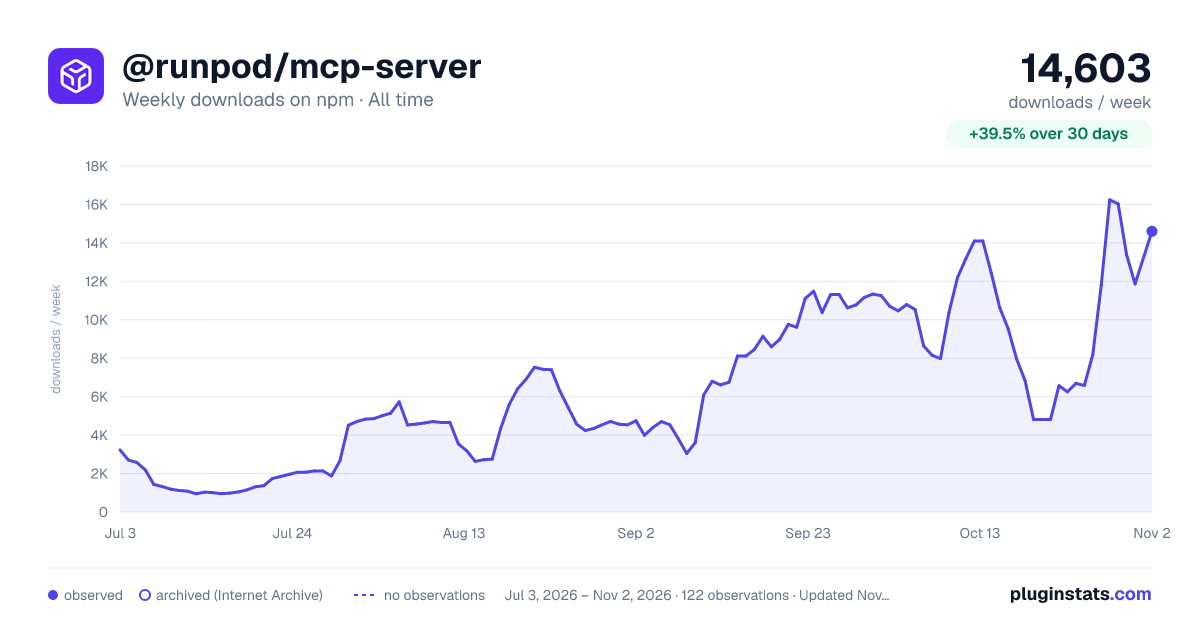

Adoption over time
7/30/90-day growth
Ranking history
Listing placement
Listing placement
Filled points are observed values; hollow points come from Internet Archive snapshots of the listing page. Dashed segments span periods with no observations — values between points are not interpolated.
Each band is one page of 20. Weekly downloads on a linear scale. Placement is projected from weekly downloads, so it can differ from the marketplace's own sort order. Hover a dot to see the listing.
Recent observations
Full history (1)Similar npm MCP servers plugins
All 20 @runpod/mcp-server alternativesData source
Weekly downloads (trailing 7 complete days) come from the official npm downloads API. Downloads include CI and mirrors and are not equivalent to installs or users. npm publishes no ratings.
Listing: https://www.npmjs.com/package/@runpod/mcp-server. First seen Oct 19, 2026; last successful collection Oct 19, 2026. See the methodology.