 PluginStats
prettier-plugin-aiken weekly downloads statistics
By aniadev · npm · Prettier plugins
A Prettier plugin for Aiken language
prettier-plugin-aiken has 9 recorded weekly downloads on npm, a decrease of 18.2% over the past 30 days, ranking #2071 of 2,322 tracked listings.
About prettier-plugin-aiken
Prettier Plugin Aiken
A Prettier plugin for the Aiken smart contract language.
Overview
This plugin integrates Aiken's built-in formatter (aiken fmt) with Prettier, allowing you to format Aiken smart contract code using Prettier's workflow and editor integrations.
Features
- 🎯 Format
.akfiles using Aiken's official formatter - 🔧 Seamless integration with Prettier
- ⚡ Works with popular editors (VS Code, Vim, etc.)
- 🔄 Supports Prettier's CLI and API
Installation
Prerequisites
Make sure you have Aiken installed on your system:
# Install Aiken (if not already installed)
curl -sSfL https://install.aiken-lang.org | bash
Install the Plugin
# Using npm
npm install --save-dev prettier prettier-plugin-aiken

# Using pnpm
pnpm add -D prettier prettier-plugin-aiken

# Using yarn
yarn add --dev prettier prettier-plugin-aiken
Usage
CLI
Format a single file:
npx prettier --write validator.ak
Format all Aiken files in your project:
npx prettier --write "**/*.ak"
Configuration
Add to your package.json:
{
  "prettier": {
    "plugins": ["prettier-plugin-aiken"]
  }
}
Or create a .prettierrc.js:
module.exports = {
  plugins: ["prettier-plugin-aiken"]
};
VS Code Integration
- Install the Prettier extension
- Add this plugin to your project dependencies
- Configure Prettier as your default formatter for
.akfiles
Add to your VS Code settings.json:
{
  "[aiken]": {
    "editor.defaultFormatter": "esbenp.prettier-vscode",
    "editor.formatOnSave": true
  }
}
How it Works
This plugin acts as a bridge between Prettier and Aiken's built-in formatter:
- Prettier detects
.akfiles using this plugin - The plugin passes the file content to
aiken fmt --stdin - Returns the formatted code back to Prettier
Requirements
- Node.js >= 14
- Aiken CLI tool installed and available in PATH
- Prettier (peer dependency)
Example
Before formatting:
validator my_validator{
pub fn spend(datum: Data,redeemer: Data,context: ScriptContext) -> Bool {
let Spend(output_reference) = context.purpose
True
}
}
After formatting:
validator my_validator {
  pub fn spend(datum: Data, redeemer: Data, context: ScriptContext) -> Bool {
    let Spend(output_reference) = context.purpose
    True
  }
}
Configuration
Setting up Aiken Binary Path
The plugin will automatically try to find your Aiken binary in the following order:
- Environment Variable:
AIKEN_BIN(recommended for custom installations) - PATH: Using
which aikencommand - Default Location:
~/.aiken/bin/aiken(standard installation path)
Using Environment Variable
If you have Aiken installed in a custom location, set the AIKEN_BIN environment variable:
# In your shell profile (.bashrc, .zshrc, etc.)
export AIKEN_BIN="/path/to/your/aiken/binary"

# Or set it per project in .env file
AIKEN_BIN="/usr/local/bin/aiken"
For VS Code Users
Add the environment variable to your VS Code settings:
{
  "terminal.integrated.env.osx": {
    "AIKEN_BIN": "/path/to/your/aiken/binary"
  },
  "terminal.integrated.env.linux": {
    "AIKEN_BIN": "/path/to/your/aiken/binary"
  },
  "terminal.integrated.env.windows": {
    "AIKEN_BIN": "C:\\path\\to\\your\\aiken\\binary.exe"
  }
}
Troubleshooting
"aiken command not found"
Make sure Aiken is installed and available in your PATH:
aiken --version
If not installed, follow the Aiken installation instructions.
Custom Aiken Installation
If you installed Aiken in a custom location, make sure to set the AIKEN_BIN environment variable as described in the Configuration section above.
Plugin not working in VS Code
- Ensure the plugin is installed in your project (not globally)
- Restart VS Code after installing the plugin
- Check that Prettier is configured as the default formatter for
.akfiles
Contributing
Contributions are welcome! Please feel free to submit a Pull Request.
Development
- Clone the repository
- Install dependencies:
npm install - Make your changes
- Test with a sample Aiken project
License
Related Projects
Changelog
See CHANGELOG.md for release history.
Description from the npm listing.
- prettier-plugin
- aiken
README badge
Show your rank in a README or on your website. The badge updates automatically.
Charts
Images: 30d · 1y · all time · 1600×900 dark


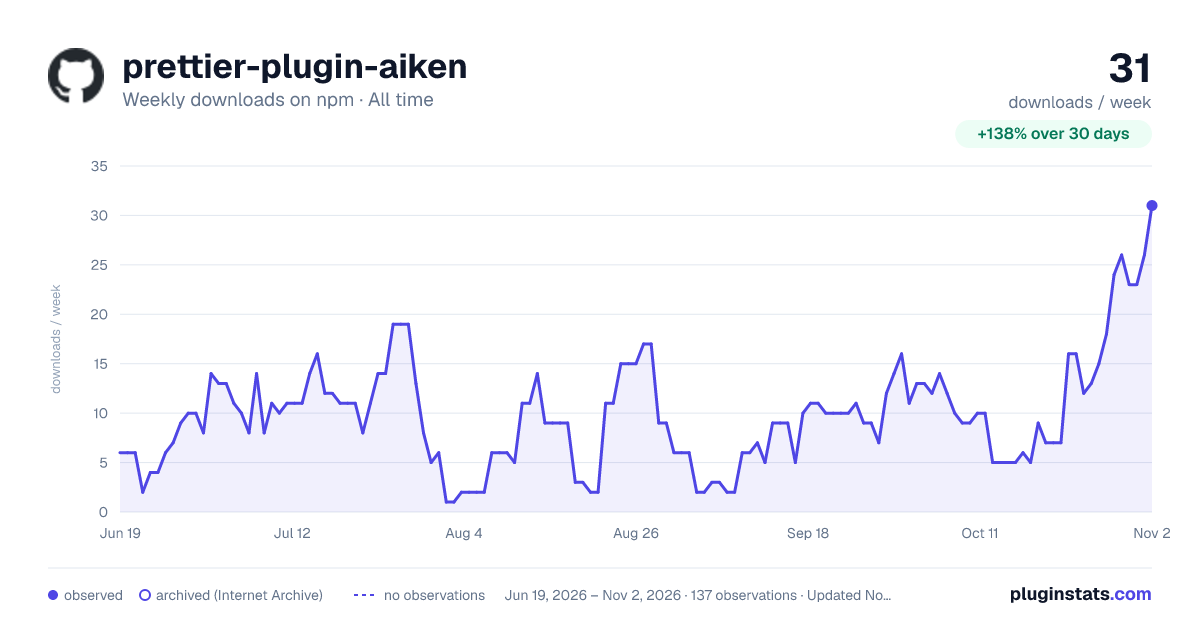

Adoption over time
7/30/90-day growth
Ranking history
Listing placement
Listing placement
Filled points are observed values; hollow points come from Internet Archive snapshots of the listing page. Dashed segments span periods with no observations — values between points are not interpolated.
Each band is one page of 20. Weekly downloads on a linear scale. Placement is projected from weekly downloads, so it can differ from the marketplace's own sort order. Hover a dot to see the listing.
Recent observations
Full history (122)Similar npm Prettier plugins plugins
All 20 prettier-plugin-aiken alternatives- 9 weekly downloads-10.0%
Data source
Weekly downloads (trailing 7 complete days) come from the official npm downloads API. Downloads include CI and mirrors and are not equivalent to installs or users. npm publishes no ratings.
Listing: https://www.npmjs.com/package/prettier-plugin-aiken. First seen Oct 16, 2026; last successful collection Oct 20, 2026. See the methodology.