 PluginStats
@eventmodelers/cli weekly downloads statistics
By eventmodelers · npm · Claude Code
Eventmodelers CLI — real-time Claude agent + skills for Claude Code, for any stack (Node, Supabase, Axon, OpenCQRS, UmaDB, Kurrent, or modeling-only)
@eventmodelers/cli has 1,270 recorded weekly downloads on npm, a decrease of 29.4% over the past 30 days.
It ranks #1350 of 2,251 tracked npm listings by weekly downloads.
PluginStats has 543 daily observations since Apr 23, 2025; the latest is from Oct 17, 2026.
About @eventmodelers/cli
@eventmodelers/cli
One CLI, real-time Claude agent, and skill kit for the Eventmodelers platform — pick a stack, scaffold it, connect it to a board.
This CLI covers two audiences. If you just want a project connected to a board and an agent working slices, Getting started below is all you need — init, run, fetch, and a couple of read-only helpers. Everything under Power users is for customizing the install itself (bridging to another spec framework, CI-driven installs, multi-project config, hooks, adding a new stack) — skip it until you actually need it.
Getting started
Quick start
Running without --stack shows an arrow-key picker. Or go straight to a stack:
The installer prompts for your API token, Organization ID, and Board ID from app.eventmodelers.ai/account, scaffolds the stack into your project, and writes .eventmodelers/config.json with your credentials.
Common scenarios
Starting from scratch on a new project:
Answer the credential prompts once — the stack's scaffold, skills, and agent loop are all installed in this one step.
Trying it out before you have a board of your own:
--demo additionally writes a ready-made model into the kit's .slices/ — the Understanding Eventsourcing context, a 16-slice shopping cart covering every slice type (state change, state view, automation, translation). It's ordinary fetched slice data in exactly the shape fetch writes, so the build skills, activate-context, set-slice-status, and the agent loop all work against it immediately, with no board connected. Build one with /build-state-change in Claude Code, or start run and let the agent work the queue.
Nothing downstream treats it specially: fetch --context replaces it with your own board whenever you're ready. --demo is skipped (with a message) if .slices/ already holds slices, so it can never overwrite fetched work.
Already initialized — you just want the agent to start working the board:
run doesn't re-configure anything. It finds whatever kit dir init already created in this project and starts its agent loop (ralph-claude.js) against your existing .eventmodelers/config.json.
Each agent turn is capped at 60 minutes by default so a hung agent can't stall the loop: it gets SIGTERM, then SIGKILL 10s later, and a slice that keeps timing out is Blocked by the stuck-slice guard. Change the cap with "turnTimeoutMinutes" in .eventmodelers/config.json or RALPH_TURN_TIMEOUT_MIN for one run; 0 turns it off.
Pulling the latest board state without starting an agent — e.g. to inspect a context's slices, or in a script:
This writes the current slice/event/command detail for that context to disk and prints a summary — no agent loop, no listener, just a one-shot pull.
Adding slices to an existing codebase (classic):
classic scaffolds nothing into your project root — it assumes the code is already there, in whatever language and architecture it uses (typically a layered CRUD app, but not necessarily). Before the first slice, the coding agent (Claude, Codex, or any --agent) runs learn-architecture: it traces one or two existing features end to end and writes .build-kit/ARCHITECTURE.md — layout, reference implementations, test style, build/test commands, and how Event Modeling maps onto this code (COMMAND → service method + endpoint, EVENT → the persisted state change, READMODEL → query + DTO, AUTOMATION → the existing listener/consumer/scheduler). The build-* skills then implement every slice by copying those reference features, never by introducing a new framework or event store. Review and commit ARCHITECTURE.md after the first run — it's the one file that steers every later slice.
Checking what's installed or which credentials are active:
What gets installed
The six backend stacks (node, supabase, axon, opencqrs, umadb, kurrent) also scaffold a real project skeleton into your project root (templates/root/) — source layout, build files, migrations, etc.
classic ships no templates/root/ at all — it installs only .build-kit/ and the skills into an existing codebase (see "Adding slices to an existing codebase" above).
react and supabase-react are two more registered stacks (installable the same way). supabase-react is real, filled-in content — a Vite + React 19 + TypeScript scaffold that authenticates and issues command POSTs via a Supabase session (src/lib/api.ts/src/lib/supabase.ts), plus init-style-guide/learn-styleguide skills so generated UI stays on-brand. It's UI-only: .build-kit/CLAUDE.md only routes STATE_CHANGE/STATE_VIEW slices to build-state-change/build-state-view — an AUTOMATION slice has no UI counterpart and gets flagged via request-feedback instead, since it belongs to whichever backend stack is installed alongside this one. It needs no overrides at all and uses shared/build-kit's realtime agent as-is.
react (the plain-REST/board-polling variant, no Supabase) is still in the same state as a fresh init --build-kit scaffold — CLAUDE.md, the build-* skills, and templates/root/ are all TODO-marked placeholders, not real content, pending an equivalent reference implementation. It overrides lib/ralph.js (+ ralph-claude.js/ralph-local-ai.js/package.json/README.md) for board-polling sync. Fill in the TODOs (and add a real templates/root/ scaffold) against an actual project before relying on it.
Skills
Use skills in Claude Code with /skill-name:
| Skill | Description |…
Description from the npm listing.
- claude
- claude-code
- eventmodelers
- event-storming
- event-driven
- realtime-agent
- ddd
Where @eventmodelers/cli sits in the listing
Each band is one page of 20. Weekly downloads on a log scale. Placement is projected from weekly downloads, so it can differ from the marketplace's own sort order. Hover a dot to see the listing.


Charts
Images: 30d · 1y · all time · 1600×900 dark


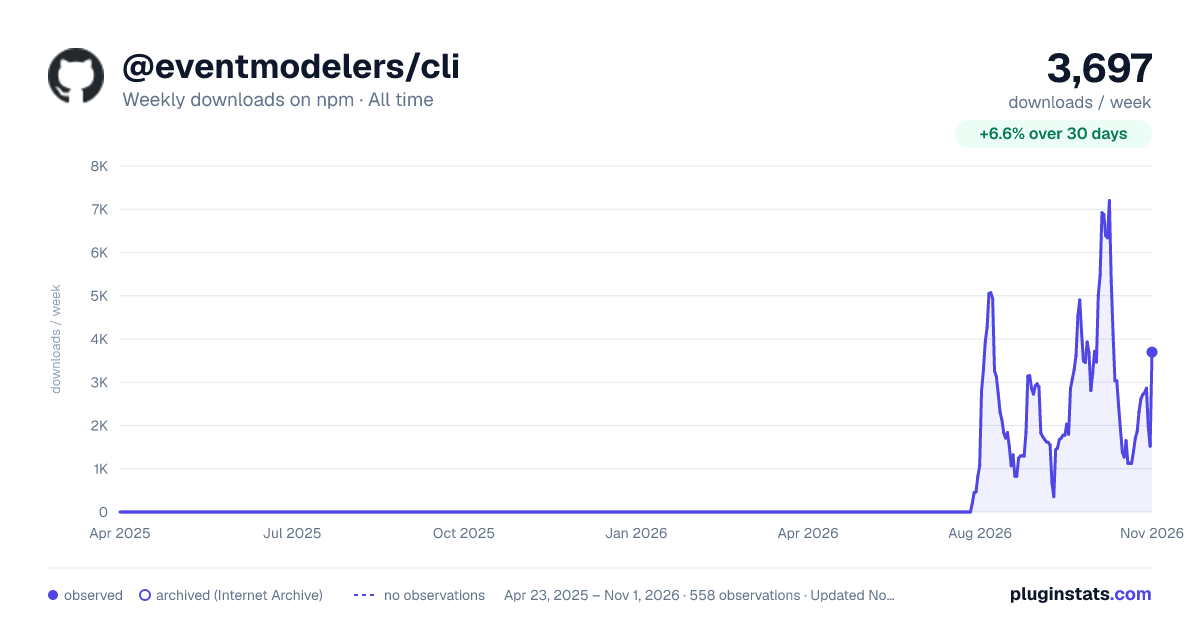

Adoption over time


7/30/90-day growth


Filled points are observed values; hollow points come from Internet Archive snapshots of the listing page. Dashed segments span periods with no observations — values between points are not interpolated.
Recent observations
Full history (543)Similar npm Claude Code plugins
Data source
Weekly downloads (trailing 7 complete days) come from the official npm downloads API. Downloads include CI and mirrors and are not equivalent to installs or users. npm publishes no ratings.
Listing: https://www.npmjs.com/package/@eventmodelers/cli. First seen Oct 16, 2026; last successful collection Oct 18, 2026. See the methodology.